mirror of
https://github.com/open-webui/open-webui.git
synced 2026-11-27 23:58:06 +00:00

132 lines
6.8 KiB
Markdown
132 lines
6.8 KiB
Markdown
<h2>Open WebUI</h2>
|
||
|
||
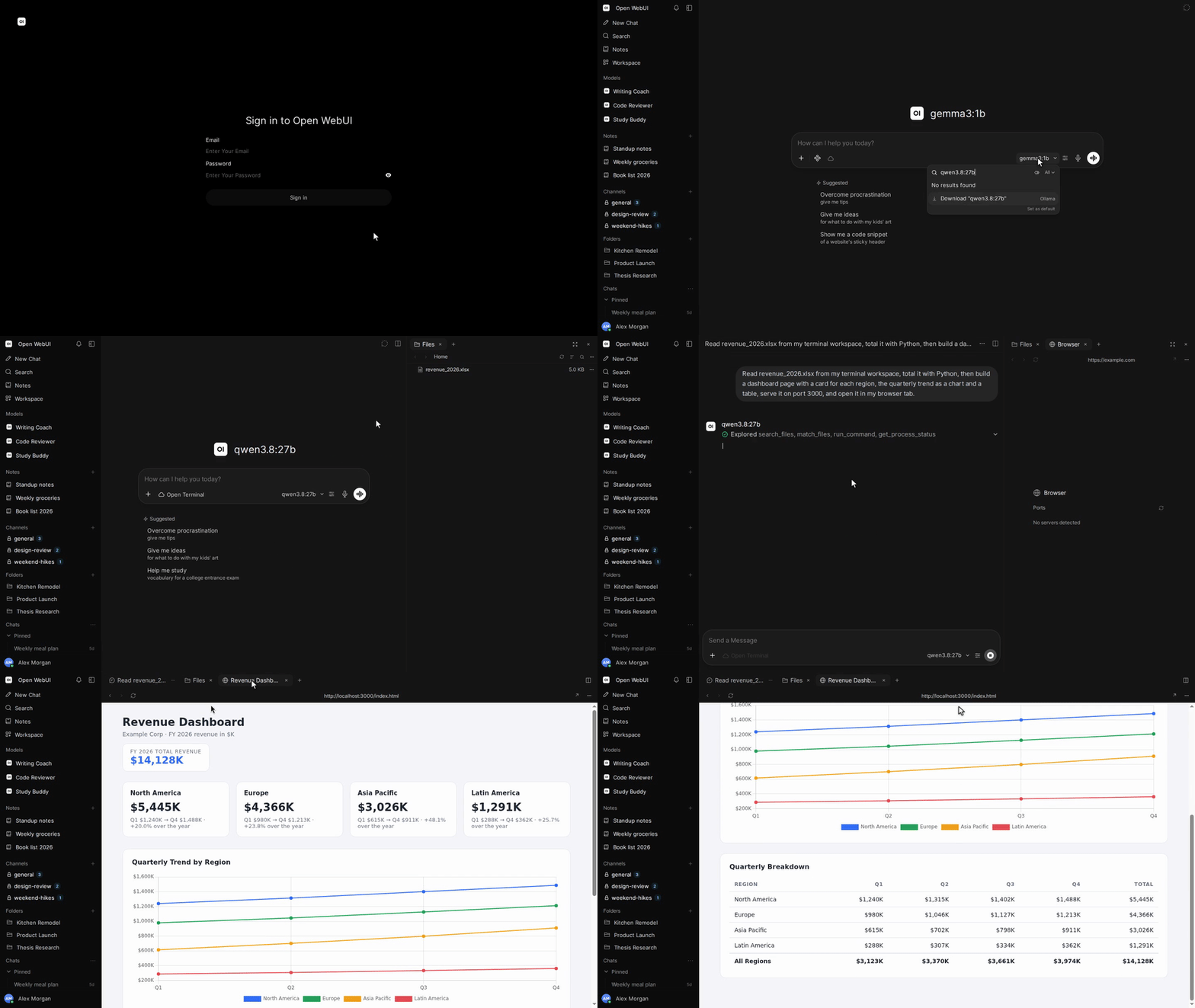
<p>Open WebUI 是 <a href="https://docs.openwebui.com/"><strong>AI 的家</strong></a>:一个可扩展、易于使用的自托管平台,支持完全离线运行。通过 Ollama 连接本地模型,使用兼容 OpenAI 的 API 连接本地和云端模型,或通过 <a href="https://docs.openwebui.com/features/open-terminal/agents">Agent Client Protocol (ACP)</a> 添加智能体。</p>
|
||
|
||
[English](README.md) |
|
||
[简体中文](README.zh.md) |
|
||
[繁體中文](README.zht.md) |
|
||
[한국어](README.ko.md) |
|
||
[Deutsch](README.de.md) |
|
||
[Español](README.es.md) |
|
||
[Français](README.fr.md) |
|
||
[Italiano](README.it.md) |
|
||
[Dansk](README.da.md) |
|
||
[日本語](README.ja.md) |
|
||
[Polski](README.pl.md) |
|
||
[Русский](README.ru.md) |
|
||
[Bosanski](README.bs.md) |
|
||
[العربية](README.ar.md) |
|
||
[Norsk](README.no.md) |
|
||
[Português (Brasil)](README.br.md) |
|
||
[ไทย](README.th.md) |
|
||
[Türkçe](README.tr.md) |
|
||
[Українська](README.uk.md) |
|
||
[বাংলা](README.bn.md) |
|
||
[Ελληνικά](README.gr.md) |
|
||
[Tiếng Việt](README.vi.md)
|
||
|
||
[](https://docs.openwebui.com/)
|
||
|
||

|
||

|
||

|
||

|
||

|
||

|
||

|
||
[](https://discord.gg/5rJgQTnV4s)
|
||
[](https://github.com/sponsors/open-webui)
|
||
|
||
[探索 Open WebUI →](https://docs.openwebui.com/)
|
||
|
||
### 安装
|
||
|
||
#### Python
|
||
|
||
需要 Python 3.12。
|
||
|
||
```bash
|
||
pip install open-webui
|
||
open-webui serve
|
||
```
|
||
|
||
然后打开 [http://localhost:8080](http://localhost:8080)。
|
||
|
||
#### Docker
|
||
|
||
```bash
|
||
docker run -d -p 3000:8080 --add-host=host.docker.internal:host-gateway -v open-webui:/app/backend/data --name open-webui --restart always ghcr.io/open-webui/open-webui:main
|
||
```
|
||
|
||
然后打开 [http://localhost:3000](http://localhost:3000)。
|
||
|
||
| 镜像标签 | 内容 |
|
||
| --------- | ---------------------------------------------- |
|
||
| `:main` | 包含本地 AI 依赖的标准镜像 |
|
||
| `:slim` | 轻量镜像,通过外部服务处理嵌入、文档提取和语音 |
|
||
| `:cuda` | 支持 CUDA 加速的 Open WebUI |
|
||
| `:ollama` | 内置 Ollama 的 Open WebUI |
|
||
| `:dev` | 最新开发版本 |
|
||
|
||
根据需要,在 `docker run` 的镜像名称前添加以下选项:
|
||
|
||
| 选项 | 用途 |
|
||
| ---------------------------------------------------- | --------------------------------------------------------------------------- |
|
||
| `-e OLLAMA_BASE_URL=http://your-ollama-server:11434` | 连接另一台服务器上的 Ollama |
|
||
| `-e OPENAI_API_KEY=your_secret_key` | 设置 OpenAI API 密钥 |
|
||
| `-e HF_HUB_OFFLINE=1` | 禁用 Hugging Face 模型下载,以便离线使用 |
|
||
| `--gpus all` | 为 `:cuda` 或 `:ollama` 启用 Nvidia GPU 访问;需要 Nvidia Container Toolkit |
|
||
|
||
安装步骤和配置选项请参阅 [Docker 安装指南](https://docs.openwebui.com/getting-started/quick-start/)。
|
||
|
||
#### 桌面应用
|
||
|
||
[下载原生桌面应用](https://github.com/open-webui/desktop),支持 macOS、Windows 和 Linux。
|
||
|
||
[阅读文档 →](https://docs.openwebui.com/getting-started/)
|
||
|
||
### 生态系统
|
||
|
||
- [Open Terminal](https://github.com/open-webui/open-terminal) / [Terminals (Enterprise)](https://github.com/open-webui/terminals): 为 Open WebUI 提供执行能力,使其成为完整的智能体运行框架,并通过企业级编排为每位用户管理独立工作空间。
|
||
- [Knowledge Base Sync (oikb)](https://github.com/open-webui/oikb): 通过增量同步,将文件夹、代码仓库、存储桶和 Wiki 镜像到 Open WebUI 知识库。
|
||
- [Open WebUI Computer](https://github.com/open-webui/computer): 在任意浏览器中使用你的电脑:文件、编辑器、终端、Git 和可选的 AI 智能体,均在你的真实机器上运行。
|
||
|
||
详情请参阅[生态系统文档](https://docs.openwebui.com/ecosystem/)。
|
||
|
||
### 故障排查与更新
|
||
|
||
连接问题请参阅[故障排查指南](https://docs.openwebui.com/troubleshooting/),更新安装请参阅[更新指南](https://docs.openwebui.com/getting-started/updating)。
|
||
|
||
### 文档
|
||
|
||
配置和使用方法请参阅[文档](https://docs.openwebui.com/),计划中的工作请参阅[路线图](https://docs.openwebui.com/roadmap/)。
|
||
|
||
Docker Compose、Kubernetes 及其他部署方式请参阅[安装文档](https://docs.openwebui.com/getting-started/)。
|
||
|
||
### 支持
|
||
|
||
[提交 Issue](https://github.com/open-webui/open-webui/issues) 或[发起讨论](https://github.com/open-webui/open-webui/discussions)。
|
||
|
||
也可以在 [Reddit](https://www.reddit.com/r/OpenWebUI/)、[X](https://x.com/OpenWebUI) 和 [Discord](https://discord.gg/5rJgQTnV4s) 找到我们。
|
||
|
||
### 安全
|
||
|
||
请通过 [GitHub 安全公告](https://github.com/open-webui/open-webui/security)私下报告漏洞。安全报告仅通过 GitHub 接收。
|
||
|
||
### Star 历史
|
||
|
||
<a href="https://star-history.com/#open-webui/open-webui&Date">
|
||
<picture>
|
||
<source media="(prefers-color-scheme: dark)" srcset="https://api.star-history.com/svg?repos=open-webui/open-webui&type=Date&theme=dark" />
|
||
<source media="(prefers-color-scheme: light)" srcset="https://api.star-history.com/svg?repos=open-webui/open-webui&type=Date" />
|
||
<img alt="Star 历史图表" src="https://api.star-history.com/svg?repos=open-webui/open-webui&type=Date" />
|
||
</picture>
|
||
</a>
|
||
|
||
#### 许可证
|
||
|
||
包含采用 Open WebUI License 的代码,该许可证要求保留 Open WebUI 品牌标识;此前的贡献仍适用各自的原始许可证。条款和历史请参阅 [LICENSE](./LICENSE) 和 [LICENSE_HISTORY](./LICENSE_HISTORY)。
|
||
|
||
[企业版](https://docs.openwebui.com/enterprise) · [招聘](https://careers.openwebui.com/) · [赞助](https://github.com/sponsors/open-webui)
|
||
|
||
由 [Timothy Jaeryang Baek](https://github.com/tjbck) 创建。
|