mirror of
https://github.com/showlab/Code2Video.git
synced 2026-08-28 06:54:58 +00:00

214 lines
7.5 KiB
Markdown
214 lines
7.5 KiB
Markdown
# Code2Video: 通过代码生成视频
|
||
|
||
<p align="right">
|
||
<a href="./README.md">English</a> | <b>简体中文</b>
|
||
</p>
|
||
|
||
<p align="center">
|
||
<b>Code2Video: 以代码为中心的教学视频生成新范式</b>
|
||
</p>
|
||
<video src="assets/video.mp4" width="600" controls>
|
||
您的浏览器不支持 video 标签。
|
||
</video>
|
||
|
||
<p align="center">
|
||
<a href="https://scholar.google.com.hk/citations?user=9lIMS-EAAAAJ&hl=zh-CN&oi=sra">Yanzhe Chen*</a>,
|
||
<a href="https://qhlin.me/">Kevin Qinghong Lin*</a>,
|
||
<a href="https://scholar.google.com/citations?user=h1-3lSoAAAAJ&hl=en">Mike Zheng Shou</a> <br>
|
||
新加坡国立大学 Show Lab
|
||
</p>
|
||
|
||
<p align="center">
|
||
<a href="https://arxiv.org/abs/2510.01174">📄 Arxiv 论文</a> |
|
||
<a href="https://huggingface.co/papers/2510.01174">🤗 Daily Paper</a> |
|
||
<a href="https://huggingface.co/datasets/YanzheChen/MMMC">🤗 数据集</a> |
|
||
<a href="https://showlab.github.io/Code2Video/">🌐 项目主页</a> |
|
||
<a href="https://x.com/KevinQHLin/status/1974199353695941114">💬 推特 (X)</a>
|
||
</p>
|
||
|
||
|
||
|
||
---
|
||
|
||
## 🔥 更新
|
||
- [x] [2025.10.11] 近期收到关于 [ICONFINDER](https://www.iconfinder.com/account/applications) 注册问题的反馈,在 [MMMC](https://huggingface.co/datasets/YanzheChen/MMMC/tree/main/assets) 数据集中更新了 Code2Video 自动收集的 icon,作为临时替代方案。
|
||
- [x] [2025.10.6] 在 Huggingface 上更新了 [MMMC](https://huggingface.co/datasets/YanzheChen/MMMC) 数据集。
|
||
- [x] [2025.10.3] 感谢 @_akhaliq 在 [推特](https://x.com/_akhaliq/status/1974189217304780863)上分享我们的工作!
|
||
- [x] [2025.10.2] 我们发布了 [ArXiv](https://arxiv.org/abs/2510.01174)、[代码](https://github.com/showlab/Code2Video)和[数据集](https://huggingface.co/datasets/YanzheChen/MMMC)。
|
||
- [x] [2025.9.22] Code2Video 已被 **NeurIPS 2025 Workshop ([DL4C](https://dl4c.github.io/))** 接收。
|
||
|
||
---
|
||
|
||
### 目录
|
||
- [🌟 项目总览](#-项目总览)
|
||
- [🚀 快速上手](#-快速上手)
|
||
- [1. 环境配置](#1-环境配置)
|
||
- [2. 配置 LLM API 密钥](#2-配置-llm-api-密钥)
|
||
- [3. 运行智能体](#3-运行智能体)
|
||
- [4. 项目结构](#4-项目结构)
|
||
- [📊 评测 -- MMMC](#-评测----mmmc)
|
||
- [🙏 致谢](#-致谢)
|
||
- [📌 引用](#-引用)
|
||
-
|
||
---
|
||
|
||
## 🌟 项目总览
|
||
|
||
<p align="center">
|
||
<img src="figures/first.png" alt="Overview" width="90%">
|
||
</p>
|
||
|
||
**Code2Video** 是一个**基于智能体、以代码为中心**的框架,能够根据知识点生成高质量的**教学视频**。
|
||
与基于像素空间的文生视频模型不同,我们的方法生成可执行的 **Manim 代码**来确保视频的**清晰度、连贯性和可复现性**。
|
||
|
||
**核心特性**:
|
||
- 🎬 **以代码为中心的范式** — 将可执行代码作为统一媒介,同时实现教学视频的时间序列和空间布局组织。
|
||
- 🤖 **模块化三智能体设计** — 规划者 (Planner) 负责故事板扩展,编码员 (Coder) 负责可调试代码的合成,鉴赏家 (Critic) 负责通过视觉锚点(Visual Anchor)优化布局,三者协同完成结构化生成。
|
||
- 📚 **MMMC 基准** — 用于代码驱动视频生成的基准数据集,涵盖了 117 个受 3Blue1Brown 启发的精选学习主题,横跨多个领域。
|
||
- 🧪 **多维度评测** — 从效率、美学和端到端知识传递三个维度进行系统性评估。
|
||
|
||
---
|
||
|
||
## 🚀 快速上手
|
||
|
||
<p align="center">
|
||
<img src="figures/approach.png" alt="Approach" width="85%">
|
||
</p>
|
||
|
||
### 1. 环境配置
|
||
|
||
```bash
|
||
cd src/
|
||
pip install -r requirements.txt
|
||
```
|
||
这里是 Manim Community v0.19.0 的[官方安装指南](https://docs.manim.community/en/stable/installation.html),以帮助您正确设置环境。
|
||
|
||
### 2. 配置 LLM API 密钥
|
||
|
||
请在 `api_config.json` 文件中填入您的 **API key**。
|
||
|
||
* **LLM API**:
|
||
* 运行 Planner 和 Coder 所需。
|
||
* 使用 **Claude-4-Opus** 可获得最佳的 Manim 代码质量。
|
||
* 使用 **ChatGPT-4.1** 亦具有不错的生成表现。
|
||
* **VLM API**:
|
||
* 运行 Critic 所需。
|
||
* 为优化布局和美学,请提供 **Gemini API key**。
|
||
* 使用 **gemini-2.5-pro-preview-05-06** 可获得最佳质量。
|
||
* **视觉素材 API**:
|
||
* 为丰富视频内容,请从 [IconFinder](https://www.iconfinder.com/account/applications) 获取并设置 `ICONFINDER_API_KEY`。
|
||
|
||
### 3. 运行智能体
|
||
|
||
提供了两种 Shell 脚本,用于不同的生成模式:
|
||
|
||
#### (a) 单个主题生成
|
||
|
||
脚本: `run_agent_single.sh`
|
||
|
||
从脚本中指定的单个**知识点**生成视频。
|
||
|
||
```bash
|
||
sh run_agent_single.sh --knowledge_point "Linear transformations and matrices"
|
||
```
|
||
|
||
**`run_agent_single.sh` 内部重要参数:**
|
||
|
||
* `API`: 指定使用的 LLM。
|
||
* `FOLDER_PREFIX`: 输出文件夹的前缀 (例如, `TEST-single`)。
|
||
* `KNOWLEDGE_POINT`: 目标概念,例如 `"Linear transformations and matrices"`。
|
||
|
||
---
|
||
|
||
#### (b) 完整基准测试模式
|
||
|
||
脚本: `run_agent.sh`
|
||
|
||
运行 `long_video_topics_list.json` 中定义的所有(或部分)学习主题。
|
||
|
||
```bash
|
||
sh run_agent.sh
|
||
```
|
||
|
||
**`run_agent.sh` 内部重要参数:**
|
||
|
||
* `API`: 指定使用的 LLM。
|
||
* `FOLDER_PREFIX`: 输出文件夹的前缀 (例如, `TEST-LIST`)。
|
||
* `MAX_CONCEPTS`: 要运行的概念数量 (`-1` 表示全部)。
|
||
* `PARALLEL_GROUP_NUM`: 并行运行的组数。
|
||
|
||
### 4. 项目结构
|
||
|
||
建议的目录结构如下:
|
||
```
|
||
src/
|
||
│── agent.py
|
||
│── run_agent.sh
|
||
│── run_agent_single.sh
|
||
│── api_config.json
|
||
│── ...
|
||
│
|
||
├── assets/
|
||
│ ├── icons/ # 通过 IconFinder API 下载的视觉素材缓存
|
||
│ └── reference/ # 参考图像
|
||
│
|
||
├── json_files/ # 基于 JSON 的主题列表及元数据
|
||
├── prompts/ # 用于 LLM 调用的提示模板
|
||
├── CASES/ # 生成的案例,按 FOLDER_PREFIX 组织
|
||
│ └── TEST-LIST/ # 示例:多主题生成结果
|
||
│ └── TEST-single/ # 示例:单主题生成结果
|
||
```
|
||
|
||
---
|
||
|
||
## 📊 评测 -- MMMC
|
||
|
||
从以下**三个互补的维度**进行评测:
|
||
|
||
1. **知识传递 (TeachQuiz)**
|
||
```bash
|
||
python3 eval_TQ.py
|
||
```
|
||
|
||
2. **美学质量 (AES)**
|
||
```bash
|
||
python3 eval_AES.py
|
||
```
|
||
|
||
3. **效率指标 (EFF)**
|
||
* Token 使用量
|
||
* 执行时间
|
||
|
||
👉 更多数据和评测脚本请见:
|
||
[HuggingFace: MMMC 基准](https://huggingface.co/datasets/YanzheChen/MMMC)
|
||
|
||
---
|
||
|
||
## 🙏 致谢
|
||
|
||
* 视频数据来源于 **[3Blue1Brown 官方课程](https://www.3blue1brown.com/#lessons)**。
|
||
这些视频代表了教学视频在清晰度和美学设计上的最高标准,并为我们的评测指标提供了参考。
|
||
* 感谢 **Show Lab @ NUS** 所有成员的支持!
|
||
* 本项目得益于 **Manim 社区**和 AI 研究生态系统的开源贡献。
|
||
* 高质量的视觉素材(图标)由 **[IconFinder](https://www.iconfinder.com/)** 和 **[Icons8](https://icons8.com/icons)** 提供,用于丰富教学视频内容。
|
||
|
||
---
|
||
|
||
## 📌 引用
|
||
|
||
如果我们的工作对您有帮助,欢迎引用我们的工作:
|
||
|
||
```bibtex
|
||
@misc{code2video,
|
||
title={Code2Video: A Code-centric Paradigm for Educational Video Generation},
|
||
author={Yanzhe Chen and Kevin Qinghong Lin and Mike Zheng Shou},
|
||
year={2025},
|
||
eprint={2510.01174},
|
||
archivePrefix={arXiv},
|
||
primaryClass={cs.CV},
|
||
url={[https://arxiv.org/abs/2510.01174](https://arxiv.org/abs/2510.01174)},
|
||
}
|
||
```
|
||
|
||
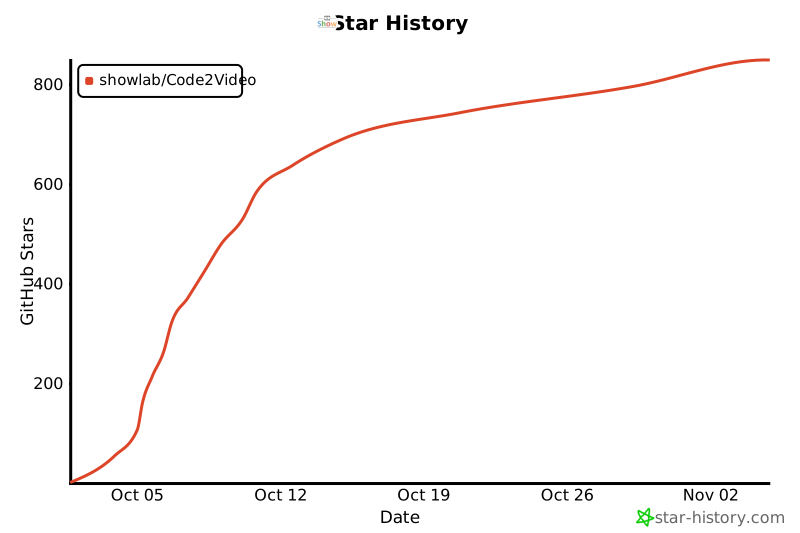
如果您喜欢我们的项目,欢迎在 GitHub 上给我们一个 Star ⭐ 以获取最新动态!
|
||
[](https://star-history.com/#showlab/Code2Video&Date)
|