mirror of
https://github.com/agentscope-ai/ReMe.git
synced 2026-09-23 00:43:18 +00:00
 2a999ce4f4
* docs(context): add comprehensive context management design documentation

- Create detailed Chinese documentation for CoPaw context management V2
- Document memory layer and file system cache architecture
- Explain Pre-Reasoning Hook workflow with four-step process
- Detail two-stage truncation strategy for tool results
- Add examples for Browser Use and ReadFile tools
- Include Mermaid diagrams for visual flow representation
- Update README with link to new context design document
- Fix minor formatting issues in existing documentation
- Add protection thresholds for Markdown files in truncation
- Document long-term memory trigger mechanisms

* docs(README): add latest articles section and CoPaw context management design doc

- Added "Latest Articles" section to README with table format
- Included link to CoPaw Context Management Design document
- Created comprehensive documentation for CoPaw context management V2
- Documented in-memory and file system layer architecture
- Explained pre-reasoning hook and context compaction process
- Detailed two-phase truncation strategy for tool results
- Described special handling for readFile tool and markdown files
- Added long-term memory trigger logic overview
- Included mermaid diagrams for visualizing context flow
691 lines
28 KiB
Markdown
691 lines
28 KiB
Markdown
<p align="center">
|
||
<img src="docs/_static/figure/reme_logo.png" alt="ReMe 标志" width="50%">
|
||
</p>
|
||
|
||
<p align="center">
|
||
<a href="https://pypi.org/project/reme-ai/"><img src="https://img.shields.io/badge/python-3.10+-blue" alt="Python Version"></a>
|
||
<a href="https://pypi.org/project/reme-ai/"><img src="https://img.shields.io/pypi/v/reme-ai.svg?logo=pypi" alt="PyPI Version"></a>
|
||
<a href="https://pepy.tech/project/reme-ai/"><img src="https://img.shields.io/pypi/dm/reme-ai" alt="PyPI Downloads"></a>
|
||
<a href="https://github.com/agentscope-ai/ReMe"><img src="https://img.shields.io/github/commit-activity/m/agentscope-ai/ReMe?style=flat-square" alt="GitHub commit activity"></a>
|
||
</p>
|
||
|
||
<p align="center">
|
||
<a href="./LICENSE"><img src="https://img.shields.io/badge/license-Apache--2.0-black" alt="License"></a>
|
||
<a href="./README.md"><img src="https://img.shields.io/badge/English-Click-yellow" alt="English"></a>
|
||
<a href="./README_ZH.md"><img src="https://img.shields.io/badge/简体中文-点击查看-orange" alt="简体中文"></a>
|
||
<a href="https://github.com/agentscope-ai/ReMe"><img src="https://img.shields.io/github/stars/agentscope-ai/ReMe?style=social" alt="GitHub Stars"></a>
|
||
<a href="https://deepwiki.com/agentscope-ai/ReMe"><img src="https://img.shields.io/badge/DeepWiki-Ask_Devin-navy.svg" alt="DeepWiki"></a>
|
||
</p>
|
||
|
||
<p align="center">
|
||
<a href="https://trendshift.io/repositories/20528" target="_blank"><img src="https://trendshift.io/api/badge/repositories/20528" alt="agentscope-ai%2FReMe | Trendshift" style="width: 250px; height: 55px;" width="250" height="55"/></a>
|
||
</p>
|
||
|
||
<p align="center">
|
||
<strong>面向智能体的记忆管理工具包,Remember Me, Refine Me.</strong><br>
|
||
</p>
|
||
|
||
> 老版本请参阅 [0.2.x 版本文档](docs/README_0_2_x_ZH.md)
|
||
|
||
---
|
||
|
||
## 📰 最新文章
|
||
|
||
| 日期 | 标题 |
|
||
|------------|----------------------------------------------------|
|
||
| 2026-03-30 | [CoPaw 上下文管理设计解析](docs/copaw_context_design_zh.md) |
|
||
|
||
---
|
||
|
||
🧠 ReMe 是一个专为 **AI 智能体** 打造的记忆管理框架,同时提供基于[文件系统](#-基于文件的记忆系统-remelight)
|
||
和基于[向量库](#-基于向量库的记忆系统)的记忆系统。
|
||
|
||
它解决智能体记忆的两类核心问题:**上下文窗口有限**(长对话时早期信息被截断或丢失)、**会话无状态**(新对话无法继承历史,每次从零开始)。
|
||
|
||
ReMe 让智能体拥有**真正的记忆力**——旧对话自动浓缩,重要信息持久保存,下次对话自动想起来。
|
||
|
||
在 LoCoMo 与 HaluMem 基准测试中,ReMe 取得了领先结果,详见[实验效果](#实验效果)。
|
||
|
||
<details>
|
||
<summary><b>你可以用 ReMe 做什么</b></summary>
|
||
|
||
<br>
|
||
|
||
- **个人助理**:为 [CoPaw](https://github.com/agentscope-ai/CoPaw) 等智能体提供长期记忆,记住用户偏好和历史对话。
|
||
- **编程助手**:记录代码风格偏好、项目上下文,跨会话保持一致的开发体验。
|
||
- **客服机器人**:记录用户问题历史、偏好设置,提供个性化服务。
|
||
- **任务自动化**:从历史任务中学习成功/失败模式,持续优化执行策略。
|
||
- **知识问答**:构建可检索的知识库,支持语义搜索和精确匹配。
|
||
- **多轮对话**:自动压缩长对话,在有限上下文窗口内保留关键信息。
|
||
|
||
</details>
|
||
|
||
---
|
||
|
||
## 📁 基于文件的记忆系统 (ReMeLight)
|
||
|
||
> 记忆即文件,文件即记忆
|
||
|
||
将**记忆视为文件**——可读、可编辑、可复制。
|
||
[CoPaw](https://github.com/agentscope-ai/CoPaw) 通过继承 `ReMeLight` 实现了长期记忆和上下文的管理。
|
||
|
||
| 传统记忆系统 | File Based ReMe |
|
||
|-----------|-----------------|
|
||
| 🗄️ 数据库存储 | 📝 Markdown 文件 |
|
||
| 🔒 不可见 | 👀 随时可读 |
|
||
| ❌ 难修改 | ✏️ 直接编辑 |
|
||
| 🚫 难迁移 | 📦 复制即迁移 |
|
||
|
||
```
|
||
working_dir/
|
||
├── MEMORY.md # 长期记忆:用户偏好等持久信息
|
||
├── memory/
|
||
│ └── YYYY-MM-DD.md # 每日日记:对话结束后自动写入
|
||
├── dialog/ # 原始对话记录:压缩前的完整对话
|
||
│ └── YYYY-MM-DD.jsonl # 按日期存储的对话消息(JSONL 格式)
|
||
└── tool_result/ # 超长工具输出缓存(自动管理,超期自动清理)
|
||
└── <uuid>.txt
|
||
```
|
||
|
||
### 核心能力
|
||
|
||
[ReMeLight](reme/reme_light.py) 是该记忆系统的核心类,为 AI Agent 提供完整的记忆管理能力:
|
||
|
||
<table>
|
||
<tr><th>类别</th><th>方法</th><th>功能</th><th>关键组件</th></tr>
|
||
<tr><td rowspan="4">上下文管理</td><td><code>check_context</code></td><td>📊 检查上下文大小</td><td><a href="reme/memory/file_based/components/context_checker.py">ContextChecker</a> — 检查上下文是否超出阈值并拆分 Message</td></tr>
|
||
<tr><td><code>compact_memory</code></td><td>📦 压缩历史对话为摘要</td><td><a href="reme/memory/file_based/components/compactor.py">Compactor</a> — ReActAgent 生成结构化上下文摘要</td></tr>
|
||
<tr><td><code>compact_tool_result</code></td><td>✂️ 压缩超长工具输出</td><td><a href="reme/memory/file_based/components/tool_result_compactor.py">ToolResultCompactor</a> — 截断超长的工具调用结果并转存到 <code>tool_result/</code>,消息中保留文件引用</td></tr>
|
||
<tr><td><code>pre_reasoning_hook</code></td><td>🔄 推理前预处理钩子</td><td>compact_tool_result + check_context + compact_memory + summary_memory(async)</td></tr>
|
||
<tr><td rowspan="2">长期记忆</td><td><code>summary_memory</code></td><td>📝 将重要记忆写入文件</td><td><a href="reme/memory/file_based/components/summarizer.py">Summarizer</a> — ReActAgent + 文件工具(read / write / edit)</td></tr>
|
||
<tr><td><code>memory_search</code></td><td>🔍 语义搜索记忆</td><td><a href="reme/memory/file_based/tools/memory_search.py">MemorySearch</a> — 向量 + BM25 混合检索</td></tr>
|
||
<tr><td rowspan="2">会话内存</td><td><code>get_in_memory_memory</code></td><td>💾 创建会话内存实例</td><td>返回 ReMeInMemoryMemory,自动配置 dialog_path 实现对话持久化</td></tr>
|
||
<tr><td><code>await_summary_tasks</code></td><td>⏳ 等待异步摘要任务</td><td>阻塞等待所有后台摘要任务完成</td></tr>
|
||
<tr><td>-</td><td><code>start</code></td><td>🚀 启动记忆系统</td><td>初始化文件存储、文件监控、Embedding 缓存;清理过期工具结果文件</td></tr>
|
||
<tr><td>-</td><td><code>close</code></td><td>📕 关闭并清理</td><td>清理工具结果文件、停止文件监控、保存 Embedding 缓存</td></tr>
|
||
</table>
|
||
|
||
---
|
||
|
||
### 🚀 快速开始
|
||
|
||
#### 安装
|
||
|
||
**从源码安装:**
|
||
|
||
```bash
|
||
git clone https://github.com/agentscope-ai/ReMe.git
|
||
cd ReMe
|
||
pip install -e ".[light]"
|
||
```
|
||
|
||
**更新到最新版本:**
|
||
|
||
```bash
|
||
git pull
|
||
pip install -e ".[light]"
|
||
```
|
||
|
||
#### 环境变量
|
||
|
||
`ReMeLight` 环境变量配置 Embedding 和存储后端
|
||
|
||
| Variable | Description | Example |
|
||
|----------------------|-------------------------|-----------------------------------------------------|
|
||
| `LLM_API_KEY` | LLM API key | `sk-xxx` |
|
||
| `LLM_BASE_URL` | LLM base URL | `https://dashscope.aliyuncs.com/compatible-mode/v1` |
|
||
| `EMBEDDING_API_KEY` | Embedding API key (可选) | `sk-xxx` |
|
||
| `EMBEDDING_BASE_URL` | Embedding base URL (可选) | `https://dashscope.aliyuncs.com/compatible-mode/v1` |
|
||
|
||
#### Python 使用
|
||
|
||
```python
|
||
import asyncio
|
||
|
||
from reme.reme_light import ReMeLight
|
||
|
||
|
||
async def main():
|
||
# 初始化 ReMeLight
|
||
reme = ReMeLight(
|
||
default_as_llm_config={"model_name": "qwen3.5-35b-a3b"},
|
||
# default_embedding_model_config={"model_name": "text-embedding-v4"},
|
||
default_file_store_config={"fts_enabled": True, "vector_enabled": False},
|
||
enable_load_env=True,
|
||
)
|
||
await reme.start()
|
||
|
||
messages = [...] # 对话消息列表
|
||
|
||
# 1. 检查上下文大小(Token 计数,判断是否需要压缩)
|
||
messages_to_compact, messages_to_keep, is_valid = await reme.check_context(
|
||
messages=messages,
|
||
memory_compact_threshold=90000, # 触发压缩的阈值(tokens)
|
||
memory_compact_reserve=10000, # 保留的近期消息 token 数
|
||
)
|
||
|
||
# 2. 将历史对话压缩为结构化摘要(可传入上轮摘要,实现增量更新)
|
||
summary = await reme.compact_memory(
|
||
messages=messages,
|
||
previous_summary="",
|
||
max_input_length=128000, # 模型上下文窗口(tokens)
|
||
compact_ratio=0.7, # 达到 max_input_length * 0.7 时触发压缩
|
||
language="zh", # 摘要语言(zh / "")
|
||
)
|
||
|
||
# 3. 压缩超长工具输出(防止工具结果撑爆上下文)
|
||
messages = await reme.compact_tool_result(messages)
|
||
|
||
# 4. 推理前预处理钩子(自动压缩工具结果 + 检查上下文 + 生成摘要)
|
||
processed_messages, compressed_summary = await reme.pre_reasoning_hook(
|
||
messages=messages,
|
||
system_prompt="你是一个有帮助的 AI 助手。",
|
||
compressed_summary="",
|
||
max_input_length=128000,
|
||
compact_ratio=0.7,
|
||
memory_compact_reserve=10000,
|
||
enable_tool_result_compact=True,
|
||
tool_result_compact_keep_n=3,
|
||
)
|
||
|
||
# 5. 将重要记忆写入文件(摘要写入 memory/YYYY-MM-DD.md)
|
||
summary_result = await reme.summary_memory(
|
||
messages=messages,
|
||
language="zh",
|
||
)
|
||
|
||
# 6. 语义搜索记忆(向量 + BM25 混合检索)
|
||
result = await reme.memory_search(query="Python 版本偏好", max_results=5)
|
||
|
||
# 7. 创建会话内存实例(管理单次对话的上下文)
|
||
from reme.memory.file_based.reme_in_memory_memory import ReMeInMemoryMemory
|
||
memory = reme.get_in_memory_memory() # 自动配置 dialog_path
|
||
for msg in messages:
|
||
await memory.add(msg)
|
||
token_stats = await memory.estimate_tokens(max_input_length=128000)
|
||
print(f"当前上下文使用率: {token_stats['context_usage_ratio']:.1f}%")
|
||
print(f"消息 Token 数: {token_stats['messages_tokens']}")
|
||
print(f"预估总 Token 数: {token_stats['estimated_tokens']}")
|
||
|
||
# 8. 标记消息为压缩状态(自动持久化到 dialog/YYYY-MM-DD.jsonl)
|
||
# await memory.mark_messages_compressed(messages_to_compact)
|
||
|
||
# 关闭 ReMeLight
|
||
await reme.close()
|
||
|
||
|
||
if __name__ == "__main__":
|
||
asyncio.run(main())
|
||
```
|
||
|
||
> 📂 完整示例代码:[test_reme_light.py](tests/light/test_reme_light.py)
|
||
> 📋 运行结果示例:[test_reme_light_log.txt](tests/light/test_reme_light_log.txt)(223,838 tokens → 1,105 tokens,压缩率99.5%)
|
||
|
||
### 基于文件的 ReMeLight 记忆系统架构
|
||
|
||
#### 上下文数据结构
|
||
|
||
```mermaid
|
||
flowchart TD
|
||
A[Context] --> B[compact_summary]
|
||
B --> C[dialog 路径引导 + Goal/Constraints/Progress/KeyDecisions/NextSteps]
|
||
A --> E[messages: 完整对话历史]
|
||
A --> F[文件系统缓存]
|
||
F --> G[dialog/YYYY-MM-DD.jsonl]
|
||
F --> H[tool_result/uuid.txt N天TTL]
|
||
```
|
||
|
||
---
|
||
|
||
[CoPaw MemoryManager](https://github.com/agentscope-ai/CoPaw/blob/main/src/copaw/agents/memory/reme_light_memory_manager.py)
|
||
继承
|
||
`ReMeLight`,将记忆能力集成到 Agent 推理流程中:
|
||
|
||
```mermaid
|
||
graph LR
|
||
Agent[Agent] -->|每轮推理前| Hook[pre_reasoning_hook]
|
||
Hook --> TC[compact_tool_result<br>压缩工具输出]
|
||
TC --> CC[check_context<br>Token 计数]
|
||
CC -->|超限| CM[compact_memory<br>生成摘要]
|
||
CC -->|超限| SM[summary_memory<br>异步持久化]
|
||
SM -->|ReAct + FileIO| Files[memory/*.md]
|
||
CC -->|超限| MMC[mark_messages_compressed<br>持久化原始对话]
|
||
MMC --> Dialog[dialog/*.jsonl]
|
||
Agent -->|主动调用| Search[memory_search<br>向量+BM25]
|
||
Agent -->|会话内存| InMem[ReMeInMemoryMemory<br>Token感知内存]
|
||
InMem -->|压缩/清空| Dialog
|
||
Files -.->|FileWatcher| Store[(FileStore<br>向量+FTS索引)]
|
||
Search --> Store
|
||
```
|
||
|
||
---
|
||
|
||
#### 1. check_context — 上下文检查
|
||
|
||
[ContextChecker](reme/memory/file_based/components/context_checker.py) 基于 Token 计数判断上下文是否超限,自动拆分为「待压缩」和「保留」两组消息。
|
||
|
||
```mermaid
|
||
graph LR
|
||
M[messages] --> H[AsMsgHandler<br>Token 计数]
|
||
H --> C{total > threshold?}
|
||
C -->|否| K[返回全部消息]
|
||
C -->|是| S[从尾部向前保留<br>reserve tokens]
|
||
S --> CP[messages_to_compact<br>早期消息]
|
||
S --> KP[messages_to_keep<br>近期消息]
|
||
S --> V{is_valid<br>工具调用对齐?}
|
||
```
|
||
|
||
- **核心逻辑**:从尾部向前保留 `reserve` tokens,超出部分标记为待压缩
|
||
- **完整性保证**:不拆分 user-assistant 对话对,不拆分 tool_use/tool_result 配对
|
||
|
||
---
|
||
|
||
#### 2. compact_memory — 对话压缩
|
||
|
||
[Compactor](reme/memory/file_based/components/compactor.py) 使用 ReActAgent 将历史对话压缩为**结构化上下文摘要**。
|
||
|
||
```mermaid
|
||
graph LR
|
||
M[messages] --> H[AsMsgHandler<br>format_msgs_to_str]
|
||
H --> A[ReActAgent<br>reme_compactor]
|
||
P[previous_summary] -->|增量更新| A
|
||
A --> S[结构化摘要<br>Goal/Progress/Decisions...]
|
||
```
|
||
|
||
**摘要结构**(上下文检查点):
|
||
|
||
| 字段 | 说明 |
|
||
|-----------------------|--------------------|
|
||
| `## Goal` | 用户目标 |
|
||
| `## Constraints` | 约束和偏好 |
|
||
| `## Progress` | 任务进展 |
|
||
| `## Key Decisions` | 关键决策 |
|
||
| `## Next Steps` | 下一步计划 |
|
||
| `## Critical Context` | 文件路径、函数名、错误信息等关键数据 |
|
||
|
||
- **增量更新**:传入 `previous_summary` 时,自动将新对话与旧摘要合并
|
||
- **思考增强**:`add_thinking_block=True`(默认)时,在生成摘要前加入思考步骤,提升摘要质量
|
||
|
||
---
|
||
|
||
#### 3. summary_memory — 记忆持久化
|
||
|
||
[Summarizer](reme/memory/file_based/components/summarizer.py) 采用 **ReAct + 文件工具** 模式,让 AI 自主决定写什么、写到哪。
|
||
|
||
```mermaid
|
||
graph LR
|
||
M[messages] --> A[ReActAgent<br>reme_summarizer]
|
||
A -->|read| R[读取 memory/YYYY-MM-DD.md]
|
||
R --> T{思考: 如何合并?}
|
||
T -->|write| W[覆盖写入]
|
||
T -->|edit| E[精确替换]
|
||
W --> F[memory/YYYY-MM-DD.md]
|
||
E --> F
|
||
```
|
||
|
||
**文件工具**([FileIO](reme/memory/file_based/tools/file_io.py)):
|
||
|
||
| 工具 | 功能 |
|
||
|---------|---------|
|
||
| `read` | 读取文件内容 |
|
||
| `write` | 覆盖写入文件 |
|
||
| `edit` | 精确匹配后替换 |
|
||
|
||
---
|
||
|
||
#### 4. compact_tool_result — 工具结果压缩
|
||
|
||
[ToolResultCompactor](reme/memory/file_based/components/tool_result_compactor.py) 解决工具输出过长导致上下文膨胀的问题。根据消息是否在
|
||
`recent_n` 范围内,采用不同的截断策略:
|
||
|
||
```mermaid
|
||
graph LR
|
||
M[messages] --> B{属于 recent_n 范围?}
|
||
B -->|是 近期消息| C[低截断 recent_max_bytes=100KB<br>完整内容写入 tool_result/uuid.txt<br>消息追加: 从第N行开始读]
|
||
B -->|否 历史消息| D[高截断 old_max_bytes=3KB<br>引用已有文件路径<br>更激进截断]
|
||
C --> E[cleanup_expired_files<br>清理过期文件]
|
||
D --> E
|
||
```
|
||
|
||
| 参数 | 默认值 | 说明 |
|
||
|--------------------|---------------------|----------------------------------------------|
|
||
| `recent_n` | `1` | 末尾连续工具结果消息的最小数量,视为"近期",使用低截断阈值 |
|
||
| `recent_max_bytes` | `100 * 1024`(100KB) | 近期消息的截断阈值;超出部分转存到 `tool_result/` 并附注文件路径和起始行 |
|
||
| `old_max_bytes` | `3000`(3KB) | 历史消息的截断阈值,截断更激进 |
|
||
| `retention_days` | `3` | 工具结果文件的保留天数,过期自动清理 |
|
||
|
||
- **自动清理**:过期文件(超过 `retention_days`)在 `start`/`close`/`compact_tool_result` 时自动删除
|
||
|
||
---
|
||
|
||
#### 5. memory_search — 记忆检索
|
||
|
||
[MemorySearch](reme/memory/file_based/tools/memory_search.py) 提供**向量 + BM25 混合检索**能力。
|
||
|
||
```mermaid
|
||
graph LR
|
||
Q[query] --> E[Embedding<br>向量化]
|
||
E --> V[vector_search<br>语义相似]
|
||
Q --> B[BM25<br>关键词匹配]
|
||
V -->|" weight: 0.7 "| M[去重 + 加权融合]
|
||
B -->|" weight: 0.3 "| M
|
||
M --> F[min_score 过滤]
|
||
F --> R[Top-N 结果]
|
||
```
|
||
|
||
- **融合机制**:向量权重 0.7 + BM25 权重 0.3,兼顾语义相似和精确匹配
|
||
|
||
---
|
||
|
||
#### 6. ReMeInMemoryMemory — 会话内存
|
||
|
||
[ReMeInMemoryMemory](reme/memory/file_based/reme_in_memory_memory.py) 扩展 AgentScope 的 `InMemoryMemory`,提供 Token
|
||
感知的内存管理和原始对话持久化能力。
|
||
|
||
```mermaid
|
||
graph LR
|
||
C[content] --> G[get_memory<br>exclude_mark=COMPRESSED]
|
||
G --> F[排除已压缩消息]
|
||
F --> P{prepend_summary?}
|
||
P -->|是| S[头部插入 previous-summary]
|
||
S --> O[输出 messages]
|
||
P -->|否| O
|
||
M[mark_messages_compressed] --> D[持久化到 dialog/YYYY-MM-DD.jsonl]
|
||
D --> R[从内存移除]
|
||
```
|
||
|
||
| 功能 | 说明 |
|
||
|----------------------------------|-----------------------|
|
||
| `get_memory` | 按标记过滤,自动追加压缩摘要 |
|
||
| `estimate_tokens` | 估算上下文 Token 用量 |
|
||
| `state_dict` / `load_state_dict` | 状态序列化/反序列化(会话持久化) |
|
||
| `mark_messages_compressed` | 标记消息压缩并持久化到 dialog 目录 |
|
||
| `clear_content` | 持久化所有消息后清空内存 |
|
||
|
||
**原始对话持久化**:当消息被压缩或清空时,自动保存到 `{dialog_path}/{date}.jsonl`,每行一条 JSON 格式的消息记录。
|
||
|
||
---
|
||
|
||
#### 7. pre_reasoning_hook — 推理前预处理
|
||
|
||
整合上述组件的统一入口,在每轮推理前自动管理上下文。
|
||
|
||
```mermaid
|
||
graph LR
|
||
M[messages] --> TC[compact_tool_result<br>压缩超长工具输出]
|
||
TC --> CC[check_context<br>计算剩余空间]
|
||
CC --> D{messages_to_compact<br>非空?}
|
||
D -->|否| K[返回原消息 + 原摘要]
|
||
D -->|是| V{is_valid?}
|
||
V -->|否| K
|
||
V -->|是| CM[compact_memory<br>同步生成摘要]
|
||
V -->|是| SM[add_async_summary_task<br>异步持久化]
|
||
CM --> R[返回 messages_to_keep + 新摘要]
|
||
```
|
||
|
||
**执行流程**:
|
||
|
||
1. `compact_tool_result` — 对除最近 `tool_result_compact_keep_n` 条消息之外的历史消息压缩超长工具输出
|
||
2. `check_context` — 检查上下文是否超限(扣除 system_prompt 和 compressed_summary 的 token 后计算剩余空间)
|
||
3. `compact_memory` — 生成压缩摘要(同步),结果追加到 `compact_summary`
|
||
4. `summary_memory` — 持久化记忆到 `memory/*.md`(异步后台,不阻塞推理)
|
||
|
||
| 关键参数 | 默认值 | 说明 |
|
||
|------------------------------|---------|--------------------------------------------------|
|
||
| `tool_result_compact_keep_n` | `3` | 最近 N 条消息跳过工具结果压缩(保留完整内容) |
|
||
| `memory_compact_reserve` | `10000` | 保留近期消息的 token 数,超出部分触发压缩 |
|
||
| `compact_ratio` | `0.7` | 压缩阈值比例:`max_input_length × compact_ratio × 0.95` |
|
||
|
||
---
|
||
|
||
## 🗃️ 基于向量库的记忆系统
|
||
|
||
[ReMe Vector Based](reme/reme.py) 是基于向量库的记忆系统核心类,支持三种记忆类型的统一管理:
|
||
|
||
| 记忆类型 | 用途 |
|
||
|--------------|------------------|
|
||
| **个人记忆** | 记录用户偏好、习惯 |
|
||
| **任务/程序性记忆** | 记录任务执行经验、成功/失败模式 |
|
||
| **工具记忆** | 记录工具使用经验、参数优化 |
|
||
|
||
### 核心能力
|
||
|
||
| 方法 | 功能 | 说明 |
|
||
|--------------------|----------|----------------|
|
||
| `summarize_memory` | 🧠 记忆总结 | 从对话中自动提取并存储记忆 |
|
||
| `retrieve_memory` | 🔍 记忆检索 | 根据查询检索相关记忆 |
|
||
| `add_memory` | ➕ 添加记忆 | 手动添加记忆到向量库 |
|
||
| `get_memory` | 📖 获取记忆 | 通过 ID 获取单条记忆 |
|
||
| `update_memory` | ✏️ 更新记忆 | 更新已有记忆的内容或元数据 |
|
||
| `delete_memory` | 🗑️ 删除记忆 | 删除指定记忆 |
|
||
| `list_memory` | 📋 列出记忆 | 列出某类记忆,支持过滤和排序 |
|
||
|
||
### 安装与环境变量
|
||
|
||
安装和环境变量配置与 [ReMeLight 一致](#安装),通过环境变量设置 API 密钥,可写在项目根目录的 `.env` 文件中。
|
||
|
||
### Python 使用
|
||
|
||
```python
|
||
import asyncio
|
||
|
||
from reme import ReMe
|
||
|
||
|
||
async def main():
|
||
# 初始化 ReMe
|
||
reme = ReMe(
|
||
working_dir=".reme",
|
||
default_llm_config={
|
||
"backend": "openai",
|
||
"model_name": "qwen3.5-plus",
|
||
},
|
||
default_embedding_model_config={
|
||
"backend": "openai",
|
||
"model_name": "text-embedding-v4",
|
||
"dimensions": 1024,
|
||
},
|
||
default_vector_store_config={
|
||
"backend": "local", # 支持 local/chroma/qdrant/elasticsearch
|
||
},
|
||
)
|
||
await reme.start()
|
||
|
||
messages = [
|
||
{"role": "user", "content": "帮我写一个 Python 脚本", "time_created": "2026-02-28 10:00:00"},
|
||
{"role": "assistant", "content": "好的,我来帮你写", "time_created": "2026-02-28 10:00:05"},
|
||
]
|
||
|
||
# 1. 从对话中总结记忆(自动提取用户偏好、任务经验等)
|
||
result = await reme.summarize_memory(
|
||
messages=messages,
|
||
user_name="alice", # 个人记忆
|
||
# task_name="code_writing", # 任务记忆
|
||
)
|
||
print(f"总结结果: {result}")
|
||
|
||
# 2. 检索相关记忆
|
||
memories = await reme.retrieve_memory(
|
||
query="Python 编程",
|
||
user_name="alice",
|
||
# task_name="code_writing",
|
||
)
|
||
print(f"检索结果: {memories}")
|
||
|
||
# 3. 手动添加记忆
|
||
memory_node = await reme.add_memory(
|
||
memory_content="用户喜欢简洁的代码风格",
|
||
user_name="alice",
|
||
)
|
||
print(f"添加的记忆: {memory_node}")
|
||
memory_id = memory_node.memory_id
|
||
|
||
# 4. 通过 ID 获取单条记忆
|
||
fetched_memory = await reme.get_memory(memory_id=memory_id)
|
||
print(f"获取的记忆: {fetched_memory}")
|
||
|
||
# 5. 更新记忆内容
|
||
updated_memory = await reme.update_memory(
|
||
memory_id=memory_id,
|
||
user_name="alice",
|
||
memory_content="用户喜欢简洁且带注释的代码风格",
|
||
)
|
||
print(f"更新后的记忆: {updated_memory}")
|
||
|
||
# 6. 列出用户的所有记忆(支持过滤和排序)
|
||
all_memories = await reme.list_memory(
|
||
user_name="alice",
|
||
limit=10,
|
||
sort_key="time_created",
|
||
reverse=True,
|
||
)
|
||
print(f"用户记忆列表: {all_memories}")
|
||
|
||
# 7. 删除指定记忆
|
||
await reme.delete_memory(memory_id=memory_id)
|
||
print(f"已删除记忆: {memory_id}")
|
||
|
||
# 8. 删除所有记忆(谨慎使用)
|
||
# await reme.delete_all()
|
||
|
||
await reme.close()
|
||
|
||
|
||
if __name__ == "__main__":
|
||
asyncio.run(main())
|
||
```
|
||
|
||
### 技术架构
|
||
|
||
```mermaid
|
||
graph LR
|
||
User[用户 / Agent] --> ReMe[Vector Based ReMe]
|
||
ReMe --> Summarize[记忆总结]
|
||
ReMe --> Retrieve[记忆检索]
|
||
ReMe --> CRUD[增删改查]
|
||
Summarize --> PersonalSum[PersonalSummarizer]
|
||
Summarize --> ProceduralSum[ProceduralSummarizer]
|
||
Summarize --> ToolSum[ToolSummarizer]
|
||
Retrieve --> PersonalRet[PersonalRetriever]
|
||
Retrieve --> ProceduralRet[ProceduralRetriever]
|
||
Retrieve --> ToolRet[ToolRetriever]
|
||
PersonalSum --> VectorStore[向量数据库]
|
||
ProceduralSum --> VectorStore
|
||
ToolSum --> VectorStore
|
||
PersonalRet --> VectorStore
|
||
ProceduralRet --> VectorStore
|
||
ToolRet --> VectorStore
|
||
```
|
||
|
||
### 实验效果
|
||
|
||
本实验部分在 LoCoMo和HaluMem 两个数据集上进行评测,实验设置如下:
|
||
|
||
1. **ReMe 使用模型**:如各表 backbone 列所示。
|
||
2. **评估使用模型**:采用 LLM-as-a-Judge 协议(参照 MemOS)——每条回答由 GPT-4o-mini 裁判模型打分。
|
||
|
||
实验设置尽量与各基线论文保持一致,以复用其公开结果。
|
||
|
||
### LoCoMo
|
||
|
||
| Method | Single Hop | Multi Hop | Temporal | Open Domain | Overall |
|
||
|----------|------------|-----------|-----------|-------------|-----------|
|
||
| MemoryOS | 62.43 | 56.50 | 37.18 | 40.28 | 54.70 |
|
||
| Mem0 | 66.71 | 58.16 | 55.45 | 40.62 | 61.00 |
|
||
| MemU | 72.77 | 62.41 | 33.96 | 46.88 | 61.15 |
|
||
| MemOS | 81.45 | 69.15 | 72.27 | 60.42 | 75.87 |
|
||
| HiMem | 89.22 | 70.92 | 74.77 | 54.86 | 80.71 |
|
||
| Zep | 88.11 | 71.99 | 74.45 | 66.67 | 81.06 |
|
||
| TiMem | 81.43 | 62.20 | 77.63 | 52.08 | 75.30 |
|
||
| TSM | 84.30 | 66.67 | 71.03 | 58.33 | 76.69 |
|
||
| MemR3 | 89.44 | 71.39 | 76.22 | 61.11 | 81.55 |
|
||
| **ReMe** | **89.89** | **82.98** | **83.80** | **71.88** | **86.23** |
|
||
|
||
### HaluMem
|
||
|
||
| Method | Memory Integrity | Memory Accuracy | QA Accuracy |
|
||
|-------------|------------------|-----------------|-------------|
|
||
| MemoBase | 14.55 | 92.24 | 35.53 |
|
||
| Supermemory | 41.53 | 90.32 | 54.07 |
|
||
| Mem0 | 42.91 | 86.26 | 53.02 |
|
||
| ProMem | **73.80** | 89.47 | 62.26 |
|
||
| **ReMe** | 67.72 | **94.06** | **88.78** |
|
||
|
||
---
|
||
|
||
## 🧪 程序化记忆论文
|
||
|
||
> 我们的程序性(任务)记忆论文已在 [arXiv](https://arxiv.org/abs/2512.10696) 发布
|
||
|
||
### 🌍 [Appworld 实验](benchmark/appworld/quickstart.md)
|
||
|
||
我们在 Appworld 环境上使用 Qwen3-8B(非思考模式)进行评测:
|
||
|
||
| 方法 | Avg@4 | Pass@4 |
|
||
|---------|---------------------|---------------------|
|
||
| 无 ReMe | 0.1497 | 0.3285 |
|
||
| 使用 ReMe | 0.1706 **(+2.09%)** | 0.3631 **(+3.46%)** |
|
||
|
||
Pass@K 衡量在生成 K 个候选中,至少一个成功完成任务(score=1)的概率。
|
||
当前实验使用的是内部 AppWorld 环境,可能与对外版本存在轻微差异。
|
||
|
||
关于如何复现实验的更多细节,见 [quickstart.md](benchmark/appworld/quickstart.md)
|
||
|
||
### 🔧 [BFCL-V3 实验](benchmark/bfcl/quickstart.md)
|
||
|
||
我们在 BFCL-V3 multi-turn-base 任务(随机划分 50 train / 150 val)上,使用 Qwen3-8B(思考模式)进行评测:
|
||
|
||
| 方法 | Avg@4 | Pass@4 |
|
||
|---------|---------------------|---------------------|
|
||
| 无 ReMe | 0.4033 | 0.5955 |
|
||
| 使用 ReMe | 0.4450 **(+4.17%)** | 0.6577 **(+6.22%)** |
|
||
|
||
关于如何复现实验的更多细节,见 [quickstart.md](benchmark/bfcl/quickstart.md)
|
||
|
||
## ⭐ 社区与支持
|
||
|
||
- **Star 与 Watch**:Star 可让更多智能体开发者发现 ReMe;Watch 可助你第一时间获知新版本与特性。
|
||
- **分享你的成果**:在 Issue 或 Discussion 中分享 ReMe 为你的智能体解锁了什么——我们非常乐意展示社区的优秀案例。
|
||
- **需要新功能?** 提交 Feature Request,我们将与社区一起完善。
|
||
- **代码贡献**:欢迎任何形式的代码贡献,请参阅 [贡献指南](docs/contribution.md)。
|
||
- **致谢**:感谢 OpenClaw、Mem0、MemU、CoPaw 等优秀的开源项目,为项目带来诸多启发与帮助。
|
||
|
||
### 贡献者
|
||
|
||
感谢所有为 ReMe 做出贡献的朋友们:
|
||
|
||
<a href="https://github.com/agentscope-ai/ReMe/graphs/contributors">
|
||
<img src="https://contrib.rocks/image?repo=agentscope-ai/ReMe" alt="贡献者" />
|
||
</a>
|
||
|
||
---
|
||
|
||
## 📄 引用
|
||
|
||
```bibtex
|
||
@software{AgentscopeReMe2025,
|
||
title = {AgentscopeReMe: Memory Management Kit for Agents},
|
||
author = {ReMe Team},
|
||
url = {https://reme.agentscope.io},
|
||
year = {2025}
|
||
}
|
||
```
|
||
|
||
---
|
||
|
||
## ⚖️ 许可证
|
||
|
||
本项目基于 Apache License 2.0 开源,详情参见 [LICENSE](./LICENSE) 文件。
|
||
|
||
---
|
||
|
||
## 🤔 为什么叫 ReMe?
|
||
|
||
ReMe 是 **Remember Me** 和 **Refine Me** 的缩写,寓意让 AI 智能体「记住我」并在交互中「精进自我」。我们希望 ReMe
|
||
不只是一个冷冰冰的记忆模块,而是能让智能体真正理解用户、积累经验、持续进化的伙伴。
|
||
|
||
---
|
||
|
||
## 📈 Star 历史
|
||
|
||
[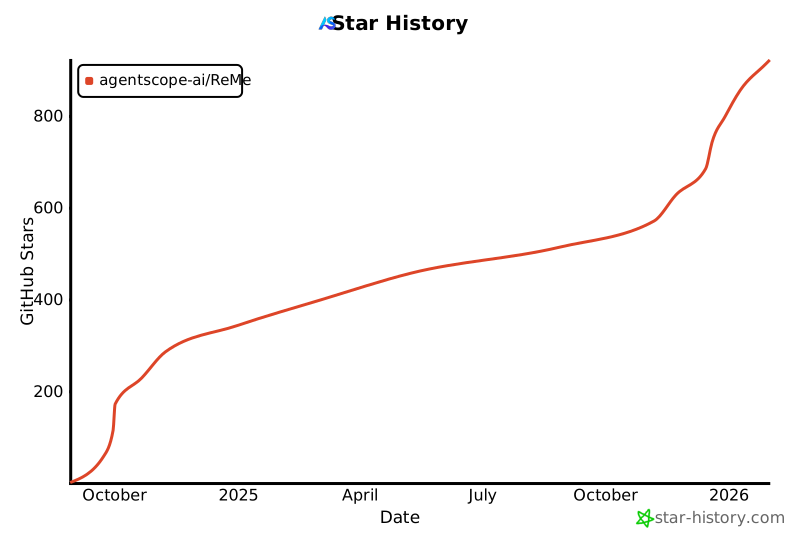](https://www.star-history.com/#agentscope-ai/ReMe&Date)
|