 524b1b6908
* fix(proactive): simplify round files and restore failed summaries

* fix(proactive): validate document-relative Markdown links

* feat(proactive_agent): implement v2 daily record workflow with single-file decision

- Add ProactiveAgentStepV2 class to support single daily note decision and reminder
- Introduce RoundOutputs for v2 round file tracking, and keep RoundArtifacts for v1 summary backup
- Refactor AgentOutbox to support both v1 standalone reminder files and v2 daily reminder records
- Add proactive_record utilities to parse and validate v2 daily record frontmatter and metadata
- Enhance proactive_agent to prepare, read, and manage artifacts for both v1 and v2 flows
- Add configuration profile proactive_v2 to enable new workflow with backward compatibility
- Update proactive.yaml and reactive proactive_agent_step configuration comment for easy switching
- Provide extensive schema validation for v2 reminders ensuring priority and message consistency
- Document v2 workflow and usage in English and Chinese runtime docs
- Add unit tests for v2 step verifying single file output and proper decision handling

* refactor(agent/runtime): replace ReminderRef with string keys and simplify reminder handling

- Remove ReminderRef model and switch to using workspace-relative string keys for reminders
- Simplify AgentOutbox to read, write, and manage reminders keyed by strings
- Change file locking and version checking to protect concurrent edits on daily record files
- Replace legacy and v2 reminder file handling with unified ReminderFiles storage
- Adjust ChatNotifications to operate with the new key scheme and update pending/read sets
- Refactor RoundOutputs to RoundRecord for safer round record tracking and rollback
- Remove unused ProactiveRunResult and related references from imports and exports
- Update InboxWakeRequest, AgentReminder, and related models for consistent ID and path validation
- Adjust proactive agent runtime and local runtime to check reminder versions before commit
- Correct language and docs to describe reminders as daily records instead of separate files
- Clean up roles of inbox and outbox for reminder ownership, delivery, and acknowledgments

* fix(proactive): serialize round commits and align desktop reminders

* refactor(proactive): unify task triggers in Proactive Runtime

* fix(proactive): bound reminder payloads and simplify receipts

* refactor(studio): share workbench and simplify proactive delivery

* fix(studio): update and centralize build dependencies

* fix(proactive): guard draft repair and verify Studio deployments

* chore(docs): update source-map-js

* feat(release): support publishing selected artifacts from a tag

* chore(studio): remove the public playground

* refactor: simplify reminders and release workflows

* fix: preserve proactive records and align release provenance

* test(proactive): remove brittle prompt and preset assertions

* fix(proactive): register reminders after input acknowledgement

* feat(notebook): list projects across todos and ideas

* feat(studio): connect mobile apps to configurable ReMe services

* fix(proactive): reserve registered reminder paths

* fix(studio): request Android local network access

* fix(proactive): reserve reminder paths referenced by receipts
19 KiB
| title | description |
|---|---|
| 服务与部署 | 使用 ReMe 的 HTTP、SSE、MCP 和 Studio 服务,并理解默认安全边界。 |
服务与部署
ReMe 可以作为本地 HTTP 服务、独立 MCP Server 或一次性 CLI Job 运行。默认 HTTP 服务监听
127.0.0.1:2333;同一进程提供 JSON API、SSE、MCP 与可选的 ReMe Studio。
HTTP 服务
在一个终端启动服务并保持运行,以下启动命令任选一条:
reme start
reme start service.host=127.0.0.1 service.port=8181
主机地址也可以使用 ::1 等 IPv6 字面量;HTTP 和 MCP client 会在连接时正确格式化该地址。
如果服务绑定到 IPv6 通配地址 ::,ReMe 会向进程内 client 提供可连接的回环地址 ::1。
在另一个终端通过 CLI client 调用 Job:
reme search query="用户偏好" limit=5
普通 Job 也暴露为 POST /<job-name>;以下 HTTP 示例使用默认端口 2333:
curl -s http://127.0.0.1:2333/search \
  -H 'Content-Type: application/json' \
  -d '{"query":"用户偏好","limit":5}'
请求体允许 Job 参数位于顶层。响应遵循 Response:
{
  "success": true,
  "answer": "...",
  "metadata": {}
}
未被 Step 捕获的错误会转换成 success: false 的响应。
Streaming 与 SSE
backend: stream 的 Job 仍使用 POST /<job-name>,但响应类型是 text/event-stream。每个 chunk 使用统一的 streaming schema;失败时会发出错误 chunk,并以终止事件结束。
默认 chat 是 Stream Job:
curl -N http://127.0.0.1:2333/chat \
  -H 'Content-Type: application/json' \
  -d '{"query":"总结我的长期偏好"}'
proactive 的工作区接口为 list_workspace、search_workspace、load_file 和 get_client_info;
默认配置提供 list、search、load 和 app_config。
proactive 配置提供 ask_agent(query, agent_name=Remy),使用固定 Chat Agent 的当前原生会话,
create_chat_session 创建并选中新会话。demo 继承这两个 Job,并提供 list_chat_sessions、
session_read 和 session_status 用于查看历史与原生会话。MCP 不暴露 Stream Job。
主动智能运行时
主动智能运行时 介绍持续任务、工作区文件和提醒的整体流程;本节说明对应的服务配置和接口。
proactive_runtime 组件协调任务收件箱、调度和提醒投递,通过 AgentWrapper 把模型执行、工具和原生会话交给 Codex 等执行后端。组件通过 components.proactive_runtime.default 配置。
工作区相对目录 reme_agent_dir 默认为 reme_agents。每个任务目录包含 config.json、TASK.md、
sessions.jsonl、inbox/ 和提醒状态目录 outbox/。Remy/ 保存 MEMORY.md 和自己的 sessions.jsonl。
任务结果和提醒正文保存在共享的 daily_dir。
服务启动时从这些文件恢复运行状态。
会话登记保留追加中断前的完整记录;读取时忽略不完整尾行,下次追加时清理尾行,完整记录损坏时明确报错。
ReMe 校验记录后确认输入,在回执中保留提醒路径,直到发件箱登记成功。确认前中断时保留 Markdown,输入可以重新执行。
下图概览 Chat、临时 Reminder fork、共享 Inbox 与后台任务如何通过工作区协作;生活任务为接入示例。

在一个终端配置 LLM_API_KEY、LLM_BASE_URL 和可选的 REME_MODEL_NAME,启动服务:
reme start config=proactive
如需使用 Claude Code,配置 CC_LLM_API_KEY 和 Anthropic 兼容的 CC_LLM_BASE_URL,再运行
reme start config=proactive_cc。两种预设共用 .reme 工作区及 REME_MODEL_NAME 指定的模型。
两个预设的 Chat 使用 Wrapper 默认的 xhigh,后台任务轮次指定 low,两者都使用 workspace-write。Claude Code 通过 Bash 沙箱和
内置文件工具的工作区写入限制实现这一策略。Shell 默认禁用网络访问。Codex 开启实时 web_search,
Claude Code 使用默认工具,包括受支持的原生 WebSearch 和 WebFetch。这些网页工具独立于 Shell 运行,
实际可用性取决于模型供应商。
proactive_cc 启动本地转发组件,以上游 CC_LLM_BASE_URL 接入百炼。组件为原生 WebSearch 的搜索请求设置
cc_entrypoint=cli,并将上游响应透传给 Claude Code。
两个预设都声明 983,616 token 的上下文窗口,并以 600,000 token 为自动压缩触发目标。Claude Code 的压缩窗口
参数设为 633,000 token,包含它的原生预留。Codex 按 95% 计算可用窗口,两端各自统计上下文用量。
另一个终端调用:
reme manage_proactive_agent action=list
reme manage_proactive_agent action=create agent_name=experiment_watch \
  'task_description=分析实验日志,失败或结束时提醒我。'
reme list_agent_inbox agent_name=experiment_watch
reme list_agent_inbox agent_name=Remy
reme list_task_reminders agent_name=experiment_watch
reme task_document action=read agent_name=experiment_watch
manage_proactive_agent 支持 list/create/status/update/delete/query,参数直接放在顶层,以 agent_name 指定任务。
名称建议使用常见的小写英文单词,多个单词以下划线连接。Remy 是保留名。创建时传入
task_description,可选的 cron 为同一个任务增加定时触发。更新只传需要修改的运行配置。询问进展时传入
question,通过已有任务会话的临时只读分支回答。
六个 action 的完整请求与返回示例见 skills/manage-proactive-agent/SKILL.md。
创建时将 task_description 原样写入尚不存在的 TASK.md。创建、状态查询和更新返回 Agent 视图,
其中 task_path 是工作区相对路径。列表用 {items,total} 包装 Agent 视图。
使用 task_document action=read/save 读取或保存任务说明。保存时把读取返回的 mtime 传为 expected_mtime。
使用 manage_proactive_agent action=update 调整 cron。任务说明中明确写出的时间也应一并调整。
修改对后续轮次生效。删除停止框架内的调度和执行,保留历史文件。外部采集器需单独停止。恢复同名任务时沿用原任务说明和历史,按新要求核对任务说明。
reme_agent_dir 指定工作区相对的 Agent 目录,默认是 reme_agents。
通过 components.proactive_runtime.default.chat.initial_memory 配置 Chat 的初始个人记忆。Runtime 启动时创建缺失的
Remy MEMORY.md,重启和切换会话保留已有个人记忆。Chat 的 job_tools 在 Step 配置中选择。
固定对话 Agent 使用 agent_name=Remy、agent_type=chat。名称是稳定身份,接口、返回值、工作区目录和 Desktop
统一使用该名称,文件位于 {reme_agent_dir}/Remy/。任务名称忽略大小写不能重名。
通过 proactive 预置配置的 components.proactive_runtime.default.agents 声明初始任务,使用创建接口的同一组字段,
包括 task_description。启动只创建缺失的身份,保留已有的任务说明、配置和删除状态。
默认配置中,finance 分析采集的新闻和行情,work 根据新观察资料跟踪主人正在做的项目,
整理各项目的进度、进展、难点和待讨论问题。codex_dialogue_cron 只采集 Codex 新增用户消息和最终回答,
screen_capture_cron 独立采集全部显示器;两者默认每五分钟执行,统一投递给 work。
对话 Job 启动时先执行 init_steps 建立读取基线,不导入已有对话,初始化成功后才开始定时采集。
同时默认启用定时任务 tech_news,每天按应用时区 08:00 整理过去 24 小时的重要科技新闻并在完成后提醒。
Proactive Runtime 为各个任务消费事件、基于工作区文件重建上下文,再将保存的提醒经 Outbox 投递到 Chat Inbox。 下图以工作场景中的潜在问题和待办提醒为例;Claude Code 轨迹可通过事件 API 接入,提醒消息仅作示意。
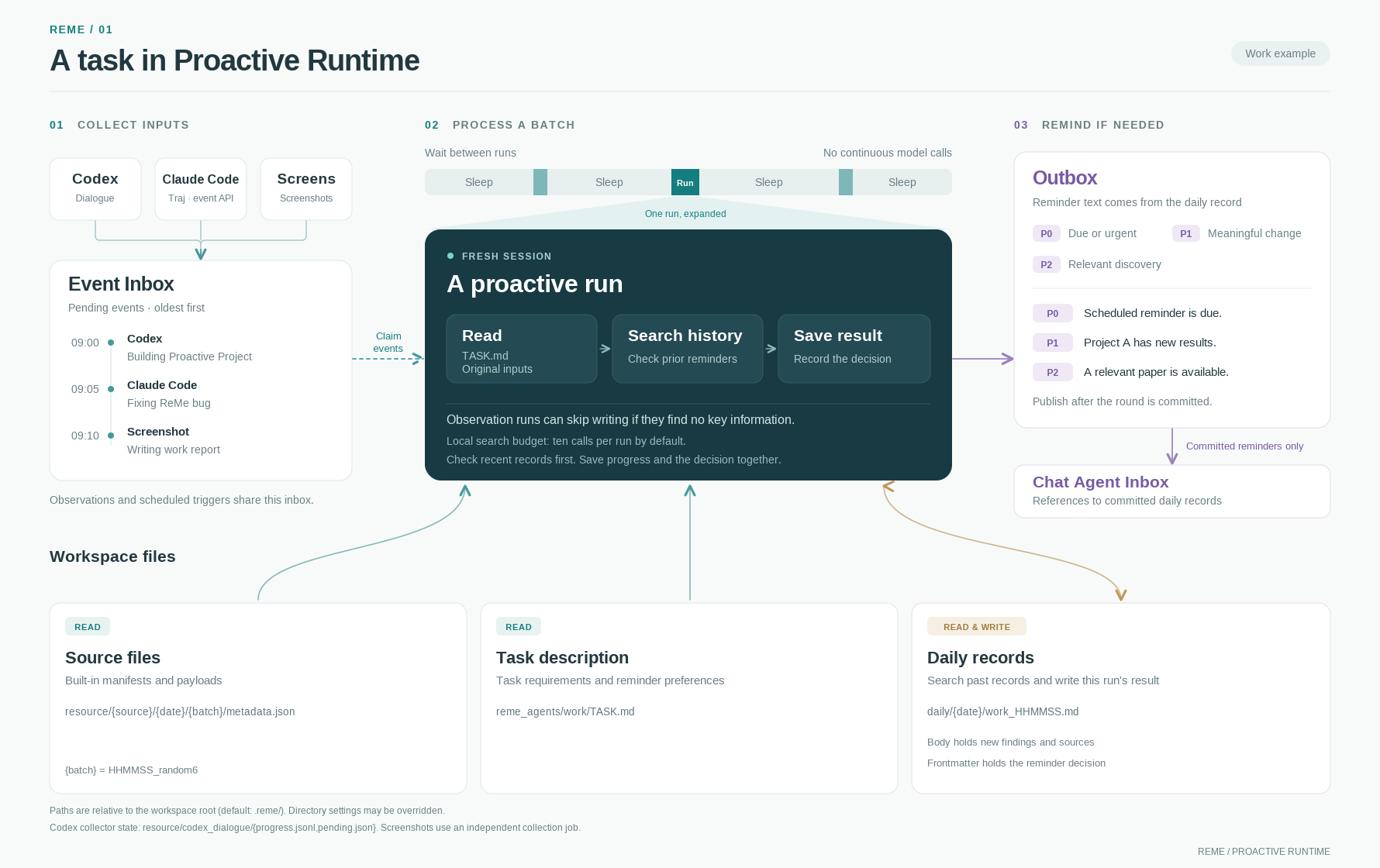
每个后台任务通过 append_task_events(agent_name, events) 接收观察。每条事件包含 event_ts、source、description,
可附工作区相对 paths、id 和 metadata。events 必须是非空数组。先保存事件引用的文件再投递,重试时使用相同的
事件 ID 和内容。成功应答返回已接收的事件 ID,执行进度通过任务状态查询。
reme append_task_events agent_name=experiment_watch \
  'events=[{"id":"experiment-log-1","event_ts":"2026-11-22T10:30:00+08:00","source":"experiment_log","description":"实验日志新增一个里程碑。"}]'
可选的 cron 表达式按应用时区将定时触发追加到同一任务收件箱。source=cron 由框架生成,cron=null 停止产生新的定时事件。
服务端根据是否配置日程生成展示字段 agent_type。每个任务串行执行,连续观察每轮最多领取 max_batch_events 条(默认 20),
每条定时事件单独执行。进程内失败重试保持原批次。min_trigger_interval_seconds 从上一轮成功完成时计时,队首是观察时应用冷却。
队首是定时事件时可以直接执行。
使用 config=proactive 时,Chat、后台任务和临时分支共用 Codex App Server 的原生工具配置,包括 web_search。
临时 query 分支使用后端的只读模式。notify_window={start,end} 限制 Chat 自动评估和发消息的时段。任务结果提交后立即入箱,窗口外仍可主动查看。删除任务会停止执行并保留源文件和历史。重启后从下一次未来时间恢复 cron,已入队事件继续处理,不补跑停机期间未入队的触发;
Chat 空闲计时和失败重试计时在内存中重新开始。
任务把进展和提醒决定写入同一个 daily/YYYY-MM-DD/{agent_name}_HHMMSS.md,同秒重名追加数字后缀。
正文保存增量信息,frontmatter 的 reminder_priority 和 reminder_message 保存投递决定。提醒 ID 使用记录的工作区相对路径。
框架在发送方的 outbox/ 下按源记录路径保存 JSON,记录投递和处理状态。
components.agent_inbox.default 使用 event 后端(AgentEventInbox),继承通用的本地 Inbox 实现;
components.proactive_runtime.default.inbox 引用该组件。每个任务的待处理输入保存在
inbox/inbox_unread.jsonl,已处理批次保存在 inbox/inbox_read.jsonl,批次字段为 items、consume_ts、metadata。
领取可以指定消息 ID,执行成功后提交消费回执。观察与定时触发均使用 Event,已处理输入默认保留最近
1000 条。Remy 收件箱与任务发件箱读取同一份提醒登记,按优先级和投递时间选择一批符合条件
的提醒,应用配置的条数和字节上限。文件监听器和定期扫描处理文件编辑与中断交接。
单个提醒缺失或损坏时会报告并隔离。修复源文件后可继续处理。
P0 在 Chat 会话允许 fork 时立即处理,延迟由 components.proactive_runtime.default.notifications.p0_delay_seconds 配置,默认 0。
P1 等待连续空闲 10 秒,P2 等待 1800 秒,分别由 notifications.p1_idle_seconds、notifications.p2_idle_seconds 配置,
继续遵守提醒时间窗口。只有前台 Chat 轮次重置空闲计时。
临时分支继承当前对话,使用后端的只读模式,执行结束、失败或取消后清理。提示和工具过程留在分支中。
Codex、Claude Code 和 AgentScope 使用统一会话契约:fork 复制最新已接受的上下文,不等待或打断源会话,也不复制正在执行的工具。P0 提醒分支可与前台 Chat 并行;已有排队的用户输入时仍延后处理,新用户指令或会话切换会使旧提醒决定失效。
append_session(delivery="immediate") 在生成期间提交;delivery="idle" 等待当前轮次结束。两者都在确认持久化后才成功返回,输入也在确认后才被消费。超时或取消后,使用同一消息 ID、角色和内容重试;待确认的重试不会重复提交。各后端的实际处理时机不同:
| 后端 | 快照与运行中注入 |
|---|---|
| Codex | 使用原生 fork 和输入队列,接受与落盘是两个阶段;原有轮次可能继续推理以处理排队输入。原生临时会话继承模型上下文,但无法返回完整轮次或提供持久化注入回执。 |
| Claude Code | CLI 原生 fork 包含当前排队输入;注入复用正在运行的客户端,另开恢复进程无法更新原客户端的上下文。assistant 输入需要隐藏的空 user 输入来提交;原生批次串行,防止相邻排队的 user 帧被合并。 |
| AgentScope | 复制内存 SDK 状态,只在分支中结束未完成工作;观察消息排队到模型输入前或本轮结束时写入,避免被 SDK 压缩覆盖。 |
公共契约见 reme/components/agent_wrapper/base_agent_wrapper.py。Claude Code、AgentScope 的分支保留文件历史;释放运行资源不会删除历史。两者的公共只读提示通过限制内置工具实现,原生命令沙箱和网络设置仍由各自 SDK 配置。
框架选定优先级和批次后,将收件箱条目放进提醒分身的提示词。分身按需读取相关源记录,
不展开记录里的链接,最后调用 submit_chat_reminder(content=...) 提交决定。
非空内容作为标记 source="proactive" 的 assistant 消息注入主会话;空内容表示静默,不追加消息。
决定成功提交后,框架自动消费本轮读取的消息。失败保留重试,主会话切换或收到新用户轮次后拒绝旧 fork 的结果。
提醒判断默认限时 120 秒,主动执行默认限时 1200 秒,可在对应 Step 设置 timeout_seconds。
收件箱临时故障按指数退避重试(最长 300 秒),SDK 类型或导入错误停止重试,修复环境并重启后恢复。
list_agents 的 Chat 状态会显示收件箱故障,cron 返回的部分采集失败也会写入日志。
fork 的普通回复不会发送给主人。桌面端从这些已标记的消息生成提醒列表。
list_agent_inbox agent_name=<name> 分页查看后台任务的输入事件。指定 agent_name=Remy 或省略该字段时查看 Chat 收到的提醒。
查询支持待处理、处理中和已处理状态,不会领取或消费输入。list_task_reminders agent_name=<name> 查询任务产出的提醒。
两个提醒列表均返回提醒正文和当前发件箱状态。read_agent_reminder message_id=<相对路径> 读取这条提醒。
read_agent_reminder agent_name=Remy 也接受合并后的 Chat 消息 ID,返回 {id,items}。发件箱通过 chat_message_ids 关联这条消息。
单个后台 proactive_loop 调度任务执行和 Chat 提醒判断,各自保留独立 worker 与重试。
read_agent_session 和 watch_agent_session 对 Chat 返回当前会话的历史,对任务返回最近一个原生轮次。
订阅使用 snapshot 整体替换视图,update 新增或替换完整消息,heartbeat 仅表示连接存活。
后台任务每轮自动执行均新建原生会话,用 TASK.md、本轮输入和相关历史记录重建上下文。历史会话保留执行过程。主 Chat 继续自己的会话,任务问答从最近的任务会话创建只读分支。proactive_agent_step 默认总超时为 1200 秒,原生上下文自动压缩沿用 Codex App Server 的全局设置。
run_proactive_agent 和 process_chat_reminders 为服务私有 Job。proactive 包含桌面运行时、初始任务以及独立运行的
财经、Codex 对话和截图采集任务。采集器显式投递观察并保留源文件。demo 继承该预设并增加独立示例。
内置 proactive 配置默认使用 CodexAgentWrapper;Claude Code、AgentScope 已实现相同的会话 API 和调度行为。
MCP
ReMe 使用 FastMCP 4 与 MCP Python SDK 2,宿主侧独立 MCP bridge 环境需要 fastmcp>=4.1.4,<5。
CLI 工具列表使用 SDK 2 的 snake_case 字段,包括 input_schema、output_schema 和 annotation hints。
默认 HTTP 服务会在 /mcp 挂载 streamable HTTP MCP:
service:
  backend: http
  mcp_enabled: true
  mcp_path: /mcp
  mcp_stateless_http: false
也可以改用独立 MCP Service:
reme start service.backend=mcp service.transport=stdio
reme start service.backend=mcp service.transport=sse service.port=2333
reme start service.backend=mcp service.transport=streamable-http service.port=2333
MCP tool 来自 enable_serve: true 的非流式 Job。service.jobs 可以设置允许列表;injected_job_kwargs 可以注入服务端管理、调用方不能覆盖的参数。
service:
  backend: http
  jobs: [search, read, traverse, auto_memory]
  injected_job_kwargs:
    tenant_id: local-user
  tool_error_on_failure: true
ReMe Studio
安装 reme-ai[core] 后,运行 reme start config=proactive 启用 ReMe Studio:
http://127.0.0.1:2333/
可通过配置关闭或指定自定义构建:
service:
  web_enabled: false
  # web_static_dir: /absolute/path/to/static
静态资源缺失不会阻止 Job API 启动。
随记项目
先用 reme start config=proactive 启动服务,再在另一个终端查询项目和明细。
reme todo action=list_projects
reme todo action=list project=ReMe scope=all
reme idea action=list project=ReMe scope=all
todo action=list_projects 从 Todo 和 Idea 记录汇总项目,返回项目总数 total 和列表 items,
每项包含 project、todo_count 和 idea_count。默认 scope=all,包含活跃和归档记录。传入
scope=active 或 scope=archive 可按范围统计。使用返回的项目名查询该项目的 Todo 或 Idea 明细。
一次性 Job
需要脚本式执行而不常驻服务时:
reme start job=search query="用户偏好" limit=5
它会切换到一次性 CLI Service,但仍经过正常的 Application、Component 和 Job 生命周期。
服务发现
reme find_reme
ReMe 会记录本机运行服务的启动参数。普通 reme <action> 优先使用实际运行服务的 backend、host、port 和 transport;找不到运行服务时才回退到本地配置。
安全边界
ReMe 默认定位为本地服务:
- 默认绑定
127.0.0.1; - HTTP CORS 配置允许任意 origin;
- Job 可进行文件写入、移动和删除;
- 当前服务层不提供通用用户认证。
远程访问必须通过 reme start service.host=0.0.0.0 显式启用。不要直接把服务暴露到公网。请在受控网络或带
身份认证、TLS、访问控制和请求大小限制的反向代理后部署,并通过 service.jobs 只开放必要 Job。
OpenAPI
HTTP 服务使用 FastAPI。启用 HTTP 服务时,可以通过 /docs、/redoc 和 /openapi.json 查看当前配置实际注册的端点;Studio 的 SPA fallback 不会覆盖这些保留路径。