 524b1b6908
* fix(proactive): simplify round files and restore failed summaries

* fix(proactive): validate document-relative Markdown links

* feat(proactive_agent): implement v2 daily record workflow with single-file decision

- Add ProactiveAgentStepV2 class to support single daily note decision and reminder
- Introduce RoundOutputs for v2 round file tracking, and keep RoundArtifacts for v1 summary backup
- Refactor AgentOutbox to support both v1 standalone reminder files and v2 daily reminder records
- Add proactive_record utilities to parse and validate v2 daily record frontmatter and metadata
- Enhance proactive_agent to prepare, read, and manage artifacts for both v1 and v2 flows
- Add configuration profile proactive_v2 to enable new workflow with backward compatibility
- Update proactive.yaml and reactive proactive_agent_step configuration comment for easy switching
- Provide extensive schema validation for v2 reminders ensuring priority and message consistency
- Document v2 workflow and usage in English and Chinese runtime docs
- Add unit tests for v2 step verifying single file output and proper decision handling

* refactor(agent/runtime): replace ReminderRef with string keys and simplify reminder handling

- Remove ReminderRef model and switch to using workspace-relative string keys for reminders
- Simplify AgentOutbox to read, write, and manage reminders keyed by strings
- Change file locking and version checking to protect concurrent edits on daily record files
- Replace legacy and v2 reminder file handling with unified ReminderFiles storage
- Adjust ChatNotifications to operate with the new key scheme and update pending/read sets
- Refactor RoundOutputs to RoundRecord for safer round record tracking and rollback
- Remove unused ProactiveRunResult and related references from imports and exports
- Update InboxWakeRequest, AgentReminder, and related models for consistent ID and path validation
- Adjust proactive agent runtime and local runtime to check reminder versions before commit
- Correct language and docs to describe reminders as daily records instead of separate files
- Clean up roles of inbox and outbox for reminder ownership, delivery, and acknowledgments

* fix(proactive): serialize round commits and align desktop reminders

* refactor(proactive): unify task triggers in Proactive Runtime

* fix(proactive): bound reminder payloads and simplify receipts

* refactor(studio): share workbench and simplify proactive delivery

* fix(studio): update and centralize build dependencies

* fix(proactive): guard draft repair and verify Studio deployments

* chore(docs): update source-map-js

* feat(release): support publishing selected artifacts from a tag

* chore(studio): remove the public playground

* refactor: simplify reminders and release workflows

* fix: preserve proactive records and align release provenance

* test(proactive): remove brittle prompt and preset assertions

* fix(proactive): register reminders after input acknowledgement

* feat(notebook): list projects across todos and ideas

* feat(studio): connect mobile apps to configurable ReMe services

* fix(proactive): reserve registered reminder paths

* fix(studio): request Android local network access

* fix(proactive): reserve reminder paths referenced by receipts
20 KiB
| title | description |
|---|---|
| Services and Deployment | Run ReMe through HTTP, SSE, MCP, the CLI, and ReMe Studio while respecting its local security boundary. |
Services and Deployment
ReMe can run as a local HTTP service, a standalone MCP server, or a one-shot CLI Job. By default HTTP binds to
127.0.0.1:2333; one process serves JSON, SSE, streamable HTTP MCP, and optional ReMe Studio.
HTTP API
Start the service in one terminal and leave it running. Choose one of these startup commands:
reme start
reme start service.host=127.0.0.1 service.port=8181
IPv6 literals such as ::1 can be used as the host; ReMe formats them correctly when HTTP or MCP clients connect.
If a service binds to the IPv6 wildcard ::, in-process clients use the connectable loopback address ::1.
From another terminal, call a Job through the CLI client:
reme search query="user preferences" limit=5
Regular Jobs also become POST /<job-name>; this HTTP example uses the default port 2333:
curl -s http://127.0.0.1:2333/search \
  -H 'Content-Type: application/json' \
  -d '{"query":"user preferences","limit":5}'
Job arguments live at the request body's top level. A regular response follows the Response schema:
{"success": true, "answer": "...", "metadata": {}}
Unhandled Step failures become unsuccessful responses.
Streaming and SSE
Jobs with backend: stream also use POST /<job-name>, returning text/event-stream. Error paths emit an error chunk and always terminate the stream. The default chat Job is streaming:
curl -N http://127.0.0.1:2333/chat \
  -H 'Content-Type: application/json' \
  -d '{"query":"Summarize my long-term preferences"}'
The proactive preset uses list_workspace, search_workspace, load_file and get_client_info for workspace access.
The default configuration provides list, search, load and app_config.
The proactive configuration exposes ask_agent(query, agent_name=Remy) for the fixed Chat Agent. It resumes the current
native session; create_chat_session selects a fresh session. The demo preset inherits both Jobs and adds
list_chat_sessions, session_read and session_status for history and native session inspection.
MCP does not expose Stream Jobs. Studio integration is separate from this backend.
Proactive Runtime
The proactive_runtime component coordinates task inboxes, scheduling, and reminders. It delegates model execution, tools, and native sessions to an agent runtime through the configured AgentWrapper.
Configure it through components.proactive_runtime.default. The workspace-relative reme_agent_dir defaults to
reme_agents. Each task directory contains config.json, TASK.md, sessions.jsonl, inbox/, and reminder
state under outbox/. Remy/ owns MEMORY.md and its own sessions.jsonl. The shared daily_dir stores task
results and reminder text.
Startup reconstructs runtime state from these files.
Session registries preserve complete records across an interrupted append; an incomplete tail is ignored on read
and removed by the next append. Corrupt complete records fail explicitly.
ReMe acknowledges the inputs after validating the record. The receipt retains the reminder path until the outbox has
registered it. A round interrupted before acknowledgement preserves the Markdown and can run again.
Proactive Runtime connects Chat, its temporary Reminder fork, a shared Inbox and background tasks through workspace files. The Life task is an illustrative integration.

Start the backend in one terminal, with LLM_API_KEY, LLM_BASE_URL and optional REME_MODEL_NAME:
reme start config=proactive
For Claude Code, set CC_LLM_API_KEY and the Anthropic-compatible CC_LLM_BASE_URL, then run
reme start config=proactive_cc. This preset shares the .reme workspace and the model selected by REME_MODEL_NAME
with proactive.
In both presets, Chat uses the wrapper default of xhigh effort and automatic task runs request low. Both use workspace-write. Claude Code
implements it with a Bash sandbox and a separate workspace write restriction for the built-in file tools.
Shell network access is disabled by default. Codex enables live web_search. Claude Code uses its default tools,
including WebSearch and WebFetch when supported. Web tools run outside the shell and depend on provider support.
proactive_cc starts a local relay to the configured CC_LLM_BASE_URL. For Bailian's native WebSearch, the relay
sets cc_entrypoint=cli in the search request and passes the upstream response back to Claude Code.
Both presets declare a 983,616-token context window and target automatic compaction at 600,000 tokens. Claude Code's
configured auto-compact window is 633,000 tokens to account for its native reserve. Codex applies its 95% usable-window
setting, and each backend measures context usage with its own accounting.
From another terminal:
reme manage_proactive_agent action=list
reme manage_proactive_agent action=create agent_name=experiment_watch \
  'task_description=Monitor experiment logs and report failures or completion.'
reme list_agent_inbox agent_name=experiment_watch
reme list_agent_inbox agent_name=Remy
reme list_task_reminders agent_name=experiment_watch
reme task_document action=read agent_name=experiment_watch
manage_proactive_agent supports list/create/status/update/delete/query with top-level parameters and a task agent_name.
Prefer simple lowercase English words joined by underscores. Remy is reserved. Creation requires
task_description. Set cron to add scheduled triggers to the same task. Send changed execution settings to update.
query takes a question and answers from a temporary read-only fork of a queryable task session.
See skills/manage-proactive-agent/SKILL.md for all six actions.
Creation writes task_description verbatim when TASK.md is absent. Create, status and update return an Agent view
with its workspace-relative task_path. List wraps those views in {items,total}.
Use task_document action=read/save to edit requirements. For a save, pass the mtime returned by read as
expected_mtime. Update cron through manage_proactive_agent action=update. If the description states an agreed time,
update that text as well. Changes apply to subsequent rounds. Deletion stops owned work
and retains history. Stop external collectors separately. Recreating a deleted task reuses its task description and history. Check the description against the new request.
reme_agent_dir selects the workspace-relative Agent directory and defaults to reme_agents.
Set Chat's initial personal memory with components.proactive_runtime.default.chat.initial_memory. Runtime startup creates
Remy's MEMORY.md if it is absent. Personal memory survives restarts and session changes. Select Chat's job_tools in
its Step configuration.
The fixed Chat Agent uses agent_name=Remy and agent_type=chat. Agent names are stable identities;
API requests, responses, workspace directories and Desktop use the same name. Its files live under
{reme_agent_dir}/Remy/. Task names must be unique regardless of case.
Declare initial tasks under components.proactive_runtime.default.agents in the proactive preset using the same creation
fields, including task_description. Startup creates missing identities and preserves existing descriptions, settings
and deletions. In the default preset, finance analyzes collected news and quotes, and work tracks the user's
current projects, progress, difficulties and discussion points from
incoming observations. codex_dialogue_cron collects new Codex user messages and final answers;
screen_capture_cron separately captures all displays. Both are enabled every five minutes and deliver to work.
The dialogue Job's init_steps establish the startup reading baseline without importing existing dialogue before
periodic collection begins.
The default scheduled task tech_news also runs daily at 08:00 in the application timezone, summarizes important
technology news from the past 24 hours and sends a reminder when ready.
The Proactive Runtime consumes events for each task, reconstructs context from workspace files and delivers saved reminders through the Outbox to the Chat Inbox. The work example below illustrates possible issues and TODOs; Claude Code trajectories can be submitted through the event API.
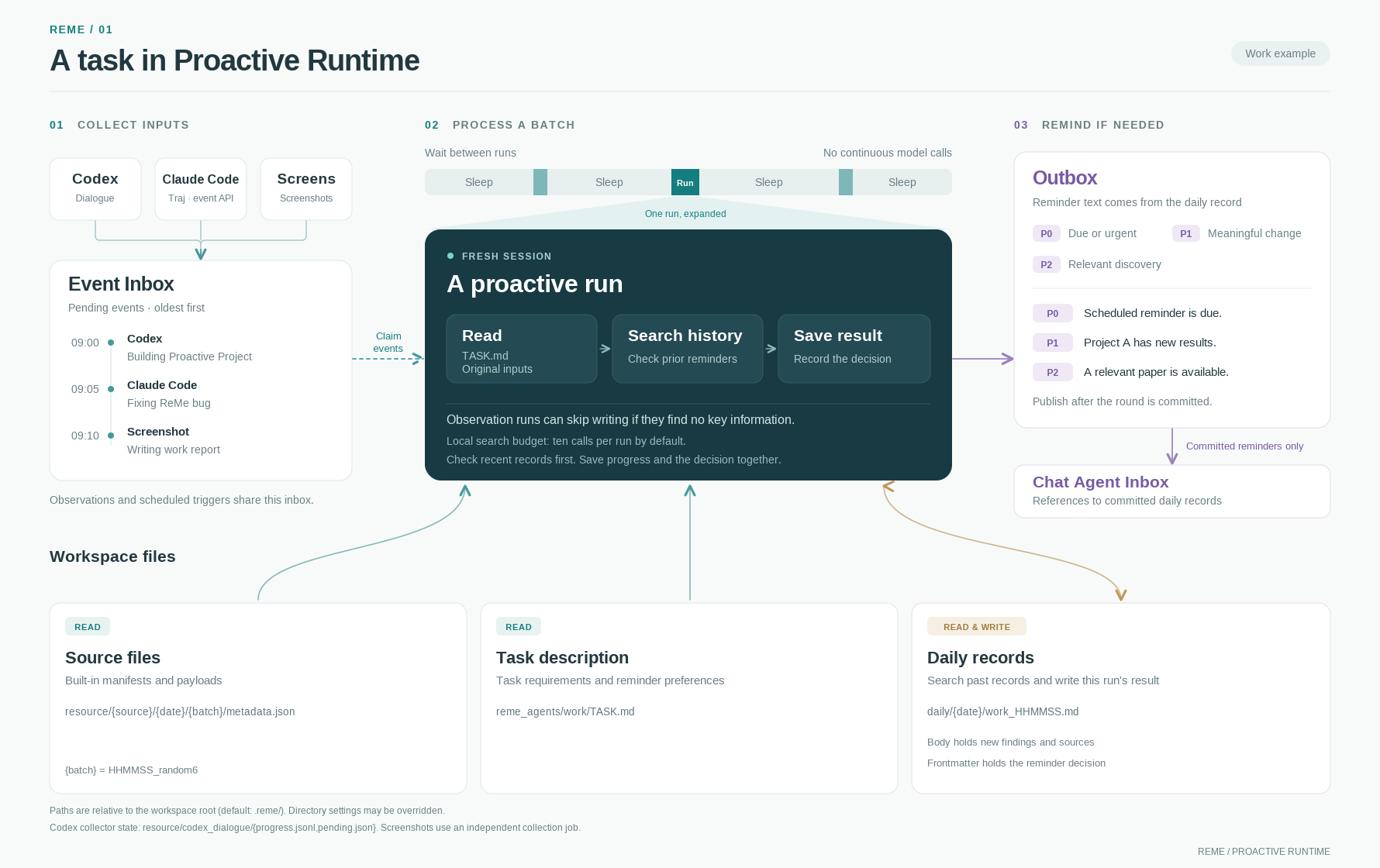
Every task accepts observations through append_task_events(agent_name, events). Use a named background task as the
target. Each observation has event_ts, source, and description, with optional workspace-relative paths, id,
and metadata. Submit a nonempty events array. Save referenced files before sending the observation. When retrying,
reuse the same event ID and payload. The response returns the accepted IDs. Check task status for execution progress.
reme append_task_events agent_name=experiment_watch \
  'events=[{"id":"experiment-log-1","event_ts":"2026-11-22T10:30:00+08:00","source":"experiment_log","description":"A new milestone was recorded."}]'
The optional cron expression appends a trigger to the same inbox in the application timezone. The runtime reserves
source=cron for its scheduler. Set cron=null to stop new scheduled triggers. The server derives agent_type for display.
Each task executes serially. A batch contains consecutive observations, up to max_batch_events (20 by default), or one
scheduled trigger. In-process retries keep the original batch. min_trigger_interval_seconds delays observations from
the previous successful completion. A scheduled trigger at the front of the queue can run during this interval.
With config=proactive, Chat, proactive, cron, and temporary forks share the Codex app server's native tool settings, including web_search.
Temporary query forks use the backend's read-only mode.
notify_window={start,end} limits automatic Chat evaluation and sending. Committed reminders enter the inbox immediately and can be browsed outside the window.
Tasks remain in their stable directories until explicitly deleted; deletion retains source files and history. On restart cron schedules the next future trigger; queued events still run, but missed offline triggers are not backfilled.
Chat idle and retry timers restart in memory. Tasks save progress and their reminder decision together in
daily/YYYY-MM-DD/{agent_name}_HHMMSS.md. Same-second collisions add a numeric suffix. The body holds new information,
and reminder_priority and reminder_message describe the delivery decision in the frontmatter. The workspace-relative
record path is the reminder ID. The sender's outbox/ mirrors the source path with a JSON file for delivery and
processing state.
components.agent_inbox.default uses the event backend (AgentEventInbox), inheriting the generic local
inbox implementation. components.proactive_runtime.default.inbox selects that component. Each task stores pending
inputs in inbox/inbox_unread.jsonl and processed batches in inbox/inbox_read.jsonl; each batch contains items,
consume_ts and metadata. Claims reserve selected IDs without consuming them; successful execution commits a receipt.
The tasks receive Event records for observations and cron triggers. The processed history limit defaults to
1,000 events. Remy's inbox view reads the same reminder registrations as the task outboxes. The
runtime selects one eligible batch at a time by priority and delivery time, subject to the configured inbox item
and byte limits. A file watcher and periodic scans reconcile edits and interrupted handoffs.
Missing or corrupt reminders are reported and isolated without blocking other reminders. Restoring the original file restores processing.
P0 forks Chat as soon as its session is available, after components.proactive_runtime.default.notifications.p0_delay_seconds
(default 0). P1 waits for 10 continuous idle seconds, P2 for 1800, controlled by notifications.p1_idle_seconds and
notifications.p2_idle_seconds. Notification windows still apply. Only foreground Chat turns reset the idle clock.
The temporary fork inherits the current conversation, runs in the backend's read-only mode, and is disposed of after execution,
including failure or cancellation. Its hint and tool traces never enter the main conversation.
Codex, Claude Code and AgentScope share one session contract: a fork snapshots the latest accepted context without waiting for or interrupting its source. Running tools are not cloned. P0 reminder forks can run alongside the foreground Chat turn. Queued user input still defers reminder evaluation, and a new foreground instruction or session switch invalidates an older decision.
append_session(delivery="immediate") submits during generation; delivery="idle" waits for the turn to finish. Both return only after durable persistence. Inputs are consumed after confirmation. After timeout or cancellation, retry with the same message ID, role and content; a pending retry never dispatches twice. Processing times differ by backend:
| Backend | Snapshot and active append |
|---|---|
| Codex | Native fork and input queue. Native acceptance precedes persistence; the running turn may continue with the queued input. Ephemeral threads inherit model context but cannot return hydrated turns or durable append receipts. |
| Claude Code | CLI-native fork includes current queued input. Appends use the running invocation's client; a separate resumed CLI cannot update that client's context. Assistant input requires a hidden empty user flush; native batches are serialized so adjacent queued user frames cannot merge. |
| AgentScope | Copies live SDK state and seals unfinished work only in the branch. Queued observations are applied before model input or after reply completion, so SDK compression cannot overwrite them. |
See reme/components/agent_wrapper/base_agent_wrapper.py for the common contract. Claude Code and AgentScope forks remain file-backed; releasing runtime resources does not delete history. Their shared read-only hint restricts built-in tools; native command sandboxes and network settings remain SDK-specific.
The framework selects the priority and puts that batch of inbox entries in the reminder fork's prompt. The fork
reads relevant source records without following their links, then calls submit_chat_reminder(content=...).
Reminder evaluation has a 120-second timeout and proactive execution a 1200-second timeout, configured with each
Step's timeout_seconds. Transient inbox failures retry with exponential backoff capped at 300 seconds; SDK type
or import errors stop retries until the environment is repaired and restarted. Chat status exposes inbox failures,
and cron logs unsuccessful partial collection results.
Reading is limited to the selected batch. Nonempty content is appended as an assistant message marked
source="proactive"; empty content commits a silent decision without inserting a message. Successful decisions
automatically consume the messages read by the fork. Failures remain retryable, and a switched
Chat session or a new foreground turn rejects the old fork's decision. The ordinary fork reply is never sent to the user.
Desktop derives its reminder list from these marked messages. list_agent_inbox agent_name=<name> pages a task's input
events. Set agent_name=Remy or omit it to view Chat's incoming reminders. The query shows pending, processing, and
processed entries without claiming them. list_task_reminders agent_name=<name> pages a task's delivered reminders.
Both reminder lists return reminder text and its current outbox state. read_agent_reminder message_id=<relative-path>
reads the source reminder.
read_agent_session and watch_agent_session expose the selected Chat session's history and the latest native turn of
each task. Subscriptions use snapshot for whole-view replacement and update for complete-message upserts. A
heartbeat carries no application state. Each automatic event or cron run starts a fresh native session and rebuilds
context from TASK.md, the current inputs and searches of past records. Earlier sessions remain available as history. Main Chat continues its
current session; task questions fork the latest task session read-only without changing task execution history.
proactive_agent_step defaults to a 1200-second total timeout. Native automatic compaction inherits the global Codex App Server settings.
read_agent_reminder agent_name=Remy also accepts a combined Chat message ID and returns {id,items}. The outbox
links the source reminders to that message through chat_message_ids.
One background proactive_loop schedules task execution and Chat reminder decisions with independent workers and retries.
run_proactive_agent and process_chat_reminders are service-private Jobs. The proactive preset includes the
Desktop runtime, initial tasks and independent finance, Codex dialogue and screenshot collectors. Collectors publish
observations explicitly and retain the source files. demo extends this preset with standalone examples.
The built-in proactive configuration selects CodexAgentWrapper. Claude Code and AgentScope implement the same session APIs and scheduling behavior.
MCP
ReMe 0.4.2.2 uses FastMCP 4 and MCP Python SDK 2. Upgrade ReMe and host-side MCP bridges together;
standalone bridge environments require fastmcp>=4.1.4,<5. CLI tool catalogs use SDK 2 snake_case fields,
including input_schema, output_schema, and annotation hints.
The default HTTP service mounts streamable HTTP MCP at /mcp:
service:
  backend: http
  mcp_enabled: true
  mcp_path: /mcp
  mcp_stateless_http: false
For a standalone MCP service:
reme start service.backend=mcp service.transport=stdio
reme start service.backend=mcp service.transport=sse service.port=2333
reme start service.backend=mcp service.transport=streamable-http service.port=2333
MCP tools come from non-stream Jobs with enable_serve: true. Use service.jobs as an allowlist. injected_job_kwargs adds server-managed values that callers cannot override.
service:
  backend: http
  jobs: [search, read, traverse, auto_memory]
  injected_job_kwargs:
    tenant_id: local-user
  tool_error_on_failure: true
ReMe Studio
Install reme-ai[core] and run reme start config=proactive to serve Studio:
http://127.0.0.1:2333/
Disable it with service.web_enabled=false or select a build with service.web_static_dir. Missing static assets do not prevent the Job API from starting.
Notebook projects
Start the service with reme start config=proactive, then run these commands in another terminal.
reme todo action=list_projects
reme todo action=list project=ReMe scope=all
reme idea action=list project=ReMe scope=all
todo action=list_projects lists projects from both Todo and Idea records. The result includes total and items,
with project, todo_count, and idea_count in each item. The default scope=all includes active and archived
records. Set scope=active or scope=archive to count records in that scope. Use the returned project name to list
its Todo or Idea records.
One-shot Jobs
reme start job=search query="user preferences" limit=5
This selects the one-shot CLI Service while retaining the normal Application, Component, and Job lifecycle.
Service discovery
reme find_reme
Ordinary reme <action> commands prefer the running service's actual backend, host, port, and transport. They fall back to local configuration only when no service is discovered.
Security boundary
ReMe is local-first:
- the default binds to
127.0.0.1; - HTTP CORS allows any origin;
- Jobs may write, move, or delete files;
- the service layer has no general-purpose user authentication.
Remote access must be enabled explicitly with reme start service.host=0.0.0.0. Do not expose the service directly to
the public internet. Place it on a controlled network or behind an authenticated TLS reverse proxy, apply access
controls and request-size limits, and expose only necessary Jobs.
OpenAPI
FastAPI exposes the active endpoints through /docs, /redoc, and /openapi.json. The Studio SPA fallback preserves these reserved paths.