 524b1b6908
* fix(proactive): simplify round files and restore failed summaries

* fix(proactive): validate document-relative Markdown links

* feat(proactive_agent): implement v2 daily record workflow with single-file decision

- Add ProactiveAgentStepV2 class to support single daily note decision and reminder
- Introduce RoundOutputs for v2 round file tracking, and keep RoundArtifacts for v1 summary backup
- Refactor AgentOutbox to support both v1 standalone reminder files and v2 daily reminder records
- Add proactive_record utilities to parse and validate v2 daily record frontmatter and metadata
- Enhance proactive_agent to prepare, read, and manage artifacts for both v1 and v2 flows
- Add configuration profile proactive_v2 to enable new workflow with backward compatibility
- Update proactive.yaml and reactive proactive_agent_step configuration comment for easy switching
- Provide extensive schema validation for v2 reminders ensuring priority and message consistency
- Document v2 workflow and usage in English and Chinese runtime docs
- Add unit tests for v2 step verifying single file output and proper decision handling

* refactor(agent/runtime): replace ReminderRef with string keys and simplify reminder handling

- Remove ReminderRef model and switch to using workspace-relative string keys for reminders
- Simplify AgentOutbox to read, write, and manage reminders keyed by strings
- Change file locking and version checking to protect concurrent edits on daily record files
- Replace legacy and v2 reminder file handling with unified ReminderFiles storage
- Adjust ChatNotifications to operate with the new key scheme and update pending/read sets
- Refactor RoundOutputs to RoundRecord for safer round record tracking and rollback
- Remove unused ProactiveRunResult and related references from imports and exports
- Update InboxWakeRequest, AgentReminder, and related models for consistent ID and path validation
- Adjust proactive agent runtime and local runtime to check reminder versions before commit
- Correct language and docs to describe reminders as daily records instead of separate files
- Clean up roles of inbox and outbox for reminder ownership, delivery, and acknowledgments

* fix(proactive): serialize round commits and align desktop reminders

* refactor(proactive): unify task triggers in Proactive Runtime

* fix(proactive): bound reminder payloads and simplify receipts

* refactor(studio): share workbench and simplify proactive delivery

* fix(studio): update and centralize build dependencies

* fix(proactive): guard draft repair and verify Studio deployments

* chore(docs): update source-map-js

* feat(release): support publishing selected artifacts from a tag

* chore(studio): remove the public playground

* refactor: simplify reminders and release workflows

* fix: preserve proactive records and align release provenance

* test(proactive): remove brittle prompt and preset assertions

* fix(proactive): register reminders after input acknowledgement

* feat(notebook): list projects across todos and ideas

* feat(studio): connect mobile apps to configurable ReMe services

* fix(proactive): reserve registered reminder paths

* fix(studio): request Android local network access

* fix(proactive): reserve reminder paths referenced by receipts
47 KiB
ReMe Framework
1. Overview
The ReMe runtime can be understood as follows: a configuration-driven Application assembles components and Jobs; the Service exposes service-enabled Jobs to the CLI, HTTP, or MCP; and each Job executes its Steps in sequence.
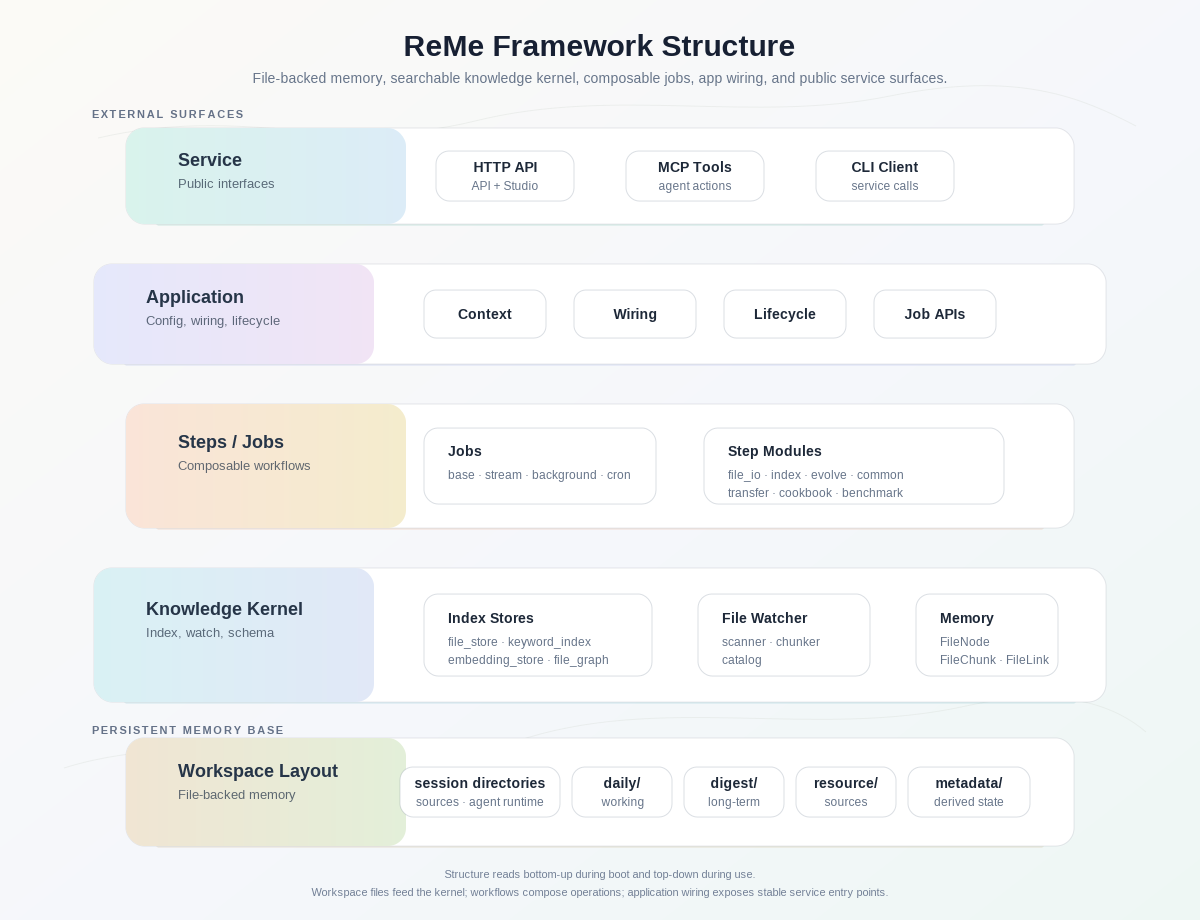
To run and use ReMe first, see Quick Start. For workspace file semantics, see Memory as File. User-facing guides for retrieval, automatic memory, and proactive reading are Memory Search, Auto Memory, Auto Resource, Auto Dream, and Proactive.
Capability Boundary
ReMe v4 focuses on long-term memory: it distills conversations and resources into daily/, organizes them into
digest/, and exposes write, retrieval, and proactive-read capabilities through the CLI, HTTP, and MCP.
Single-session context-window management is outside the scope of ReMe v4. This includes compressing the current
conversation, injecting summaries, trimming tool output, or providing an independent /compact interface. Those
capabilities belong in the host agent framework. ReMe accepts conversations, resources, and file changes that have
already occurred and persists the information with long-term value.
flowchart LR
    CLI["reme CLI<br/>reme/reme.py"] --> Client["Client<br/>http / mcp"]
    Client --> Service["Service<br/>HTTP / MCP"]
    Service --> App["Application<br/>reme/core/application.py"]
    App --> Jobs["Jobs<br/>base / stream / background / cron"]
    Jobs --> Steps["Steps<br/>reme/steps/**"]
    Steps --> Ctx["RuntimeContext<br/>data + Response + stream queue"]
    Steps --> Components["Components<br/>store / graph / index / llm / agent / catalog"]
    Components --> Workspace["Workspace<br/>daily / digest / resource / metadata"]
Core layers:
| Layer | Main location | Responsibility |
|---|---|---|
| CLI | reme/reme.py |
Parse commands; start launches the service; other actions call the service through a client. |
| Service | reme/components/service/ |
Register Jobs as HTTP endpoints or MCP tools. |
| Application | reme/core/application.py |
Assemble configured objects, start them in dependency order, close them, and invoke Jobs. |
| Job | reme/components/job/ |
Orchestrate Steps and select normal, streaming, background, or scheduled execution. |
| Step | reme/steps/ |
Atomic business operations such as file I/O, retrieval, indexing, and self-evolution. |
| Component | reme/components/ |
Reusable infrastructure such as file_store, file_graph, keyword_index, and agent_wrapper. |
| Schema | reme/schema/ |
Data structures such as Request, Response, FileChunk, FileNode, and configuration models. |
| Config | reme/config/ |
Default YAML configuration and command-line override parsing. |
2. Directory Structure
reme/
  reme.py                    # CLI entry point
  core/
    application.py           # Application assembly and lifecycle
    context.py               # application state and per-Job execution context
    registry.py              # backend registry and application-local copies
  plugin/                    # installed plugin contract and entry-point loader
  config/
    default.yaml             # default service / jobs / components
    cookbook.yaml            # Auto Fin + Daily Paper + DingTalk composition
    config_parser.py         # config=, dot notation, and env placeholder parsing
  components/
    base.py                  # ComponentMixin / BaseComponent / bind dependency declarations
    job/                     # BaseJob / StreamJob / BackgroundJob / CronJob
    service/                 # HTTP / MCP services
    client/                  # HTTP / MCP clients
    file_store/              # file-index coordination layer
    file_graph/              # wikilink graph
    keyword_index/           # BM25 and other keyword indexes
    file_chunker/            # Markdown / JSON / JSONL / generic text chunking
    file_catalog/            # change checkpoints
    as_llm/, as_embedding/   # model wrappers
    as_decision_model/       # optional decision model adapters
    agent_wrapper/           # AgentScope / Claude Code / Codex wrappers
    codex_app_server/        # BaseCodexAppServer / SDK backend / shared session ownership
    agent_inbox/             # BaseAgentInbox / local storage and Agent event inputs
    proactive_runtime/           # BaseProactiveRuntime / local Agent coordination
  steps/
    base_step.py             # BaseStep, Ref, dispatch_steps
    common/                  # version, help, health_check, status, chat
    file_io/                 # read/write/edit/delete/move/frontmatter/daily
    index/                   # watch/init/update/search/traverse
    evolve/                  # auto_memory, auto_resource, auto_dream, proactive
    transfer/                # upload/download
plugins/
  dingtalk/                  # independent DingTalk integration plugin distribution
  auto-fin/                  # independent example plugin distribution
  daily_paper/               # independent paper-research plugin distribution
integrations/
  claude_code/               # Claude Code adapter and marketplace
  hermes_agent/              # Hermes Agent memory-provider adapter
The default workspace directories are defined by ApplicationConfig:
<workspace_dir>/
  metadata/     # persistent file_store, file_graph, keyword_index, file_catalog, and related state
  session/      # source conversations used by memory workflows
  mem_session/  # generated Agent wrapper sessions and configuration
  resource/     # external resources
  daily/        # lightly processed memory
  digest/       # long-term digest memory
Application.__init__() first ensures that these directories exist, then initializes the service, components, and Jobs.
3. Startup and Call Chain
3.1 CLI
The entry point is reme/reme.py::main():
flowchart LR
    A["main()"] --> B["parse_args(*sys.argv[1:])"]
    B --> C{action}
    C -->|" start "| D["load_env()"]
    D --> E["resolve_app_config(**kwargs)"]
    E --> F["precheck_start(service)"]
    F --> G["Application(**config).run_app()"]
    C -->|" find_reme "| H["cli_find_reme()"]
    C -->|" other actions "| I["call_server(action, **kwargs)"]
    I --> J["R.get(ComponentEnum.CLIENT, backend)"]
    J --> K["client(action=action, **kwargs)"]
Start a service in one terminal and leave it running; omit config to use the default configuration:
reme start
From another terminal, call Jobs through the running service:
reme version
reme search query="memory" limit=5
reme search query="memory" backend=mcp
Configuration parsing supports:
| Capability | Source | Description |
|---|---|---|
| Default configuration | resolve_app_config() |
Load reme/config/default.yaml when config is not specified. |
| Explicit configuration | config=<name-or-path> |
Accept a built-in configuration name or a YAML/JSON file path. |
| Dot notation | parse_dot_notation() |
For example, service.port=8181. |
| Environment variables | _expand_env_vars() |
Support ${VAR} and ${VAR:-default}. |
| Value conversion | _convert_value() |
Convert bool, int, float, JSON list/dict, and null values automatically. |
3.2 Service
BaseService.run_app() executes in this order:
Set the optional service.jobs list to restrict HTTP or MCP exposure to those job names. If omitted, all jobs with
enable_serve: true remain eligible; an empty list exposes none. The whitelist does not override enable_serve: false.
When the list is configured, a missing, disabled, unsupported, or invalid selected job fails service startup.
flowchart LR
    A["Service.build_service(app)"] --> B["read app.context.jobs"]
    B --> C{"enabled and selected by service.jobs?"}
    C -->|yes| D["Service.add_job(job)"]
    C -->|no| E["skip registration"]
    D --> F["Service.start_service(app)"]
    E --> F
    F --> G["app.start() during lifespan"]
    G --> H["Application starts jobs"]
HTTP service behavior:
| Job type | HTTP exposure |
|---|---|
Non-StreamJob with enable_serve: true |
POST /<job.name> returning Response JSON. |
StreamJob |
POST /<job.name> returning text/event-stream. |
enable_serve: false |
No endpoint is registered. |
After registering Job endpoints, the HTTP service can mount ReMe Studio. The proactive preset enables it with
service.web_enabled=true. Builds are resolved from service.web_static_dir, REME_WEB_STATIC_DIR, the optional
reme_studio package installed by the web and core extras, and source-tree locations such as
reme_studio/web/dist-static. If no index.html is found, only the frontend is skipped and the Job API remains available. The
Studio GET fallback does not replace existing POST /<job.name> routes.
MCP service behavior:
| Job type | MCP exposure |
|---|---|
Non-StreamJob with enable_serve: true |
Registered as an MCP tool. |
StreamJob |
Currently skipped and not registered. |
BackgroundJob |
Forces enable_serve=False at construction and is never exposed. |
MCP services can inject server-owned arguments with injected_job_kwargs; callers cannot override those arguments. Set
tool_error_on_failure: true to expose an unsuccessful ReMe Response as an MCP tool error.
4. Registry and Dependency Injection
4.1 Global Registry R
ReMe uses the process-wide singleton R = ComponentRegistry(). Every component, Job, and Step is registered with
@R.register("name").
from ...core.registry import R


@R.register("version_step")
class VersionStep(BaseStep):
    ...
The registry key is:
(component_type, register_name) -> class
component_type comes from a class attribute:
| Type | Class attribute |
|---|---|
| Step | BaseStep.component_type = ComponentEnum.STEP |
| Job | BaseJob.component_type = ComponentEnum.JOB |
| Service | BaseService.component_type = ComponentEnum.SERVICE |
| FileStore | BaseFileStore.component_type = ComponentEnum.FILE_STORE |
The same backend name can therefore exist under different component types. For example, http can be both a service
backend and a client backend.
ComponentEnum provides the built-in identifiers, but installed plugins may declare a new type with a namespaced
string such as example.reranker. Custom identifiers use lowercase letters and numbers separated by ., _, or -.
They are configured under components and participate in the same dependency ordering and lifecycle as built-ins.
4.2 Built-in and Plugin Registration
Built-in implementations populate the built-in registry through package imports. ReMe freezes that template after
bootstrap, and each Application receives a mutable copy. Runtime code resolves backends through the application's
registry rather than changing the process-wide template. ReMe then loads only the installed plugins explicitly named by
plugins in the resolved configuration. A plugin exposes its package through the reme.plugins Python entry-point
group. The package's plugin.yaml has two optional mappings: backends maps registration names to
module:Class targets, and application_defaults contributes a low-priority ApplicationConfig fragment. The
entry-point name is the plugin's identity.
Plugins are enabled explicitly through the application config's plugins list or a plugins=[...] CLI override.
Plugin registration therefore stays local to one application;
duplicate (component_type, backend) providers fail during assembly instead of overwriting each other.
Configuration files can use extends to inherit a built-in, installed named, or file-based configuration. See the independently
packaged DingTalk, Auto Fin, and
Daily Paper plugins.
Plugin packages are managed locally and remain separate from per-application activation:
reme plugins list
reme plugins install plugins/dingtalk
reme plugins install plugins/auto-fin
reme plugins install plugins/daily_paper
reme plugins show daily-paper
reme plugins validate daily-paper
reme plugins uninstall daily-paper

reme start config=cookbook
These management commands use the current Python interpreter's pip and never run through an HTTP or MCP service.
The built-in cookbook configuration composes the three plugins, adds DingTalk delivery to the two report pipelines,
and starts the DingTalk Agent bridge as a background Job. Enabling Auto Fin or Daily Paper alone keeps it independent
from DingTalk.
4.3 Component.bind
Dependencies between components are declared with BaseComponent.bind(). At startup,
Application._topological_order() reads every component's dependencies and starts them in topological order.
flowchart LR
    A["Component.__init__<br/>self.keyword_index = self.bind(...)"] --> B["Dependency placeholder"]
    B --> C["Application._topological_order()"]
    C --> D["component.start()"]
    D --> E["_resolve_bindings()"]
    E --> F["self.keyword_index = app_context.components[type][name]"]
    F --> G["component._start()"]
Rules for BaseComponent.bind(name, BaseClass, optional=True):
| Scenario | Behavior |
|---|---|
name is empty |
Return None and skip the dependency. |
app_context exists |
Look up app_context.components[ctype][name]. |
Dependency missing and optional=True |
Resolve to None. |
Dependency missing and optional=False |
Fail at startup. |
| Standalone mode | A private component can be created with default_factory. |
4.4 Step.Ref
Steps do not participate in component topological startup. They are created temporarily for each Job invocation. Steps
access components primarily through BaseStep.Ref:
file_store: BaseFileStore = Ref(BaseFileStore, ComponentEnum.FILE_STORE)
agent_wrapper: BaseAgentWrapper = Ref(BaseAgentWrapper, ComponentEnum.AGENT_WRAPPER, optional=True)
Resolution priority:
flowchart LR
    A["access self.file_store"] --> B{"same-named object in kwargs?"}
    B -->|yes| C["use kwargs object"]
    B -->|no| D{"same-named object in context.data?"}
    D -->|yes| E["use context object"]
    D -->|no| F["read name from kwargs['file_store']; default is default"]
    F --> G["app_context.components[FILE_STORE][name]"]
A Step configuration can therefore specify:
steps:
  - backend: update_catalog_step
    file_catalog: resource
Here, file_catalog: resource means to resolve the file_catalog component named resource.
5. Application Lifecycle
The Application converts configuration into runtime objects and starts and closes them in order.
flowchart LR
    A["Application(**kwargs)"] --> B["ApplicationContext(**kwargs)<br/>parse ApplicationConfig"]
    B --> C["_setup_workspace_directories()"]
    C --> D["_init_service()"]
    D --> E["_init_components()"]
    E --> F["_init_jobs()"]
    F --> G["run_app()"]
    G --> H["service.run_app(app)"]
Startup order in Application._start():
flowchart LR
    A["create optional thread_pool"] --> B["topologically sort components"]
    B --> C["start components"]
    C --> D["start BaseJob"]
    D --> E["start StreamJob"]
    E --> F["start BackgroundJob"]
    F --> G["start CronJob"]
During shutdown, objects in _started_components are closed in reverse order so dependents close before their
dependencies.
6. Job Model
A Job is the orchestration unit for an externally callable capability or background task. Jobs are configured under
jobs:
in reme/config/default.yaml.
6.1 BaseJob
BaseJob is the most common request-oriented Job:
flowchart LR
    Caller["Caller"] --> Job["BaseJob<br/>job(**kwargs)"]
    Job --> Ctx["RuntimeContext<br/>merged_kwargs"]
    Ctx --> S1["Step 1<br/>await step(context)"]
    S1 --> D1["read/write context.data / response"]
    D1 --> S2["Step 2<br/>await step(context)"]
    S2 --> D2["read/write context.data / response"]
    D2 --> Resp["context.response"]
    Resp --> Caller
Important source behavior:
| Source | Behavior |
|---|---|
_start() |
Parse each Step config from YAML into (step_cls, params). |
_build_steps() |
Create new Step instances for every call, avoiding state shared across requests. |
__call__() |
Create a RuntimeContext and execute Steps sequentially. |
| Exception handling | Catch the exception, set response.success=False, and set answer=str(e). |
6.2 StreamJob
StreamJob extends BaseJob but returns streaming chunks:
| Behavior | Description |
|---|---|
| Context | Includes stream_queue. |
| Step output | Call context.add_stream_string(text, ChunkEnum.CONTENT). |
| Exception | Write ChunkEnum.ERROR. |
| Completion | Always send a DONE chunk. |
6.3 BackgroundJob
BackgroundJob runs long-lived loops such as file watchers. Its constructor forces enable_serve=False.
flowchart LR
    A["Application starts BackgroundJob"] --> B["_start() creates stop_event and task"]
    B --> C["_run_with_supervisor()"]
    C --> D["await self()"]
    D --> E{"exception?"}
    E -->|no, returned normally| F["finish"]
    E -->|yes and supervisor = True| G["exponential backoff + jitter"]
    G --> C
    E -->|yes and supervisor = False| H["raise exception"]
    I["close()"] --> J["stop_event.set()"]
    J --> K["wait close_timeout; cancel on timeout"]
The default BackgroundJob.__call__() also executes configured Steps in sequence, but it does not swallow exceptions,
which allows the supervisor to restart the task.
6.4 CronJob
CronJob extends BackgroundJob with a cron expression:
jobs:
  nightly_dream:
    backend: cron
    cron: "0 3 * * *"
    steps:
      - backend: dream_extract_step
      - backend: dream_integrate_step
      - backend: dream_finish_step
The implementation uses croniter to calculate the next trigger time in app_config.timezone. Optional
init_steps run before entering the schedule; only steps run at each
trigger. Initialization failures reach the background supervisor, and initialization must be idempotent for retries.
6.5 Default Job Types
flowchart LR
    Jobs["default.yaml jobs"] --> BG["background<br/>index_update_loop<br/>resource_watch_loop<br/>digest_watch_loop"]
    Jobs --> Cron["cron<br/>dream_cron<br/>proactive_refresh_cron<br/>optimize_index_cron"]
    Jobs --> Stream["stream<br/>chat"]
    Jobs --> Base["base<br/>version / help / health_check / status / app_config<br/>search / node_search / traverse / graph_snapshot / reindex<br/>read / load / read_image / write / save / edit / delete / move / list / stat / frontmatter_*<br/>daily_list / daily_reindex / daily_write<br/>auto_memory / auto_memory_cc / auto_resource / auto_dream / proactive_refresh / proactive_read"]
7. Step Model
A Step is a concrete business action. Every Step extends BaseStep and implements execute().
shell_step uses the shared local process runner: stdout and stderr each have a 1 MiB limit. Timeout, cancellation
and completion clean up child processes. shell_timeout must be a finite positive number of seconds.
flowchart LR
    A["Job._build_steps()"] --> B["Step.__init__()"]
    B --> C["load prompt<br/>class-named YAML + prompt_dict override"]
    C --> D["Step.__call__(context, **kwargs)"]
    D --> E["clear Ref cache"]
    E --> F["RuntimeContext.from_context()"]
    F --> G["input_mapping"]
    G --> H["execute()"]
    H --> I["output_mapping"]
    I --> J["return result"]
7.1 RuntimeContext
RuntimeContext is shared by all Steps within one Job invocation:
| Field | Description |
|---|---|
response |
Final Response(answer, success, metadata). |
data |
Free-form dictionary containing input parameters and intermediate results. |
stream_queue |
Output queue for streaming Jobs. |
stop_event |
Stop signal for background Jobs. |
Common Step code:
assert self.context is not None
query = self.context.get("query", "")
self.context["processed_query"] = query.strip().lower()
self.context.response.answer = "..."
self.context.response.metadata["key"] = "value"
return self.context.response
7.2 input_mapping / output_mapping
BaseStep.__call__() invokes RuntimeContext.apply_mapping() before and after execution:
steps:
  - backend: some_step
    input_mapping:
      user_query: query
    output_mapping:
      result: final_result
The semantics are to copy context.data[source] to context.data[target].
7.3 dispatch_steps
Some Steps produce batches of events and dispatch them to other Steps. BaseStep.dispatch_steps() resolves and executes
child Steps according to configuration.
Example from the default configuration:
index_update_loop:
  backend: background
  watch_dirs: [ daily_dir, digest_dir ]
  watch_suffixes: [ md ]
  steps:
    - backend: init_changes_step
      monitor_type: file_store
      monitor_name: default
      dispatch_steps: [ update_index_step ]
    - backend: watch_changes_step
      dispatch_steps: [ update_index_step ]
Flow:
flowchart LR
    Init["init_changes_step"] --> Batch["changes batch"]
    Watch["watch_changes_step"] --> Batch
    Batch --> Dispatch["dispatch_steps(...)"]
    Dispatch --> Update["update_index_step"]
    Update --> Store["file_store"]
8. Components in the Default Configuration
Current default components in reme/config/default.yaml:
| ComponentEnum | Name | Backend | Description |
|---|---|---|---|
service |
singleton | http |
Default HTTP service. |
tokenizer |
default |
regex |
BM25 tokenizer. |
as_embedding |
default |
Not configured by default; example uses openai |
Provides the embedding model wrapper after uncommenting the example config. |
as_decision_model |
default |
Not configured by default; example uses agentscope |
Optional probabilistic decision model; demonstrated by the decision_demo config extending default. |
embedding_store |
default |
Not configured by default; example uses local |
Depends on as_embedding: default after uncommenting the example config. |
as_llm |
default |
${LLM_BACKEND:-openai} |
LLM model wrapper. |
agent_wrapper |
default |
agentscope |
AgentScope wrapper. |
agent_wrapper |
claude_code |
claude_code |
Claude Code wrapper. |
codex_app_server |
default/oauth |
sdk |
Shared Codex processes for API-key and OAuth authentication. |
agent_wrapper |
codex/codex_oauth |
codex |
Agent configuration referencing a named Codex app-server. |
file_graph |
default |
local |
Wikilink graph. |
file_catalog |
default/resource/digest/dream |
local |
File-change checkpoints. |
file_chunker |
markdown |
markdown |
Markdown AST chunking. |
file_chunker |
json/jsonl/default |
json/jsonl/default |
JSON, JSONL, and generic text chunkers; generic text supports txt and log. |
keyword_index |
default |
bm25 |
BM25 keyword index. |
file_store |
default |
local |
Combines file_graph and keyword_index; defaults to embedding_store: "". |
All three agent backends execute through reply_stream(). reply() collects that same stream into an
AgentReply dictionary: session_id, final text in result,
structured_output, invocation-scoped usage, status, error, raw, and the complete ordered JSON events.
Both modes accept output_schema. Only completed is successful; failed, interrupted, and waiting preserve
incomplete outcomes. Setup/transport errors and caller cancellation propagate. Both modes record reported token
usage once per invocation; unavailable usage remains null.
StreamChunk uses start, append-only delta, and end operations.
Non-null start/end payloads replace a block's accumulated content; null leaves it unchanged, and an empty string
clears it. Session, turn, message, block, and tool-call IDs correlate updates. metadata.native retains complete
provider events, including unknown fields and diagnostic notifications. reply_end.chunk carries the outcome
fields above, excluding events; reply_start/reply_end delimit one invocation, while DONE only closes transport.
collect_reply(stream) and replay_reply(reply) convert between the async stream and JSON result without losing
payloads, order, native metadata, or terminal state. Collection fails if the terminal outcome is missing or repeated.
raw preserves native results: AgentScope's final message in raw.message plus an optional
raw.structured_response, Claude's ResultMessage, or Codex's TurnResult. Persist the full AgentReply for exact
replay; native session history supplies item snapshots rather than the original stream's deltas.
Studio reconciles block snapshots, displays structured output and terminal states, and retains live events through
history refreshes. Raw HTTP stream_chunks() includes errors and DONE; CLI/text helpers handle errors separately.
Text-only producers use the default delta operation.
AgentScope wrappers implement the session operations without changing the agent's generation flow. resume restores
model context; an explicit session_id starts fresh context under that ID while retaining its display history.
Each {mem_session_dir}/agentscope/<UUID>.jsonl atomically stores the current SDK state and a committed byte offset into
agentscope/history/<UUID>.jsonl. The paired append-only display log records only new or changed message tails;
completed block snapshots replace their live deltas. Serialization and parsing run off the event loop. Back up both
files together. Readers ignore uncommitted history tails, and the next writer removes only that uncommitted suffix.
Compaction preserves displayed messages. Replies, compaction and idle appends share a session lock; reads and forks do
not wait behind generation. Immediate appends queue until a safe model-input or reply boundary and return after
persistence. Appends retain their delivery policy and are idempotent by message_id across restarts.
Pending approval or external execution is reported as active. Ownership and live status
are scoped to the Application; independent processes must not write the same session concurrently.
Codex wrappers reference app_server: default or app_server: oauth. Multiple wrappers can share one server while
keeping their own models, instructions and conversations. Omit session_id to start a new thread; pass a returned
session_id to continue it. Different threads can execute concurrently; operations on one thread are serialized.
Pass fork_session=True with resume or session_id to inherit native conversation context.
Models, instructions, turn settings and job tools come from the current wrapper configuration and call arguments.
After restart, the application configuration and Steps reconstruct these settings.
An empty source without a native rollout starts an independent
thread with the current configuration. Rejected or cancelled preparation retains the previous live settings and tools.
create_session() retains in-process turn settings such as effort before the first query.
output_schema applies only to the current invocation; omission uses the calling wrapper's default, and explicit
None disables that default for this invocation.
A disposable read-only fork receives the selected Chat inbox entries in its prompt. It reads relevant source records and submits its decision through submit_chat_reminder.
Only explicitly submitted text is appended to the foreground conversation; fork reasoning and ordinary replies stay
outside it. Codex stores injected content in its native rollout without a second application-authored message copy.
reme_agents/ contains task configuration, event inboxes, personal memory and session references.
Remy's inbox derives its state from reminders and acknowledgement fields in the daily records. Native
conversation histories retain the conversation content.
The Proactive Runtime owns transient execution activity and live output. Desktop clients observe watch_agent_session; native Codex status notifications remain internal to operation completion and disconnect handling.
All three wrappers support append_session(..., role="user" | "assistant") without generating a reply; the default role
is assistant. Retries with the same message_id must retain both content and role. Injected messages keep
source="proactive" independently of their role, including after reload or fork.
SessionSnapshot.revision is an opaque content fingerprint, stable across reloads and independent of activity status.
Pass it as expected_revision to reject an append if the content changed, including a user injection without a new
model turn. expected_turn_id checks only the model-turn anchor. Both guards are checked inside the session writer
lease; an already committed matching message_id remains retryable with an old guard. Reminder forks carry the
source revision when submitting text, so stale decisions leave inbox items pending for reassessment.
append_session(..., delivery="idle" | "immediate") records the delivery mode and source session in the message.
idle waits for generation to finish. immediate can submit during a native turn. Recoverable SDK errors from session
reading and status in Codex are exposed as ConnectionError; validation errors and cancellation propagate.
Claude Code uses native streaming input and a zero-inference flush receipt to persist appended messages.
{mem_session_dir}/claude_sessions/<UUID>.json retains native locations, provenance and retry IDs across restarts;
an explicitly configured external mem_session_dir remains supported. History and status reads do not wait behind
generation; append and compaction share its session lease. Empty sessions contain a hidden native seed input.
continue_conversation=True resolves the latest main session in the current project before taking its lease,
including when using an external session_store; with no stored conversation it starts a new session.
Resume and fork restore the saved native cwd; an explicit conflicting directory is rejected. Rejected query setup
retains the previous turn anchor and approval state until native history confirms input acceptance.
The session_read and session_status jobs use the wrapper selected by their Step configuration.
Start the service with reme start config=default, then use another terminal:
reme session_read session_id=YOUR_SESSION_ID
reme session_status session_id=YOUR_SESSION_ID
await wrapper.get_session_path(session_id) returns the native session file as a Path, or None when Codex
reports no path. The file may not exist before the first turn. Lookup errors propagate, and returned paths must stay
inside the configured codex_home. AgentScope and Claude Code also expose their native session files; Claude returns
None when an external session_store is configured. Path lookup does not resume or generate a turn.
await wrapper.session_exists(session_id) checks resumability, including a live empty Codex thread whose rollout
has not been created yet. Unsupported backends raise NotImplementedError.
The default is approval_mode: deny_all with sandbox: full-access: the SDK maps this mode to
approval_policy: never, so available tools run without human or model approval. Requests that need additional
permissions are rejected rather than prompting. Set approval_mode: auto_review to opt into the configured
automatic reviewer. Tool allowlists and injected argument constraints continue to apply.
With an API key and a custom base_url, the shared server configures a dedicated Responses provider that uses
HTTP/SSE by default. Set supports_websockets: true on codex_app_server only for endpoints supporting the Responses
WebSocket transport. Explicit config_overrides retain precedence over generated provider defaults.
API-key defaults use qwen3.8-max for main conversations, code reviews, subagents and native memory consolidation,
and qwen3.8-flash for automatic approval review and native memory extraction. The model catalog, main requests and
default subagents select xhigh reasoning. The catalog exposes only xhigh, so native approval reviews also use
that level rather than the SDK's internal low default. Main-model overrides use model
on the wrapper; the remaining native settings are explicit in codex_app_server.default.config_overrides and
model_catalog. ReMe writes this native Codex catalog as rebuildable metadata in the server's private home.
auto_review_model_override selects the approval model separately from the main model; changing only model does
not change that reviewer. Native conversation compaction uses the thread's model. OAuth uses account-supported
models and the separate CODEX_OAUTH_MODEL_NAME override. See demo configuration for
the complete API-key setup using LLM_API_KEY and LLM_BASE_URL.
Configure auth_mode, api_key, base_url, codex_home, codex_bin, config_overrides and experimental_api
under components.codex_app_server.<name> (backend: sdk). The default Codex home is {workspace_dir}/.codex.
Configure separate codex_home values when servers need independent account or session storage.
Job tools run against the current Application through a session-scoped MCP endpoint, reusing its plain HTTP
listener when available. TLS, CLI and embedded applications use
a lifecycle-managed loopback listener. Tool selection and injected arguments remain bound to each loaded thread; an unloaded
thread can be resumed with a new binding. Internal jobs are available only through the explicitly selected tools,
without changing their public service exposure. Closing a wrapper leaves the shared server running; application
shutdown closes it. A disconnected request fails without replaying tools; later requests can reconnect and resume.
Note that the search Step configuration contains vector_weight, but file_store.default.embedding_store is empty by
default. Vector retrieval is available only when the runtime configuration enables an embedding store.
9. Adding a Step
9.1 Minimal Step
Suppose you want to add a Step that converts input text to uppercase.
Create a file such as reme/steps/common/uppercase.py:
from ..base_step import BaseStep
from ...core.registry import R


@R.register("uppercase_step")
class UppercaseStep(BaseStep):
    async def execute(self):
        assert self.context is not None
        text = self.context.get("text", "")
        result = str(text).upper()

        self.context["uppercase_text"] = result
        self.context.response.answer = result
        self.context.response.metadata["length"] = len(result)
        return self.context.response
9.2 Registering the Step
Make sure reme/steps/common/__init__.py imports the new module. Add:
from . import uppercase
The reason is that @R.register("uppercase_step") only executes after the module is imported.
9.3 Accessing Components
If a Step needs an existing component, prefer the Refs provided by BaseStep:
class MySearchStep(BaseStep):
    async def execute(self):
        assert self.context is not None
        results = await self.file_store.keyword_search(
            self.context.get("query", ""),
            limit=5,
        )
        ...
Common attributes available directly:
| Attribute | Component resolved by default |
|---|---|
self.as_llm |
.model from as_llm: default. |
self.agent_wrapper |
agent_wrapper: default; optional. |
self.file_catalog |
file_catalog: default; optional. |
self.file_store |
file_store: default. |
To select a non-default component from Job configuration:
steps:
  - backend: my_step
    file_catalog: dream
9.4 Step Design Guidance
| Guidance | Reason |
|---|---|
Read input from context and write intermediate results to context. |
A multi-Step Job passes data through the same context. |
Write the final result to context.response. |
Services and clients consume the standard Response. |
| Do not store request-scoped state on a Step instance. | A Step is rebuilt for every Job call, and stateless Steps are easier to test. |
A background loop that supports interruption should check context.stop_event. |
BackgroundJob.close() relies on the stop event for graceful shutdown. |
Call add_stream_string() only from a StreamJob. |
A normal Job has no stream queue. |
9.5 Unit Test Example
A Step can be instantiated directly and passed a RuntimeContext:
import pytest

from reme.core.context import RuntimeContext
from reme.steps.common.uppercase import UppercaseStep


@pytest.mark.asyncio
async def test_uppercase_step():
    ctx = RuntimeContext(text="hello")
    resp = await UppercaseStep()(ctx)
    assert resp.answer == "HELLO"
    assert ctx["uppercase_text"] == "HELLO"
10. Adding a Job
A Job usually requires no new Python class; configure existing Steps instead. Add a new Job backend only when a new execution model is required.
10.1 Adding a Normal Request Job
Save a configuration such as /path/to/uppercase.yaml, inheriting the default service and adding the Job:
extends: default

jobs:
  uppercase:
    backend: base
    description: "Convert text to uppercase."
    parameters:
      type: object
      properties:
        text:
          type: string
          description: "input text"
      required:
        - text
    steps:
      - backend: uppercase_step
Start that configuration in one terminal and leave it running:
reme start config=/path/to/uppercase.yaml
From another terminal, call the Job:
reme uppercase text="hello"
Call chain:
flowchart LR
    CLI["CLI<br/>reme uppercase text=hello"] --> HTTP["HTTP Client"]
    HTTP --> Req["POST /uppercase"]
    Req --> S["HttpService"]
    S --> J["uppercase BaseJob<br/>job(text='hello')"]
    J --> Step["uppercase_step<br/>await step(context)"]
    Step --> Resp["context.response.answer = HELLO"]
    Resp --> JSON["Response JSON"]
    JSON --> CLIOut["CLI prints answer"]
10.2 Adding a Multi-Step Job
A Job can chain multiple Steps:
jobs:
  demo_echo:
    backend: base
    description: "Normalize query, then echo it."
    parameters:
      type: object
      properties:
        query:
          type: string
          default: ""
        min_score:
          type: number
          default: 0.5
    steps:
      - backend: demo_echo_step1
      - backend: demo_echo_step2
The first Step writes:
context["processed_query"]
context["adjusted_min_score"]
The second Step reads those fields and writes the final response.
10.3 Adding a Stream Job
Use backend: stream in configuration:
jobs:
  stream_uppercase:
    backend: stream
    description: "Stream uppercase text."
    parameters:
      type: object
      properties:
        text:
          type: string
      required:
        - text
    steps:
      - backend: uppercase_prepare_step
      - backend: uppercase_stream_step
Example streaming Step:
from ..base_step import BaseStep
from ...core.registry import R
from ...enumeration import ChunkEnum


@R.register("uppercase_stream_step")
class UppercaseStreamStep(BaseStep):
    async def execute(self):
        assert self.context is not None
        for ch in self.context.get("uppercase_text", ""):
            await self.context.add_stream_string(ch, ChunkEnum.CONTENT)
        return self.context.response
10.4 Adding a Background Job
Use backend: background in configuration:
jobs:
  my_watch_loop:
    backend: background
    watch_dirs: [ daily_dir ]
    watch_suffixes: [ md ]
    steps:
      - backend: init_changes_step
        monitor_type: file_store
        monitor_name: default
        dispatch_steps: [ update_index_step ]
      - backend: watch_changes_step
        dispatch_steps: [ update_index_step ]
Characteristics of a background Job:
| Characteristic | Description |
|---|---|
| Not externally exposed | BackgroundJob.__init__() forces enable_serve=False. |
| Has a supervisor | Restarts with exponential backoff after an exception by default. |
| Has a stop event | Notifies the loop to exit during close. |
| Suitable for watching/consuming | File watching, queue consumption, and periodic long-running loops. |
10.5 Adding a Cron Job
Use backend: cron in configuration:
jobs:
  daily_auto_dream:
    backend: cron
    cron: "30 3 * * *"
    steps:
      - backend: dream_extract_step
        file_catalog: dream
      - backend: dream_integrate_step
      - backend: dream_finish_step
        file_catalog: dream
An invalid cron expression fails at startup.
10.6 When a New Job Backend Is Needed
Most use cases require only a new Step plus a YAML Job. Consider adding reme/components/job/*.py only in these cases:
| Requirement | New Job class? |
|---|---|
| Add a business command | No; use backend: base. |
| Chain existing steps | No; use steps:. |
| Need SSE/streaming output | No; use backend: stream. |
| Need a background loop | No; use backend: background. |
| Need cron scheduling | No; use backend: cron. |
| Need entirely new scheduling, concurrency, or transaction semantics | Yes; add a Job backend. |
Minimal shape of a new Job backend:
from .base_job import BaseJob
from ...core.registry import R


@R.register("my_job_backend")
class MyJob(BaseJob):
    async def __call__(self, **kwargs):
        # custom scheduling logic
        return await super().__call__(**kwargs)
Also ensure the module is imported by reme/components/job/__init__.py.