 581ab41d28
## Summary Promotes the most useful per-run state into the Overview tab so users no longer have to tab-hop to read the basics of a run. - **Adds a horizontal summary panel** above the workflow graph (right column only — does not span the stages sidebar) with five columns: **Created by · Changes · Sandbox · Cost · Artifacts**. Quiet-uppercase labels (`text-[10px] uppercase tracking-[0.08em] text-fg-muted`) over regular-weight values. Skeleton loaders while queries are in flight; em dash in muted color for missing/zero data. - **Promotes the PR chip** out of the meta strip into a `SECONDARY_BUTTON_CLASS`-style pill next to the Actions menu, visible on every tab. Pill renders only when a PR exists. - Lifts `formatBytesAsMemory`, `formatCpuCores`, `formatUsdMicros` to `lib/format.ts` so the panel can reuse them. - New `RunSummaryPanel` is split into a smart wrapper (owns the SWR hooks) + a presentational `RunSummaryPanelView` (prop-driven) for clean test seams. - All 7 `Principal` kinds (user / agent / system / slack / webhook / worker / anonymous) map to glyph + label; user kind uses login-initial avatar. ## Screenshots Captured against a real local Fabro server (`fabro server start`) on demo runs — these only exercise the Created-by column (the other cells display em dashes because the demo runs have no PR / diff / billing / artifacts data). The em-dash states **are** the intended empty-state design. ### Overview tab — full page 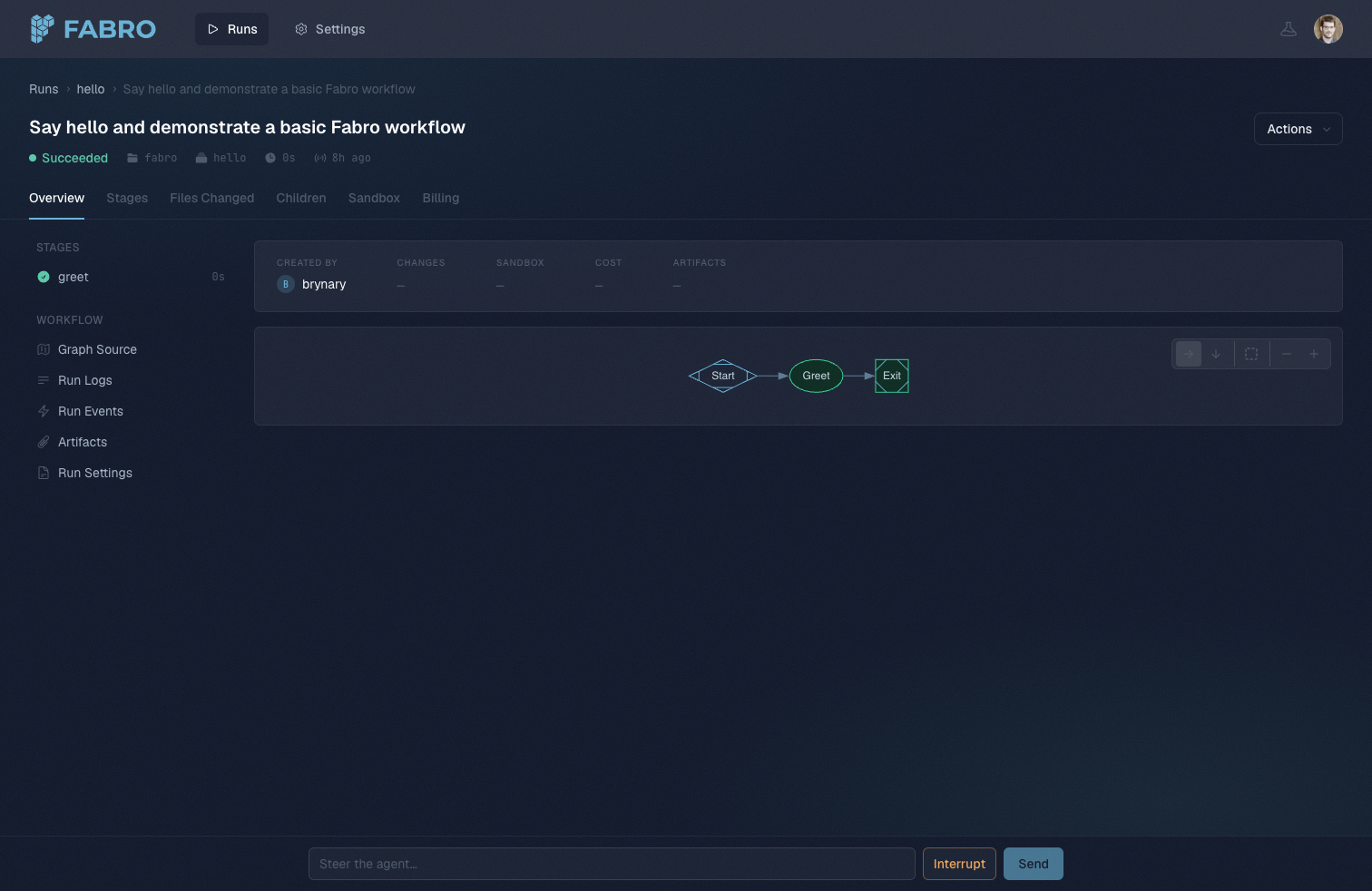 ### Header + tabs + summary panel close-up 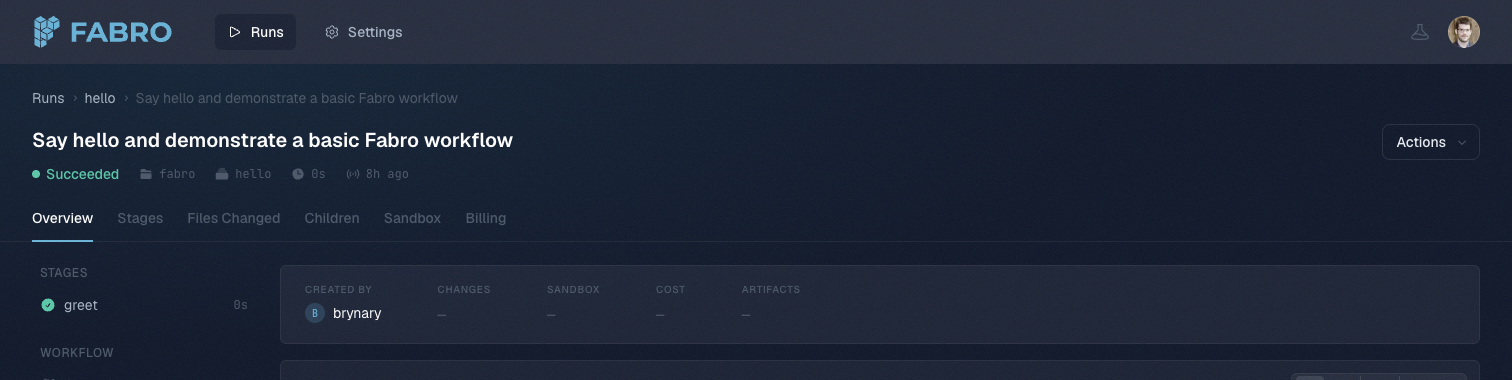 ### Summary panel detail  > The PR pill (mint icon + `#number` next to Actions) is unverified visually because no demo run on this server has an associated PR — but the rendering path is the same `SECONDARY_BUTTON_CLASS` markup as the Actions button and is conditioned on `run.pullRequestUrl && run.number != null`. See the [HTML prototype](https://github.com/fabro-sh/fabro/blob/feat/run-overview-summary-panel/.context/run-overview-options.html) for the locked design. ## Test plan - [x] `cd apps/fabro-web && bun run typecheck` clean (only pre-existing assistant-ui errors) - [x] `bun test` — +12 new passes, no new failures (387 pass / 5 fail / 2 errors vs baseline 375 / 6 / 3) - [x] Manual: load `/runs/<id>` against a real server, confirm panel + em dashes render correctly - [ ] Manual on a run **with** a PR: verify the pill appears next to Actions and opens the PR in a new tab - [ ] Manual on a run **with** rich data (diff / billing / sandbox resources / artifacts): verify each column populates correctly 🤖 Generated with [Claude Code](https://claude.com/claude-code) Co-authored-by: Claude Opus 4.7 (1M context) <noreply@anthropic.com> |
||
|---|---|---|
| .ai/prompts | ||
| .cargo | ||
| .claude | ||
| .config | ||
| .fabro | ||
| .github | ||
| apps | ||
| bin/agent | ||
| docker | ||
| docs | ||
| evals/swe-bench | ||
| installer | ||
| lib | ||
| test | ||
| .dockerignore | ||
| .env.example | ||
| .gitattributes | ||
| .gitignore | ||
| AGENTS.md | ||
| bun.lock | ||
| Cargo.lock | ||
| Cargo.toml | ||
| CLAUDE.md | ||
| clippy.toml | ||
| CONTRIBUTING.md | ||
| docker-compose.local.yaml | ||
| docker-compose.prod.yaml | ||
| docker-compose.yaml | ||
| Dockerfile | ||
| install.md | ||
| install.sh | ||
| LICENSE.md | ||
| package.json | ||
| README.md | ||
| rustfmt.toml | ||

The open source dark software factory for expert engineers
AI coding agents are powerful but unpredictable. You either babysit every step or review a 50-file diff you don't trust. Fabro gives you a middle path: define the process as a graph, let agents execute it, and intervene only where it matters. Why Fabro?





# With Claude Code
curl -fsSL https://fabro.sh/install.md | claude

# With Codex
codex "$(curl -fsSL https://fabro.sh/install.md)"

# With Homebrew
brew install fabro-sh/tap/fabro-nightly

# With Bash
curl -fsSL https://fabro.sh/install.sh | bash
Then run fabro server start to finish setup in your browser. The server opens a web wizard, exits when the wizard completes, and starts in configured mode the next time you run it.

Use Cases
- Extend disengagement time — Stop babysitting an agent REPL. Define a workflow with verification gates and walk away — Fabro keeps the process on track without you.
- Leverage ensemble intelligence — Seamlessly combine models from different vendors. Use one model to implement, another to cross-critique, and a third to summarize — all in a single workflow.
- Share best practices across your team — Collaborate on version-controlled workflows that encode your software processes as code. Review, iterate, and reuse them like any other source file.
- Reduce token bills — Route cheap tasks to fast, inexpensive models and reserve frontier models for the steps that need them. CSS-like stylesheets make this a one-line change.
- Improve agent security — Run agents in cloud sandboxes with full network and filesystem isolation. Keep untrusted code off your laptop and out of your production environment.
- Run agents 24/7 — Fabro's API server queues and executes runs continuously. Close your laptop — workflows keep running and results are waiting when you return.
- Scale infinitely — Move execution off your laptop and into cloud sandboxes. Run as many concurrent workflows as your infrastructure allows.
- Guarantee code quality — Layer deterministic verifications — test suites, linters, type checkers, LLM-as-judge — into your workflow graph. Failures trigger fix loops automatically.
- Inspect every run — Query durable event streams, checkpoints, conclusions, and stage outputs to understand what happened and improve the workflow.
- Specify in natural language — Define requirements as natural-language specs and let Fabro generate — and regenerate — implementations that conform to them.
Key Features
| Feature | Description | |
|---|---|---|
| 🔀 | Deterministic workflow graphs | Define pipelines in Graphviz DOT with branching, loops, parallelism, and human gates. Diffable, reviewable, version-controlled |
| 🙋 | Human-in-the-loop | Approval gates pause for human decisions. Steer running agents mid-turn. Interview steps collect structured input |
| 🎨 | Multi-model routing | CSS-like stylesheets route each node to the right model and provider, with automatic fallback chains |
| ☁️ | Cloud sandboxes | Run agents in isolated Daytona cloud VMs with snapshot-based setup, network controls, and automatic cleanup |
| 🔌 | SSH access and preview links | Shell into running sandboxes with fabro sandbox ssh and expose ports with fabro sandbox preview for live debugging |
| 🌲 | Git checkpointing | Every stage commits code changes and execution metadata to Git branches. Resume, revert, or trace any change |
| 📊 | Run observability | Durable events, checkpoints, conclusions, and stage outputs make every run inspectable and exportable |
| ⚡ | Comprehensive API | REST API with SSE event streaming and a React web UI. Run workflows programmatically or as a service |
| 🦀 | Single binary, no runtime | One compiled Rust executable with zero dependencies. No Python, no Node, no Docker required |
| ⚖️ | Open source (MIT) | Full source code, no vendor lock-in. Self-host, fork, or extend to fit your workflow |
Example Workflow
A plan-approve-implement workflow where a human reviews the plan before the agent writes code:

digraph PlanImplement {
    graph [
        goal="Plan, approve, implement, and simplify a change"
        model_stylesheet="
            *        { model: claude-haiku-4-5; reasoning_effort: low; }
            .coding  { model: claude-sonnet-4-5; reasoning_effort: high; }
        "
    ]

    start [shape=Mdiamond, label="Start"]
    exit  [shape=Msquare, label="Exit"]

    plan      [label="Plan", prompt="Analyze the goal and codebase. Write a step-by-step plan.", reasoning_effort="high"]
    approve   [shape=hexagon, label="Approve Plan"]
    implement [label="Implement", class="coding", prompt="Read plan.md and implement every step."]
    simplify  [label="Simplify", class="coding", prompt="Review the changes for clarity and correctness."]

    start -> plan -> approve
    approve -> implement [label="[A] Approve"]
    approve -> plan      [label="[R] Revise"]
    implement -> simplify -> exit
}
Agents run as multi-turn LLM sessions with tool access. Human gates (hexagon) pause for approval. The stylesheet routes planning to a cheap model and coding to a frontier model. See the Graphviz DOT language reference for the full syntax.
📖 Documentation
Fabro ships with comprehensive documentation covering every feature in depth:
- Getting Started -- Installation, first workflow, and why Fabro exists
- Defining Workflows -- Node types, transitions, variables, stylesheets, and human gates
- Executing Workflows -- Run configuration, sandboxes, checkpoints, observability, and failure handling
- Tutorials -- Step-by-step guides from hello world to parallel multi-model ensembles
- API Reference -- Full OpenAPI spec with authentication, SSE events, and client SDKs
Quick Start
Install
# With Claude Code
curl -fsSL https://fabro.sh/install.md | claude

# With Codex
codex "$(curl -fsSL https://fabro.sh/install.md)"

# With Homebrew
brew install fabro-sh/tap/fabro-nightly

# With Bash
curl -fsSL https://fabro.sh/install.sh | bash
Release binaries and the multi-arch Docker image ship with SLSA Build Provenance attestations. See Verifying Releases to check an artifact was built by our GitHub Actions workflow.
Then finish setup in your browser and initialize Fabro in your project:
fabro server start     # opens a web install wizard in your browser
                       # (server exits when the wizard finishes — start it again to run Fabro)

cd my-project
fabro repo init        # per project
For headless or scripted environments, fabro install runs the same setup as a CLI-only wizard.
Running Fabro
Fabro runs as a server. You choose where it runs:
- On your laptop — install the CLI (above) and run
fabro server start. Workflows pause when your laptop sleeps. - On a host (self-hosted) — deploy the Docker image with
docker composeor any cloud container service (ECS, Cloud Run, Kubernetes). See Self-host with Docker.
One-click managed alternative for the same Docker image:

See the deployment overview for the full picture.
Contributing to Fabro
Outside contributions are welcome! Whether it's a bug fix, a new feature, documentation, or a typo -- we'd love your help making Fabro better.
- Bug fixes and small improvements -- Send a pull request directly.
- Larger features or changes -- Open a GitHub Issue or start a Discussion first so we can align on the approach.
- Questions -- Open a Discussion or email bryan@qlty.sh.
See CONTRIBUTING.md for build instructions and development workflow.
Help or Feedback
- Bug reports via GitHub Issues
- Feature requests via GitHub Discussions
- Email bryan@qlty.sh for questions
- See CONTRIBUTING.md for build instructions and development workflow
License
Fabro is licensed under the MIT License.