 b6bded9818
* feat: add configurable delay for Go diagnostics to prevent premature error reporting - Add diagnosticsDelayMs setting (default: 2000ms) to allow linters time to process - Add diagnosticsEnabled setting to optionally disable diagnostic checking entirely - Update DiffViewProvider.saveChanges() to use configurable delay before checking diagnostics - Update all tool files (writeToFile, searchAndReplace, insertContent, applyDiff, multiApplyDiff) to pass diagnostic settings - Add comprehensive tests for new diagnostic functionality - Fixes issue where Go diagnostics errors were submitted to LLM before linter could clean up unused imports Resolves #5859 * fix: add missing TypeScript type definitions for diagnostic settings - Add diagnosticsDelayMs and diagnosticsEnabled to globalSettingsSchema - Include properties in ExtensionState Pick type - Add default values to EVALS_SETTINGS - Fix VSCode mock to include DiagnosticSeverity for tests - Resolves compilation errors in ClineProvider and webviewMessageHandler * fix: update test mocks to support diagnostic settings in tool tests - Add providerRef mock to insertContentTool and writeToFileTool tests - Update mocks to include diagnosticsEnabled and diagnosticsDelayMs settings - Fix test expectations to match new implementation with diagnostic configuration - Resolves failing unit tests for insertContentTool.spec.ts and writeToFileTool.spec.ts * fix: remove package-lock.json file (project uses pnpm) * refactor: use existing writeDelayMs instead of diagnosticsDelayMs - Remove diagnosticsDelayMs setting in favor of existing writeDelayMs - Add min(0) validation for writeDelayMs in global settings schema - Add error handling around delay function calls in DiffViewProvider - Create DEFAULT_WRITE_DELAY_MS constant (1000ms) to replace repeated defaults - Update all tool files to pass writeDelayMs instead of diagnosticsDelayMs - Remove diagnosticsDelayMs from webview message handlers and types - Update test files to use writeDelayMs instead of diagnosticsDelayMs This refactoring consolidates diagnostic delay functionality to use the existing writeDelayMs setting as requested in PR feedback. * fix: resolve failing unit tests and TypeScript compilation errors - Fix DiffViewProvider test to expect correct default delay (1000ms instead of 2000ms) - Fix TypeScript type errors in ClineProvider test mock state object - Correct terminalPowershellCounter and terminalZdotdir types to boolean - Fix pinnedApiConfigs type from array to Record<string, boolean> * fix: remove unrelated changes from ClineProvider.spec.ts - Removed extensive unrelated property additions to mock state - Kept only diagnosticsEnabled property which is related to Go diagnostics delay feature - Removed unused DEFAULT_WRITE_DELAY_MS import - Restored original structure and organization of mock state object This addresses the feedback to remove unrelated changes while preserving the necessary diagnostic functionality for the Go diagnostics delay feature. * refactor: move DEFAULT_WRITE_DELAY_MS to packages/types/src/global-settings.ts - Move DEFAULT_WRITE_DELAY_MS constant from src/shared/constants.ts to packages/types/src/global-settings.ts - Update all import statements in affected files to use @roo-code/types - Delete src/shared/constants.ts file as it is no longer needed - Files updated: - src/integrations/editor/DiffViewProvider.ts - src/core/webview/ClineProvider.ts - src/core/tools/multiApplyDiffTool.ts - src/core/tools/applyDiffTool.ts - src/core/tools/searchAndReplaceTool.ts - src/core/tools/insertContentTool.ts - src/core/tools/writeToFileTool.ts --------- Co-authored-by: Roo Code <roomote@roocode.com> |
||
|---|---|---|
| .changeset | ||
| .github | ||
| .husky | ||
| .roo | ||
| .vscode | ||
| apps | ||
| locales | ||
| packages | ||
| scripts | ||
| src | ||
| webview-ui | ||
| .dockerignore | ||
| .env.sample | ||
| .git-blame-ignore-revs | ||
| .gitattributes | ||
| .gitconfig | ||
| .gitignore | ||
| .nvmrc | ||
| .prettierrc.json | ||
| .rooignore | ||
| .roomodes | ||
| .tool-versions | ||
| CHANGELOG.md | ||
| CODE_OF_CONDUCT.md | ||
| CONTRIBUTING.md | ||
| ellipsis.yaml | ||
| knip.json | ||
| LICENSE | ||
| package.json | ||
| pnpm-lock.yaml | ||
| pnpm-workspace.yaml | ||
| PRIVACY.md | ||
| README.md | ||
| renovate.json | ||
| SECURITY.md | ||
| turbo.json | ||
English • Català • Deutsch • Español • Français • हिंदी • Bahasa Indonesia • Italiano • 日本語
한국어 • Nederlands • Polski • Português (BR) • Русский • Türkçe • Tiếng Việt • 简体中文 • 繁體中文
Roo Code (prev. Roo Cline)
Connect with developers, contribute ideas, and stay ahead with the latest AI-powered coding tools.






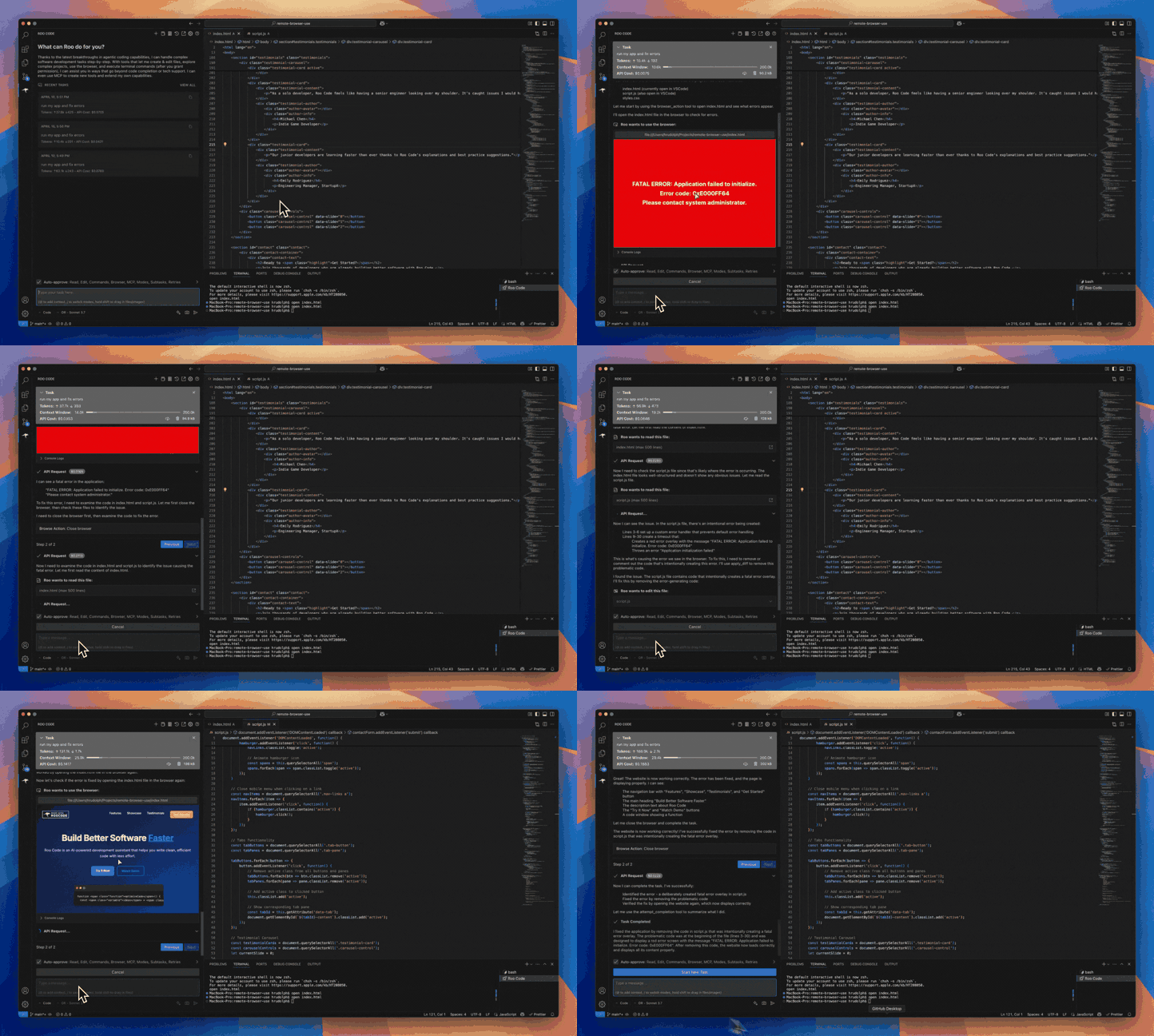
Roo Code is an AI-powered autonomous coding agent that lives in your editor. It can:
- Communicate in natural language
- Read and write files directly in your workspace
- Run terminal commands
- Automate browser actions
- Integrate with any OpenAI-compatible or custom API/model
- Adapt its “personality” and capabilities through Custom Modes
Whether you’re seeking a flexible coding partner, a system architect, or specialized roles like a QA engineer or product manager, Roo Code can help you build software more efficiently.
Check out the CHANGELOG for detailed updates and fixes.
🎉 Roo Code 3.23 Released
Roo Code 3.23 brings powerful new features and significant improvements to enhance your development workflow!
- Codebase Indexing Graduated from Experimental - Full codebase indexing is now stable and ready for production use with improved search and context understanding.
- New Todo List Feature - Keep your tasks on track with integrated todo management that helps you stay organized and focused on your development goals.
What Can Roo Code Do?
- 🚀 Generate Code from natural language descriptions
- 🔧 Refactor & Debug existing code
- 📝 Write & Update documentation
- 🤔 Answer Questions about your codebase
- 🔄 Automate repetitive tasks
- 🏗️ Create new files and projects
Quick Start
Key Features
Multiple Modes
Roo Code adapts to your needs with specialized modes:
- Code Mode: For general-purpose coding tasks
- Architect Mode: For planning and technical leadership
- Ask Mode: For answering questions and providing information
- Debug Mode: For systematic problem diagnosis
- Custom Modes: Create unlimited specialized personas for security auditing, performance optimization, documentation, or any other task
Smart Tools
Roo Code comes with powerful tools that can:
- Read and write files in your project
- Execute commands in your VS Code terminal
- Control a web browser
- Use external tools via MCP (Model Context Protocol)
MCP extends Roo Code's capabilities by allowing you to add unlimited custom tools. Integrate with external APIs, connect to databases, or create specialized development tools - MCP provides the framework to expand Roo Code's functionality to meet your specific needs.
Customization
Make Roo Code work your way with:
- Custom Instructions for personalized behavior
- Custom Modes for specialized tasks
- Local Models for offline use
- Auto-Approval Settings for faster workflows
Resources
Documentation
Community
- Discord: Join our Discord server for real-time help and discussions
- Reddit: Visit our subreddit to share experiences and tips
- GitHub: Report issues or request features
Local Setup & Development
- Clone the repo:
git clone https://github.com/RooCodeInc/Roo-Code.git
- Install dependencies:
pnpm install
- Run the extension:
There are several ways to run the Roo Code extension:
Development Mode (F5)
For active development, use VSCode's built-in debugging:
Press F5 (or go to Run → Start Debugging) in VSCode. This will open a new VSCode window with the Roo Code extension running.
- Changes to the webview will appear immediately.
- Changes to the core extension will also hot reload automatically.
Automated VSIX Installation
To build and install the extension as a VSIX package directly into VSCode:
pnpm install:vsix [-y] [--editor=<command>]
This command will:
- Ask which editor command to use (code/cursor/code-insiders) - defaults to 'code'
- Uninstall any existing version of the extension.
- Build the latest VSIX package.
- Install the newly built VSIX.
- Prompt you to restart VS Code for changes to take effect.
Options:
-y: Skip all confirmation prompts and use defaults--editor=<command>: Specify the editor command (e.g.,--editor=cursoror--editor=code-insiders)
Manual VSIX Installation
If you prefer to install the VSIX package manually:
- First, build the VSIX package:
pnpm vsix - A
.vsixfile will be generated in thebin/directory (e.g.,bin/roo-cline-<version>.vsix). - Install it manually using the VSCode CLI:
code --install-extension bin/roo-cline-<version>.vsix
We use changesets for versioning and publishing. Check our CHANGELOG.md for release notes.
Disclaimer
Please note that Roo Code, Inc does not make any representations or warranties regarding any code, models, or other tools provided or made available in connection with Roo Code, any associated third-party tools, or any resulting outputs. You assume all risks associated with the use of any such tools or outputs; such tools are provided on an "AS IS" and "AS AVAILABLE" basis. Such risks may include, without limitation, intellectual property infringement, cyber vulnerabilities or attacks, bias, inaccuracies, errors, defects, viruses, downtime, property loss or damage, and/or personal injury. You are solely responsible for your use of any such tools or outputs (including, without limitation, the legality, appropriateness, and results thereof).
Contributing
We love community contributions! Get started by reading our CONTRIBUTING.md.
Contributors
Thanks to all our contributors who have helped make Roo Code better!














License
Apache 2.0 © 2025 Roo Code, Inc.
Enjoy Roo Code! Whether you keep it on a short leash or let it roam autonomously, we can’t wait to see what you build. If you have questions or feature ideas, drop by our Reddit community or Discord. Happy coding!