 1be30fc8c2
* feat: Add safeWriteJson utility for atomic file operations Implements a robust JSON file writing utility that: - Prevents concurrent writes to the same file using in-memory locks - Ensures atomic operations with temporary file and backup strategies - Handles error cases with proper rollback mechanisms - Cleans up temporary files even when operations fail - Provides comprehensive test coverage for success and failure scenarios Signed-off-by: Eric Wheeler <roo-code@z.ewheeler.org> * fix: use safeWriteJson for all JSON file writes This change refactors all direct JSON file writes to use the safeWriteJson utility, which implements atomic file writes to prevent data corruption during write operations. - Modified safeWriteJson to accept optional replacer and space arguments - Updated tests to verify correct behavior with the new implementation Fixes: #722 Signed-off-by: Eric Wheeler <roo-code@z.ewheeler.org> * feat: Implement inter-process file locking for safeWriteJson Replaces the previous in-memory lock in `safeWriteJson` with `proper-lockfile` to provide robust, cross-process advisory file locking. This enhances safety when multiple processes might attempt concurrent writes to the same JSON file. Key changes: - Added `proper-lockfile` and `@types/proper-lockfile` dependencies. - `safeWriteJson` now uses `proper-lockfile.lock()` with configured retries, staleness checks (31s), and lock update intervals (10s). - An `onCompromised` handler is included to manage scenarios where the lock state is unexpectedly altered. - Logging and comments within `safeWriteJson` have been refined for clarity, ensuring error logs include backtraces. - The test suite `safeWriteJson.test.ts` has been significantly updated to: - Use real timers (`jest.useRealTimers()`). - Employ a more comprehensive mock for `fs/promises`. - Correctly manage file pre-existence for various scenarios. - Simulate lock contention by mocking `proper-lockfile.lock()` using `jest.doMock` and a dynamic require for the SUT. - Verify lock release by checking for the absence of the `.lock` file. All tests are passing with these changes. Signed-off-by: Eric Wheeler <roo-code@z.ewheeler.org> * feat: implement streaming JSON write in safeWriteJson Refactor safeWriteJson to use stream-json for memory-efficient JSON serialization: - Replace in-memory string creation with streaming pipeline - Add Disassembler and Stringer from stream-json library - Extract streaming logic to a dedicated helper function - Add proper-lockfile and stream-json dependencies This implementation reduces memory usage when writing large JSON objects. Signed-off-by: Eric Wheeler <roo-code@z.ewheeler.org> * fix: improve safeWriteJson locking mechanism - Use file path itself for locking instead of separate lock file - Improve error handling and clarity of code - Enhance cleanup of temporary files Signed-off-by: Eric Wheeler <roo-code@z.ewheeler.org> * test: fix safeWriteJson test failures - Ensure test file exists before locking - Add proper mocking for fs.createWriteStream - Fix test assertions to match expected behavior - Improve test comments to follow project guidelines Signed-off-by: Eric Wheeler <roo-code@z.ewheeler.org> * test: update tests to work with safeWriteJson Updated tests to work with safeWriteJson instead of direct fs.writeFile calls: - Updated importExport.test.ts to expect safeWriteJson calls instead of fs.writeFile - Fixed McpHub.test.ts by properly mocking fs/promises module: - Moved jest.mock() to the top of the file before any imports - Added mock implementations for all fs functions used by safeWriteJson - Updated the test setup to work with the mocked fs module All tests now pass successfully. Signed-off-by: Eric Wheeler <roo-code@z.ewheeler.org> * refactor: replace JSON.stringify with safeWriteJson for file operations Replace all non-test instances of JSON.stringify used for writing to JSON files with safeWriteJson to ensure safer file operations with proper locking, error handling, and atomic writes. - Updated src/services/mcp/McpHub.ts - Updated src/services/code-index/cache-manager.ts - Updated src/api/providers/fetchers/modelEndpointCache.ts - Updated src/api/providers/fetchers/modelCache.ts - Updated tests to match the new implementation Signed-off-by: Eric Wheeler <roo-code@z.ewheeler.org> * docs: add rules for using safeWriteJson Add concise rules for using safeWriteJson instead of JSON.stringify with file operations to ensure atomic writes and prevent data corruption. Signed-off-by: Eric Wheeler <roo-code@z.ewheeler.org> --------- Signed-off-by: Eric Wheeler <roo-code@z.ewheeler.org> Co-authored-by: Eric Wheeler <roo-code@z.ewheeler.org> Co-authored-by: Daniel <57051444+daniel-lxs@users.noreply.github.com> |
||
|---|---|---|
| .changeset | ||
| .github | ||
| .husky | ||
| .roo | ||
| .vscode | ||
| apps | ||
| locales | ||
| packages | ||
| scripts | ||
| src | ||
| webview-ui | ||
| .dockerignore | ||
| .env.sample | ||
| .git-blame-ignore-revs | ||
| .gitattributes | ||
| .gitconfig | ||
| .gitignore | ||
| .nvmrc | ||
| .prettierrc.json | ||
| .rooignore | ||
| .roomodes | ||
| .tool-versions | ||
| CHANGELOG.md | ||
| CODE_OF_CONDUCT.md | ||
| CONTRIBUTING.md | ||
| ellipsis.yaml | ||
| knip.json | ||
| LICENSE | ||
| MONOREPO.md | ||
| package.json | ||
| pnpm-lock.yaml | ||
| pnpm-workspace.yaml | ||
| PRIVACY.md | ||
| README.md | ||
| renovate.json | ||
| SECURITY.md | ||
| turbo.json | ||
English • Català • Deutsch • Español • Français • हिन्दी • Italiano • Nederlands • Русский
日本語 • 한국어 • Polski • Português (BR) • Türkçe • Tiếng Việt • 简体中文 • 繁體中文
Roo Code (prev. Roo Cline)
Connect with developers, contribute ideas, and stay ahead with the latest AI-powered coding tools.






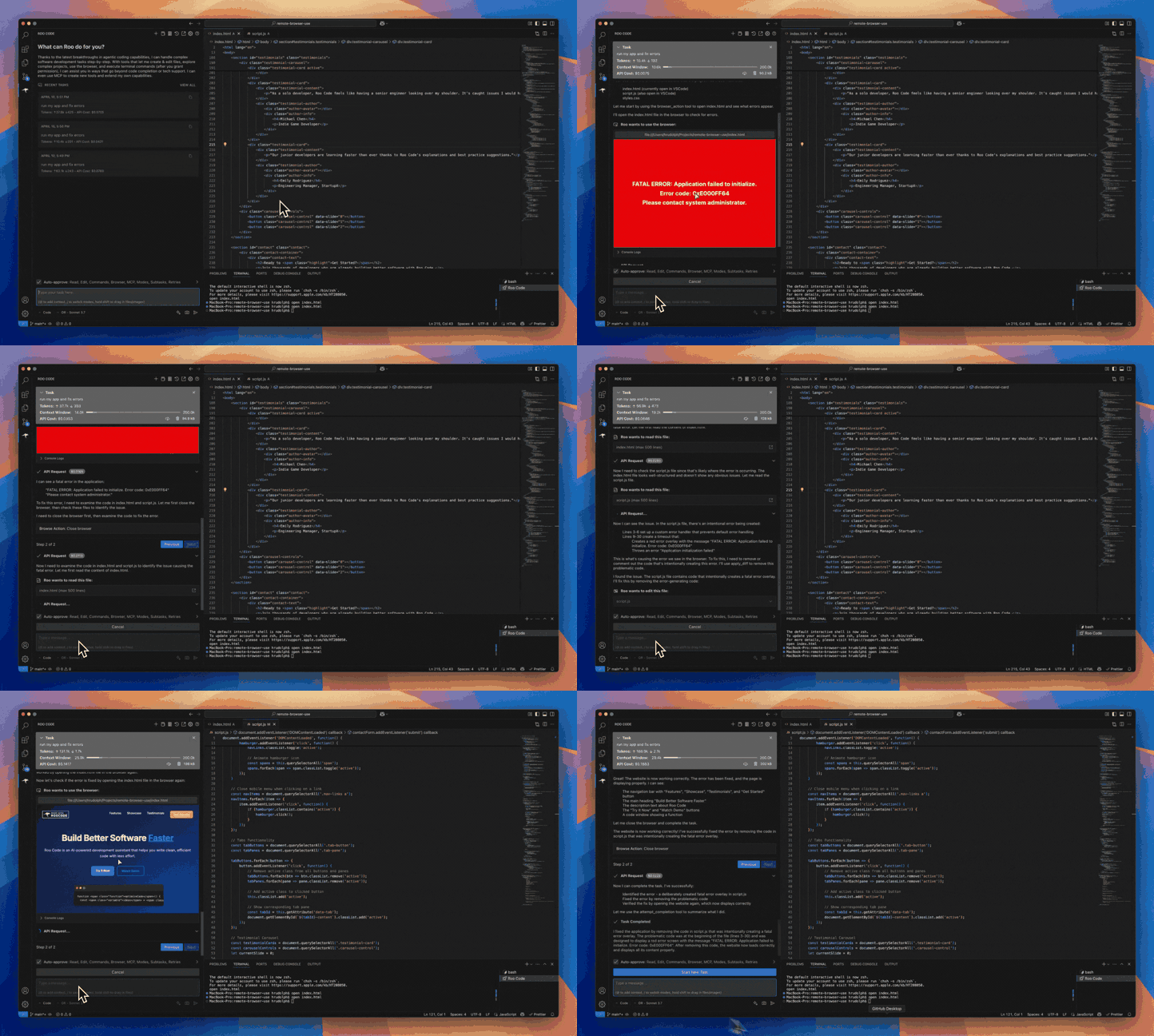
Roo Code is an AI-powered autonomous coding agent that lives in your editor. It can:
- Communicate in natural language
- Read and write files directly in your workspace
- Run terminal commands
- Automate browser actions
- Integrate with any OpenAI-compatible or custom API/model
- Adapt its “personality” and capabilities through Custom Modes
Whether you’re seeking a flexible coding partner, a system architect, or specialized roles like a QA engineer or product manager, Roo Code can help you build software more efficiently.
Check out the CHANGELOG for detailed updates and fixes.
🎉 Roo Code 3.19 Released
Roo Code 3.19 brings intelligent context management improvements and enhanced user experience!
- Intelligent Context Condensing Enabled by Default - Context condensing is now enabled by default with configurable settings for when automatic condensing happens.
- Manual Condensing Button - New button in the task header allows you to manually trigger context condensing at any time.
- Enhanced Condensing Settings - Fine-tune when and how automatic condensing occurs through the Context Settings panel.
What Can Roo Code Do?
- 🚀 Generate Code from natural language descriptions
- 🔧 Refactor & Debug existing code
- 📝 Write & Update documentation
- 🤔 Answer Questions about your codebase
- 🔄 Automate repetitive tasks
- 🏗️ Create new files and projects
Quick Start
Key Features
Multiple Modes
Roo Code adapts to your needs with specialized modes:
- Code Mode: For general-purpose coding tasks
- Architect Mode: For planning and technical leadership
- Ask Mode: For answering questions and providing information
- Debug Mode: For systematic problem diagnosis
- Custom Modes: Create unlimited specialized personas for security auditing, performance optimization, documentation, or any other task
Smart Tools
Roo Code comes with powerful tools that can:
- Read and write files in your project
- Execute commands in your VS Code terminal
- Control a web browser
- Use external tools via MCP (Model Context Protocol)
MCP extends Roo Code's capabilities by allowing you to add unlimited custom tools. Integrate with external APIs, connect to databases, or create specialized development tools - MCP provides the framework to expand Roo Code's functionality to meet your specific needs.
Customization
Make Roo Code work your way with:
- Custom Instructions for personalized behavior
- Custom Modes for specialized tasks
- Local Models for offline use
- Auto-Approval Settings for faster workflows
Resources
Documentation
Community
- Discord: Join our Discord server for real-time help and discussions
- Reddit: Visit our subreddit to share experiences and tips
- GitHub: Report issues or request features
Local Setup & Development
- Clone the repo:
git clone https://github.com/RooCodeInc/Roo-Code.git
- Install dependencies:
pnpm install
- Run the extension:
Press F5 (or Run → Start Debugging) in VSCode to open a new window with Roo Code running.
Changes to the webview will appear immediately. Changes to the core extension will require a restart of the extension host.
Alternatively you can build a .vsix and install it directly in VSCode:
pnpm vsix
A .vsix file will appear in the bin/ directory which can be installed with:
code --install-extension bin/roo-cline-<version>.vsix
We use changesets for versioning and publishing. Check our CHANGELOG.md for release notes.
Disclaimer
Please note that Roo Code, Inc does not make any representations or warranties regarding any code, models, or other tools provided or made available in connection with Roo Code, any associated third-party tools, or any resulting outputs. You assume all risks associated with the use of any such tools or outputs; such tools are provided on an "AS IS" and "AS AVAILABLE" basis. Such risks may include, without limitation, intellectual property infringement, cyber vulnerabilities or attacks, bias, inaccuracies, errors, defects, viruses, downtime, property loss or damage, and/or personal injury. You are solely responsible for your use of any such tools or outputs (including, without limitation, the legality, appropriateness, and results thereof).
Contributing
We love community contributions! Get started by reading our CONTRIBUTING.md.
Contributors
Thanks to all our contributors who have helped make Roo Code better!











License
Apache 2.0 © 2025 Roo Code, Inc.
Enjoy Roo Code! Whether you keep it on a short leash or let it roam autonomously, we can’t wait to see what you build. If you have questions or feature ideas, drop by our Reddit community or Discord. Happy coding!