 e3d602cc9d
Some checks failed
Security / CodeQL / Analyze python (push) Has been cancelled
CI / Python quality / GitHub Actions (push) Has been cancelled
CI / Python quality / Pre-commit (push) Has been cancelled
CI / Python tests / Hermes embedded - ubuntu-latest (push) Has been cancelled
CI / Python tests / Unit Tests - py3.11 (push) Has been cancelled
CI / Python tests / Unit Tests - py3.12 (push) Has been cancelled
CI / Python tests / Unit Tests - py3.13 (push) Has been cancelled
CI / Python tests / Unit Tests - py3.14 (push) Has been cancelled
Deploy / Documentation / Build documentation (push) Has been cancelled
Security / CodeQL / Analyze javascript-typescript (push) Has been cancelled
CI / ReMe Studio / Studio checks (push) Has been cancelled
CI / Python packages / Build and verify distributions (push) Has been cancelled
CI / Python tests / Hermes embedded - windows-latest (push) Has been cancelled
CI / Windows / CLI smoke - py3.11 (push) Has been cancelled
Deploy / Documentation / deploy (push) Has been cancelled
* docs(readme): announce HoMe and update benchmark results * docs: add HoMe plugin guides and update BEAM homepage score * docs: quantify HoMe improvements and align README announcements * docs: move HoMe guides to the bilingual blog * Clarify HoMe optimizes ReMe plugins * docs: explain HoMe automated optimization in bilingual blogs * docs: link HoMe announcements to the documentation site * docs: use published URLs for HoMe announcements * docs: announce HoMe paper in bilingual READMEs * docs: refine HoMe announcements and report absolute scores * docs: simplify HoMe guides and fix blog link validation * docs: keep homepage and English README unchanged * docs: retain only the HoMe blog link validation fix * docs: clarify HoMe code release announcement --------- Co-authored-by: jinli.yl <jinli.yl@alibaba-inc.com> |
||
|---|---|---|
| .github | ||
| benchmark | ||
| docs | ||
| github-pages | ||
| integrations | ||
| plugins | ||
| reme | ||
| reme_studio | ||
| scripts | ||
| skills | ||
| tests | ||
| .dockerignore | ||
| .gitignore | ||
| .pre-commit-config.yaml | ||
| AGENTS.md | ||
| CLAUDE.md | ||
| docker-compose.yml | ||
| Dockerfile | ||
| example.env | ||
| LICENSE | ||
| pyproject.toml | ||
| README.md | ||
| README_ZH.md | ||











A local-first, self-evolving personal knowledge base for AI agents.
Previous versions: 0.3.x · 0.2.x · MemoryScope
✨ Why ReMe?
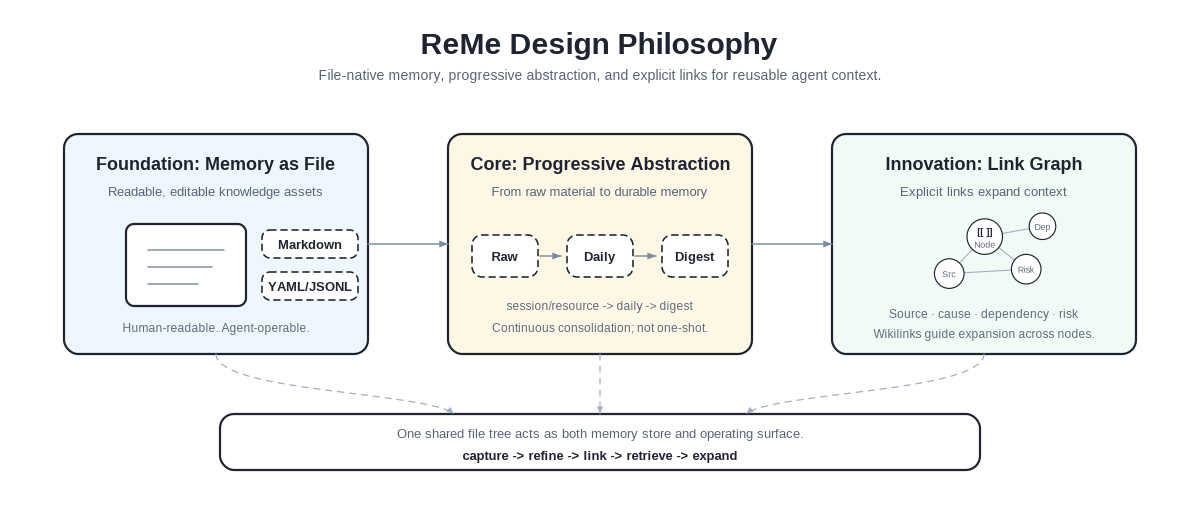
🧠 ReMe turns conversations and resources into readable, editable, searchable, and interconnected Markdown memory. Agents such as QwenPaw and DeepSeek Harness can share the same workspace to retrieve, maintain, and evolve knowledge, while users retain control of the durable files.
The Proactive Runtime uses that memory in ongoing tasks. It schedules work from new events or a cron expression, delegates execution to an agent runtime such as Codex, and records results and reminders in the workspace.
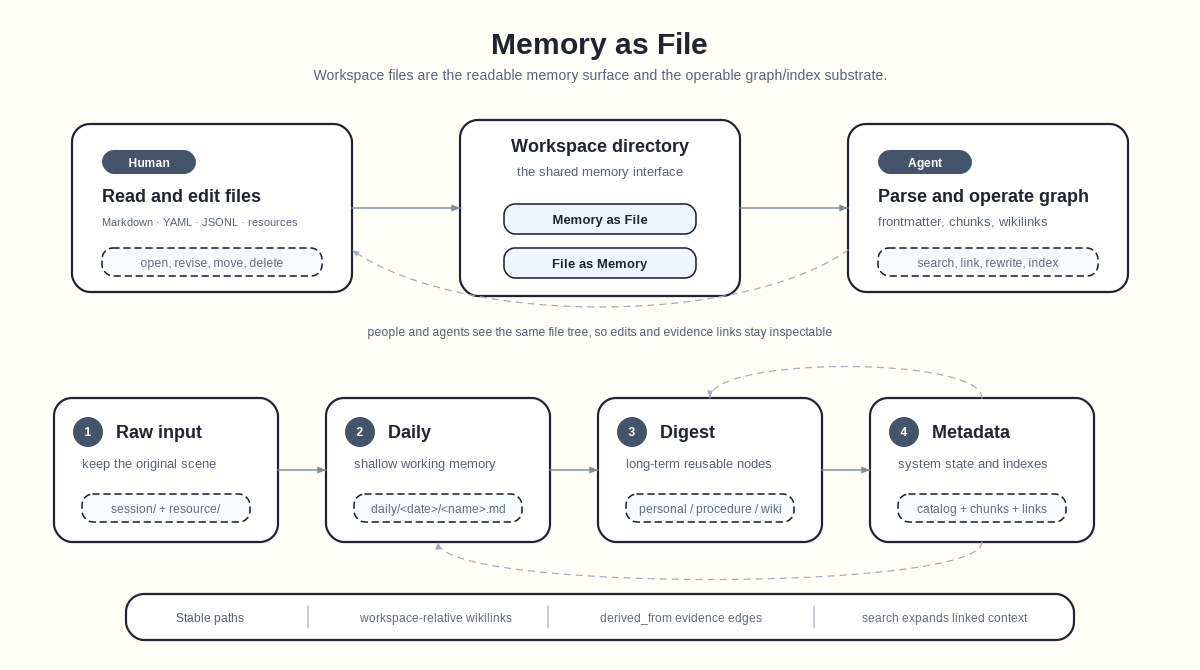
- Memory as File, File as Memory: ReMe stores durable memory as ordinary Markdown with frontmatter and wikilinks. Users and agents can inspect, edit, move, sync, and back it up with familiar tools, while indexes and generated metadata remain rebuildable.
- Self-evolving knowledge base: ReMe progressively turns conversations and resources into daily notes and long-term knowledge, preserving sources while refining facts, preferences, procedures, and relationships over time.
- Recall is precise and context-aware. BM25, optional embeddings, and wikilink expansion retrieve relevant line-level passages and their relationships without loading the entire knowledge base into the agent context.
- One memory workspace works across agents. Personal assistants, coding agents, and other agent runtimes can share the same local workspace through native integrations, SKILL.md, CLI, HTTP, MCP, or Python APIs.
📰 Latest Updates
- [ROADMAP] - ReMe5 Preview — Proactive Runtime. ReMe puts file-native memory at the core of its event-triggered and time-triggered agents. Give ReMe a task to follow, and it will record new developments and let you know when your attention is needed. We aim to release ReMe5 by the end of 2026. Read the preview for the design, development plan, and milestones.
- [2026.11] -
NEWHoMe code released: the implementation of our HoMe paper is now available as a ReMe plugin. It uses evaluation feedback to diagnose failures and automatically optimize memory systems. On the LongMemEval test set and BEAM 1M, scores improve by 2.8pp and 5.4pp, while average query-time tokens drop by 59.2% and 40.7%, respectively. - [2026.11] -
NEWWe released our paper HoMe: Toward Practical Harness Optimization of Memory Systems for AI Assistants. - [2026.10] - Decision-model context compaction: score old tool calls and results against the next action, preserve protected history, and return a recoverable compaction proposal. Includes an SVG walkthrough, two live-model integration scenarios, and a 14-query fixed-summary Top-N benchmark with a forced Hermes summary baseline.
- [2026.10] - ReMe Multimodal Memory update: Auto Memory reads images with their conversation context and preserves image sources; Auto Resource turns image files into searchable daily cards linked to the originals. With Qwen3.8-Max, ReMe Image scores 72.49% on MemLens-256K and 60.69% on MobileMem in LLM-Judge accuracy; the reports also cover Kimi and DeepSeek.
- [2026.09] - ReMe Memory Tags published: an introduction to file-native entity tags, rebuildable tag indexes, and tag-filtered memory search.
More updates
-
[2026.09] - Hermes Agent memory provider available: choose HTTP or embedded mode for automatic recall before model calls and asynchronous
auto_memoryafter completed turns. The integration supports Hermes Agent 0.21+ and includes profile-aware background work. -
[2026.09] - OpenClaw plugin released: install it from ClawHub or npm to add native memory recall, automatic conversation capture, and scheduled consolidation to OpenClaw.
-
[2026.09] - DeepSeek Harness plugin released: install it from Awesome DSH Plugin or npm for long-term-memory guidance,
reme_search, automatic memory, Auto Dream, and ReMe Status. -
[2026.08] - ReMe blog published: the ReMe blog introduces the local-first memory architecture, self-evolving workflows, hybrid search, proactive discovery, and benchmark results.
-
[2026.08] - New ReMe ecosystem plugins: Daily Paper discovers and analyzes papers and generates file-native briefs, while Auto Fin researches the latest 24 hours of topic-related CLS news and builds traceable reports with local memory. Try them out.
-
[2026.08] - Plugin development support released: use Plugin Development and Plugin Management to extend ReMe with Components, Steps, and Jobs. Contributions and new community plugins are welcome.
-
[2026.08] - ReMe's experience-driven enhancement method for agent tool use is available on arXiv:2608.03403.
-
[2026.07] - Our paper Remember Me, Refine Me: A Dynamic Procedural Memory Framework for Experience-Driven Agent Evolution has been accepted to Findings of ACL 2026.
🚀 Quick Start
Installation
ReMe requires Python 3.11+.
Install from pip:
pip install "reme-ai[core]"
Install from source:
git clone https://github.com/agentscope-ai/ReMe.git
cd ReMe
pip install -e reme_studio/web/python -e ".[core]"
cd reme_studio
npm ci
npm run build:static
cd ..
The static build requires Node.js 22.13 or newer and makes Studio available from the source tree.
Optional decision models use pip install "reme-ai[core,decision]". Configure a TypeSafe API key and run the
service demo as described in Decision model configuration.
Docker
With Docker and Compose 2.24.0+, build and start ReMe with the bundled Studio:
mkdir -p .reme
docker compose up --build -d
Open http://127.0.0.1:2333. The complete workspace persists in ./.reme. On Linux, set REME_UID and REME_GID to your
user's IDs when they differ from 1000. See Docker deployment for model credentials,
custom paths, published images, and upgrades.
Environment Variables
Configure environment variables when you want LLM-powered memory evolution or embedding retrieval. Embeddings are disabled by default, so the default setup does not start an embedding model or require an embedding API key.
cat > .env <<'EOF'
# Optional: used only after embedding components are explicitly enabled in the config.
# EMBEDDING_API_KEY=sk-xxx
# EMBEDDING_BASE_URL=https://dashscope.aliyuncs.com/compatible-mode/v1

# Required for auto_memory, auto_resource, auto_dream, and proactive refresh.
LLM_API_KEY=sk-xxx
LLM_BASE_URL=https://dashscope.aliyuncs.com/compatible-mode/v1
EOF
Basic file operations, BM25 search, wikilink traversal, and reading proactive topics can run without LLM credentials.
Note
To enable embedding-based semantic retrieval, uncomment
components.as_embeddingandcomponents.embedding_storeinreme/config/default.yaml, then changecomponents.file_store.default.embedding_storefrom""todefault. See the memory search guide for details.
Start the Service
Start ReMe in one terminal and leave it running:
reme start
The default service address is 127.0.0.1:2333. If the port is occupied, specify another port:
reme start service.port=8181
# reme start workspace_dir=/tmp/reme-demo service.port=8181
From another terminal, call the running service. The CLI discovers its configuration; the curl example uses the
default port 2333:
reme version
reme health_check
reme help
curl -s http://127.0.0.1:2333/version -H 'Content-Type: application/json' -d '{}'
5-Minute Memory Demo
With the service running, write a memory node, let ReMe index it, then retrieve it:
reme write \
  path=digest/wiki/quick-start-demo \
  name="Quick Start Demo" \
  description="A first ReMe memory node" \
  content="# Quick Start Demo

ReMe stores agent memory as readable Markdown.

Related: [[digest/wiki/memory-as-file.md]]"

reme search query="agent memory markdown" limit=5
reme read path=digest/wiki/quick-start-demo start_line=1 end_line=20
The generated file is ordinary Markdown with frontmatter:
---
name: Quick Start Demo
description: A first ReMe memory node
---

# Quick Start Demo

ReMe stores agent memory as readable Markdown.

Related: [[digest/wiki/memory-as-file.md]]
ReMe Studio (Optional)
The core installation includes Studio. Run reme start config=proactive, then open http://127.0.0.1:2333/ for
Remy, Proactive AI, Notebook, and Knowledge. To add Studio to a base installation, use pip install "reme-ai[web]". See the
ReMe Studio guide for source builds and development.
🤝 Use ReMe with Your Agent
ReMe can run as a local memory service accessed through the CLI, HTTP API, or MCP server, or it can be embedded in the host process through its Python API. Host integrations can add memory guidance, recall, and capture to the agent lifecycle according to the capabilities of each runtime.
| Agent | Recommended path | Available after integration |
|---|---|---|
| DeepSeek Harness | Install @agentscope-ai/reme-dsh-plugin with dsh plugin --profile web add @agentscope-ai/reme-dsh-plugin. |
Configurable memory guidance, reme_search, automatic turn capture, scheduled Auto Dream, and ReMe Status. |
| OpenClaw | Install @agentscope-ai/reme-openclaw-plugin with openclaw plugins install clawhub:@agentscope-ai/reme-openclaw-plugin. |
Native memory tools, recall before user-triggered runs, and automatic turn capture. |
| QwenPaw | Embed ReMe in-process through its Python API. | Reuse the host lifecycle and model config while keeping memory local and file-based. |
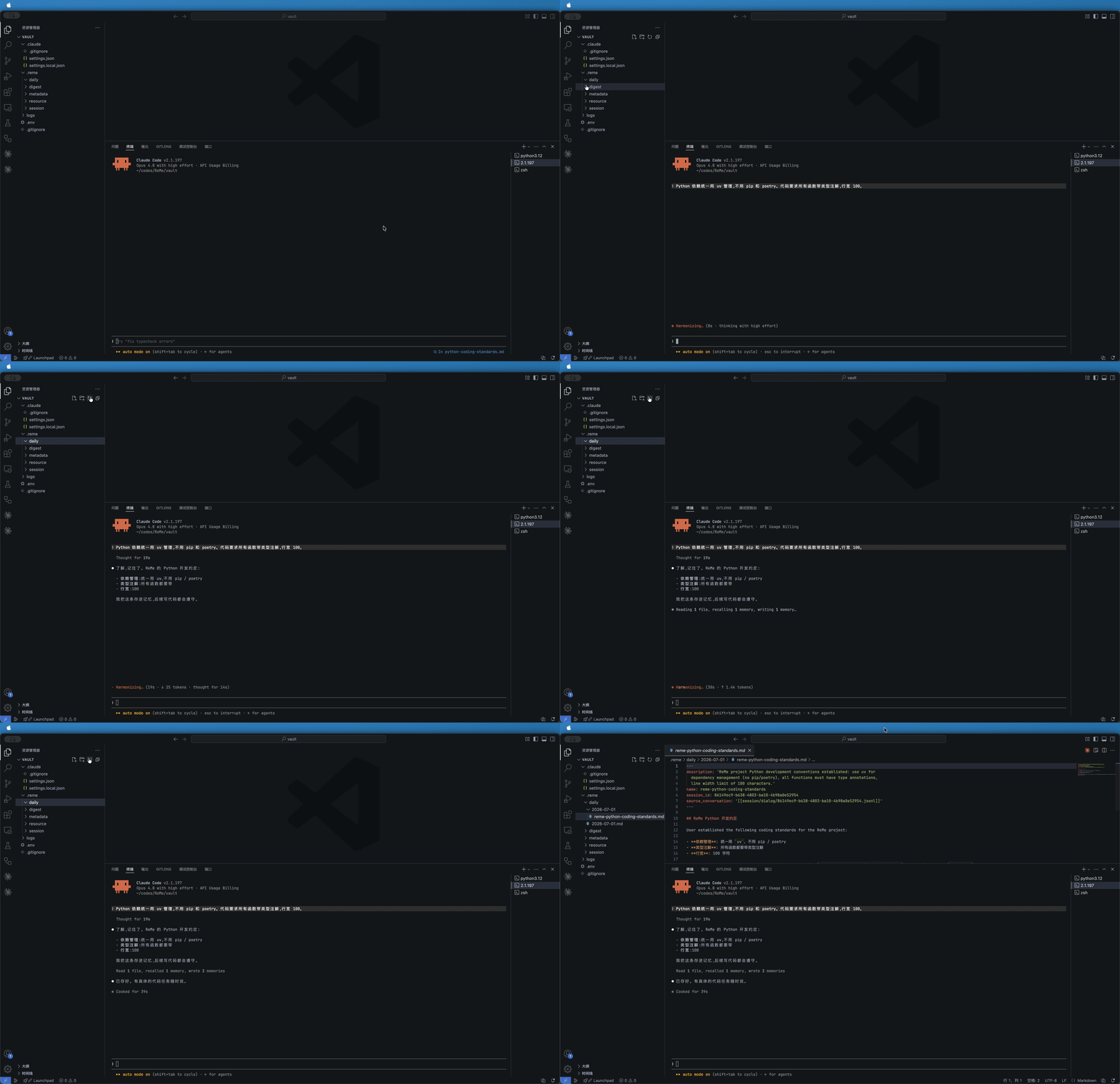
| Claude Code | Start ReMe, then install the Claude Code plugin. | Automatic recall, batched completed-turn recording, and MCP tools. |
| Qoder | Start ReMe, then install the Qoder plugin. | Automatic recall, retryable completed-turn recording, MCP tools, and the bundled skill. |
| ZCode | Start ReMe, then install the ZCode plugin. | Automatic recall, detached retryable recording, MCP tools, and the bundled skill. |
| Hermes | Install the ReMe provider and choose HTTP or embedded mode. | Recall before model calls and asynchronous auto_memory after each completed turn. |
| Codex | Start ReMe, then install the Codex plugin. | Native hooks for automatic recall and batched recording, plus MCP tools. |
| Other CLI agents | Install or copy the ReMe Memory skill. | Search, read, and write memory through the CLI. |
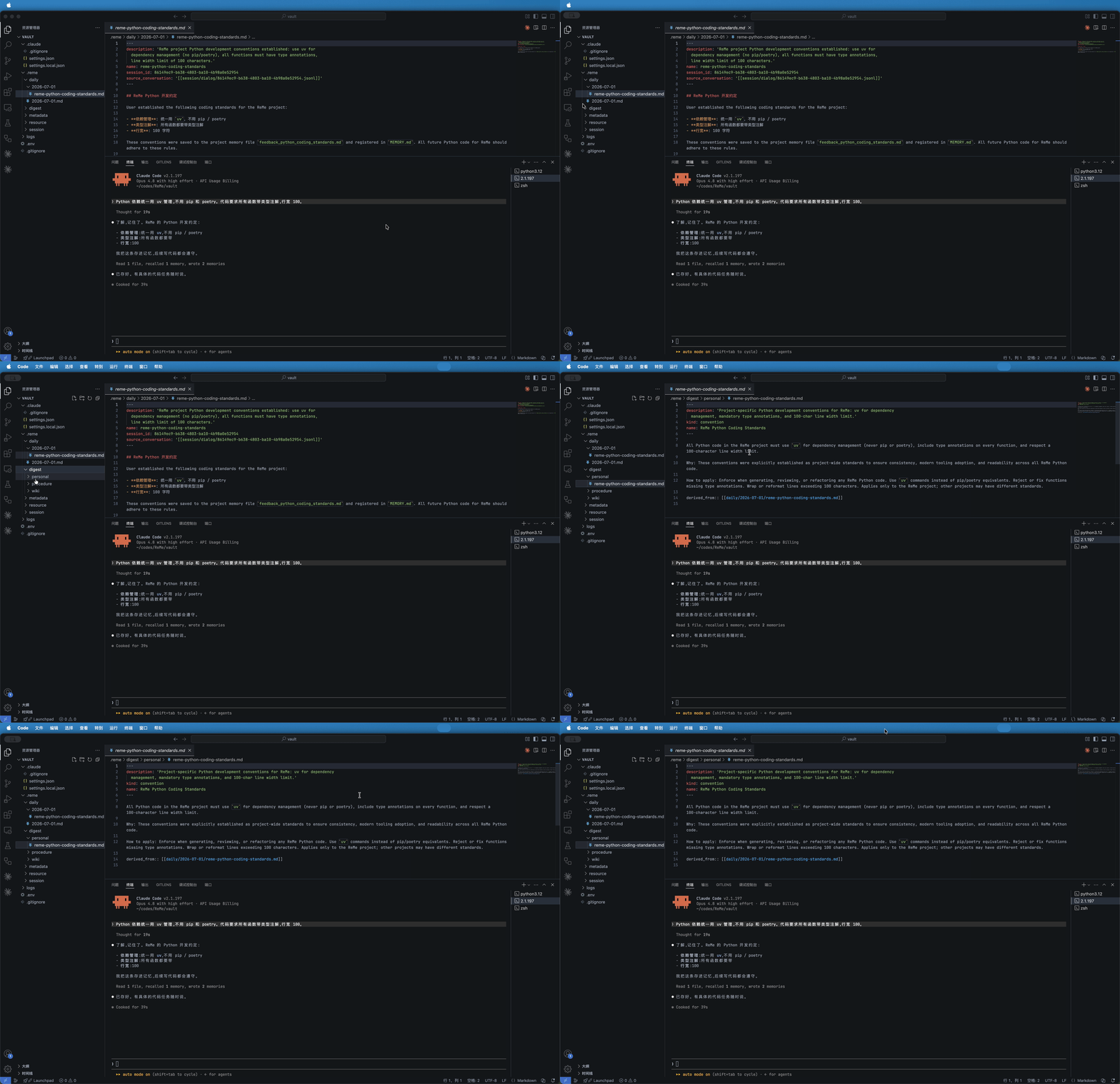
Integration demos
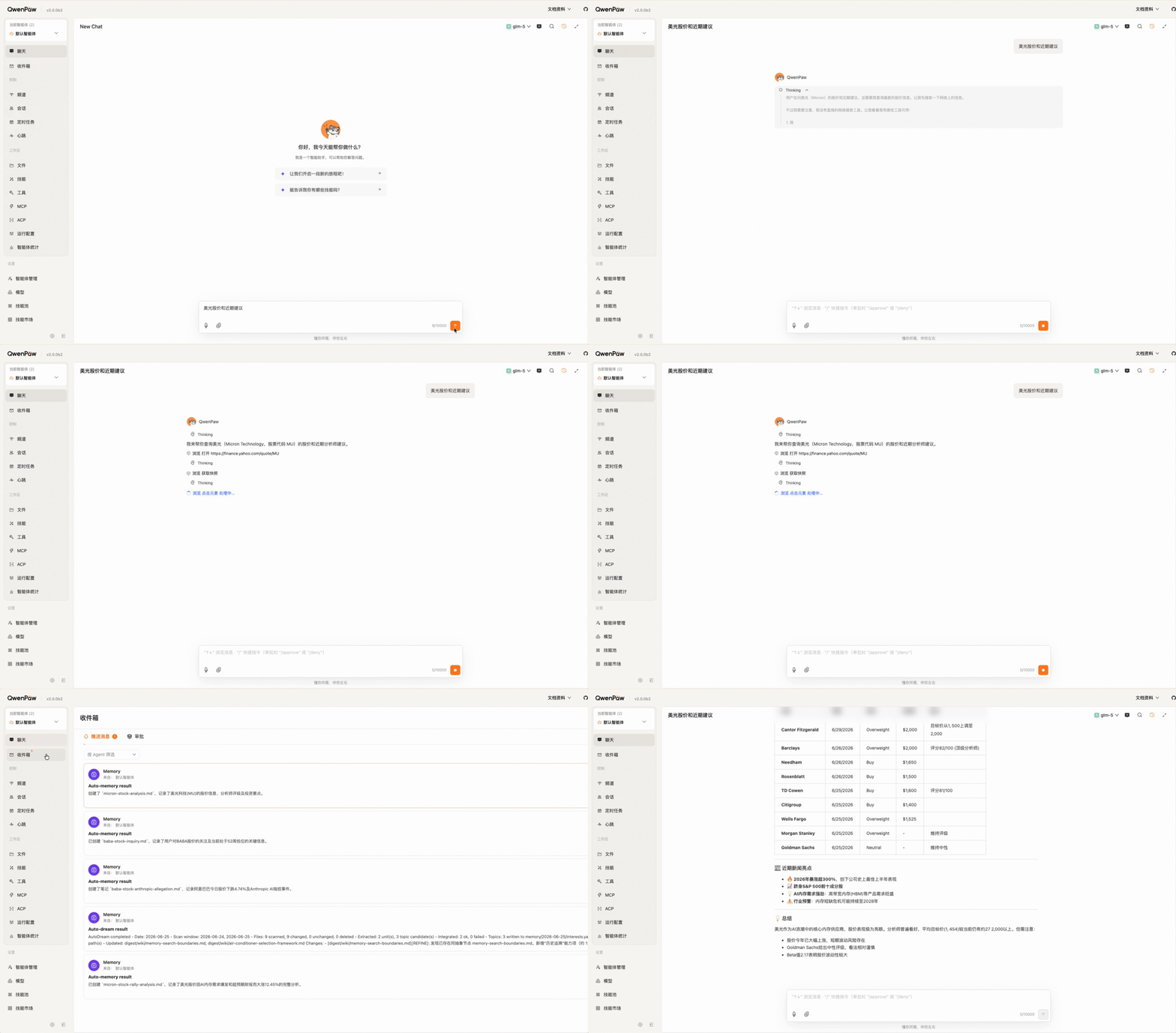
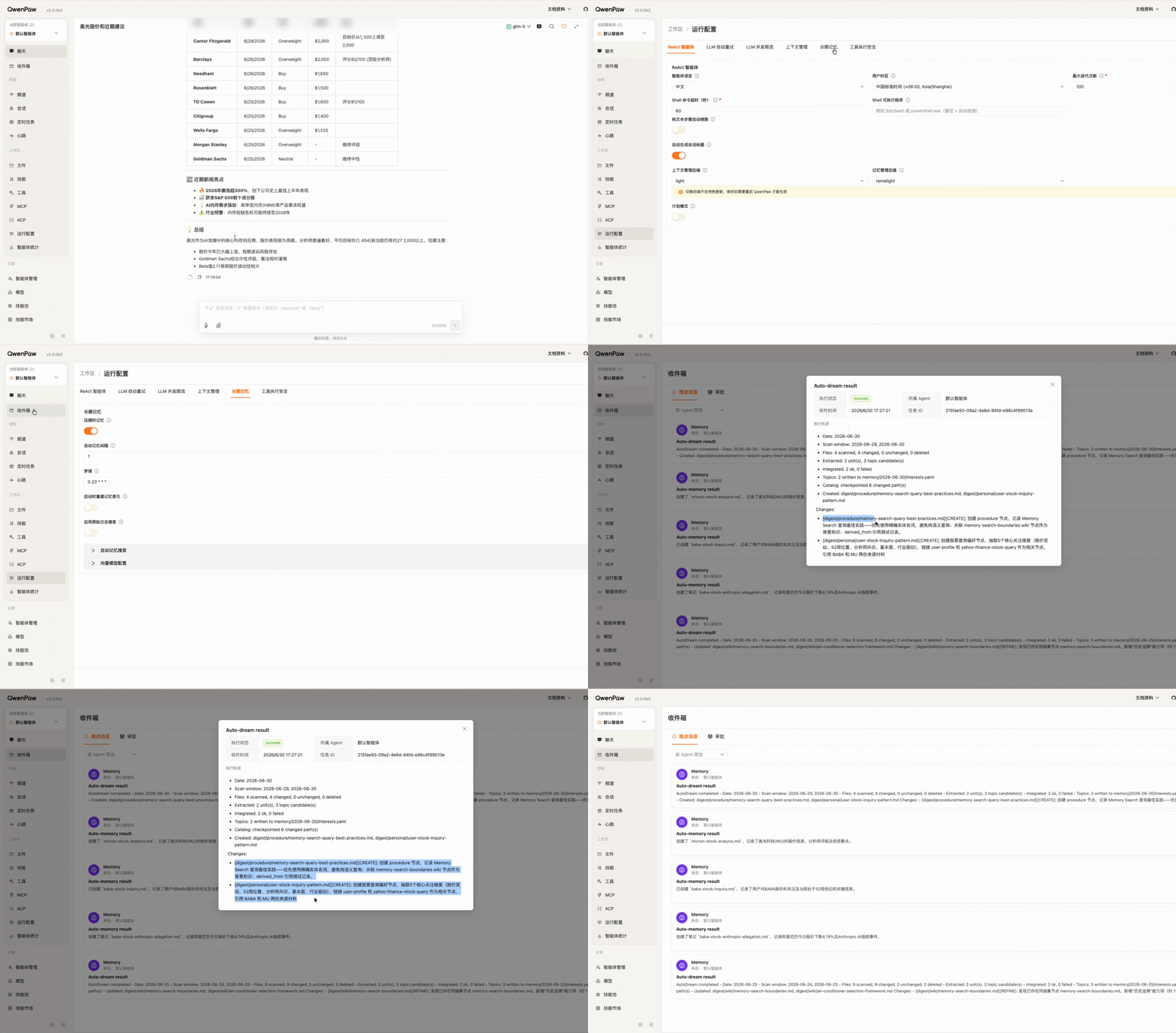
| Auto Memory | Auto Dream | |
| QwenPaw |
|
|
| Claude Code |
|
|
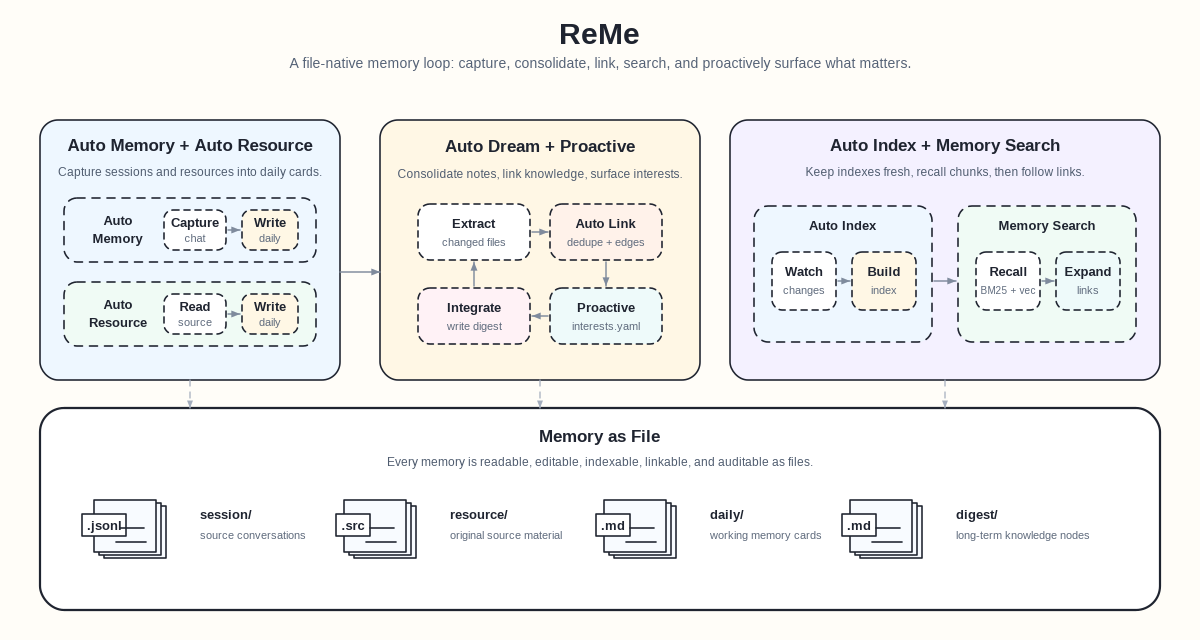
🧠 How ReMe Works
Memory as File, File as Memory.
ReMe treats memory as files, progressively processing filtered conversation source records and external resources
from session/ and resource/ into daily/, then digest/. The default workspace is .reme/ under the current
directory; workspace_dir=... selects a different user-owned location.
Workspace Layout
<workspace_dir>/
├── metadata/       # Rebuildable indexes, graphs, catalogs, and caches
├── session/        # Conversation source records and agent sessions
│   ├── dialog/
│   │   └── <session_id>.jsonl  # Source messages saved by auto_memory
│   └── claude_code/
│       └── <session_id>.jsonl  # ReMe copy used by auto_memory_cc
├── mem_session/    # Generated agent-wrapper sessions/config, not user memory
│   ├── agentscope/
│   ├── claude_config/
│   └── codex/
├── resource/            # External raw materials
│   ├── <resource>.<ext>  # Root-level files enter today's daily layer
│   └── YYYY-MM-DD/
│       └── <resource>.<ext>
├── daily/               # Lightly processed memory: daily facts, conversation summaries, resource readings
│   ├── YYYY-MM-DD.md
│   └── YYYY-MM-DD/
│       ├── <generated_name>.md  # Topic-named conversation or resource card
│       └── interests.yaml
└── digest/              # Long-term memory: personal facts, procedural experience, knowledge nodes
    ├── personal/
    │   └── {topic/event}.md
    ├── procedure/
    │   └── {topic/event}.md
    └── wiki/
        └── {topic/event}.md
Memory Lifecycle
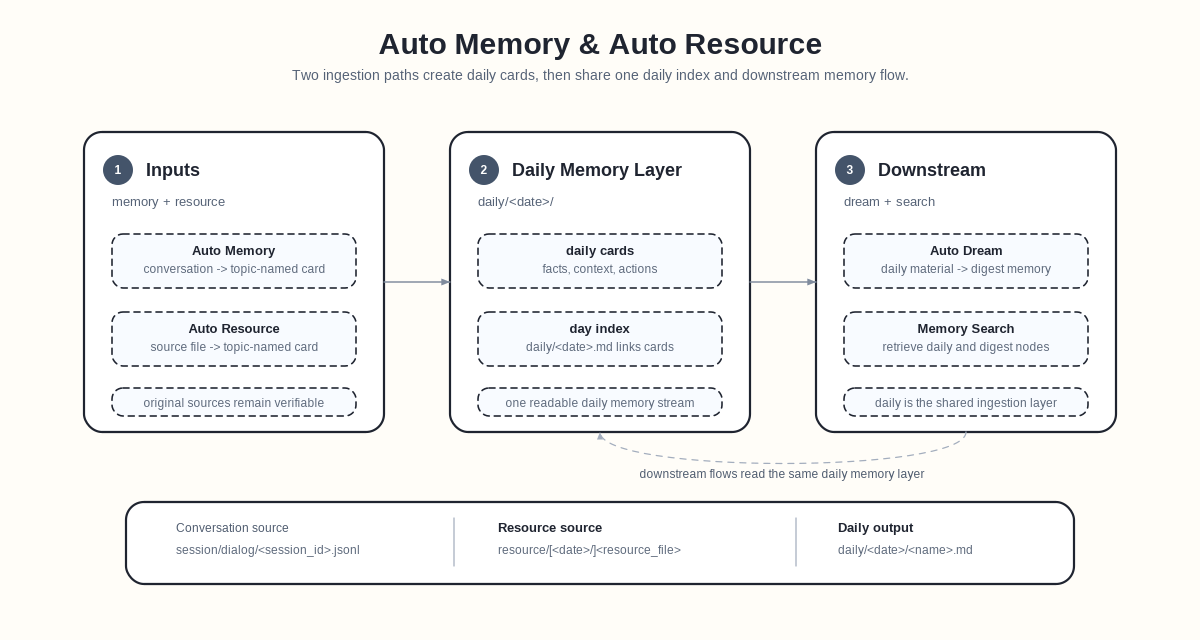
ReMe follows a capture → index → consolidate → recall loop. Workspace files remain the durable source of truth;
everything under metadata/ is rebuildable.
| Capability | Entry point | What it does | Output |
|---|---|---|---|
auto_memory |
Agent hook or reme auto_memory |
Distills useful conversation facts while preserving a filtered conversation source record. | session/dialog/*.jsonl, daily/<date>/<generated-name>.md |
auto_resource |
Resource watcher or reme auto_resource |
Turns files under resource/ into source-linked, content-named daily cards. |
daily/<date>/<resource-card>.md |
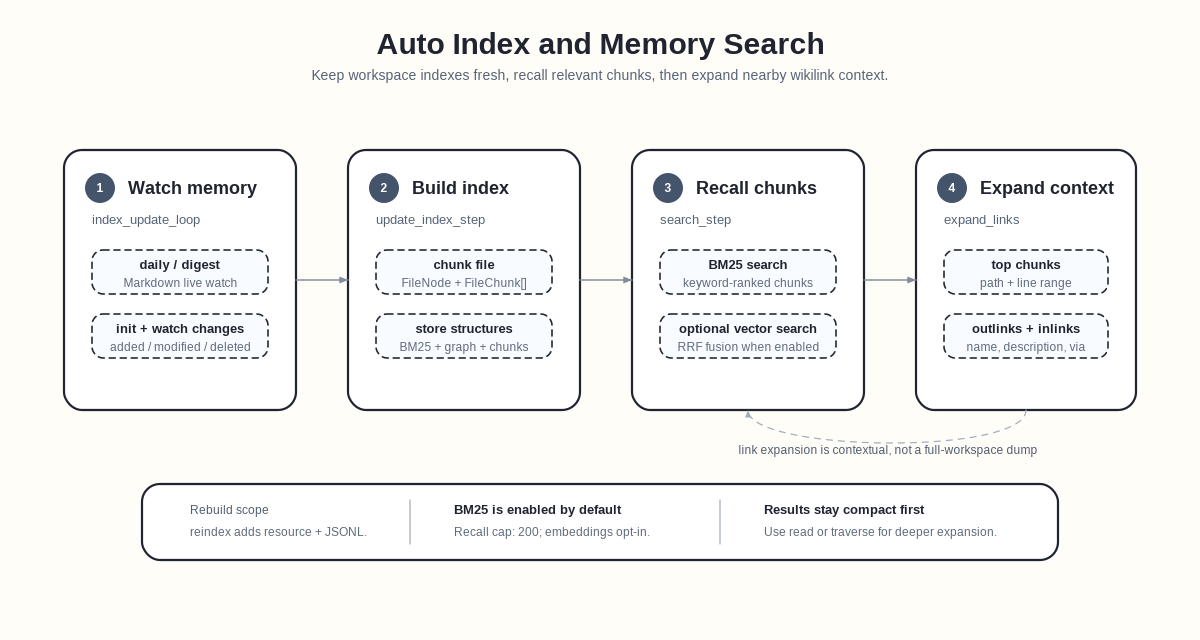
auto_index |
Background watcher or reme reindex |
The watcher ingests Markdown from daily/ and digest/; reindex only rebuilds BM25 and embeddings from already-ingested chunks. |
Searchable chunks, BM25, wikilink graph, and optional vectors |
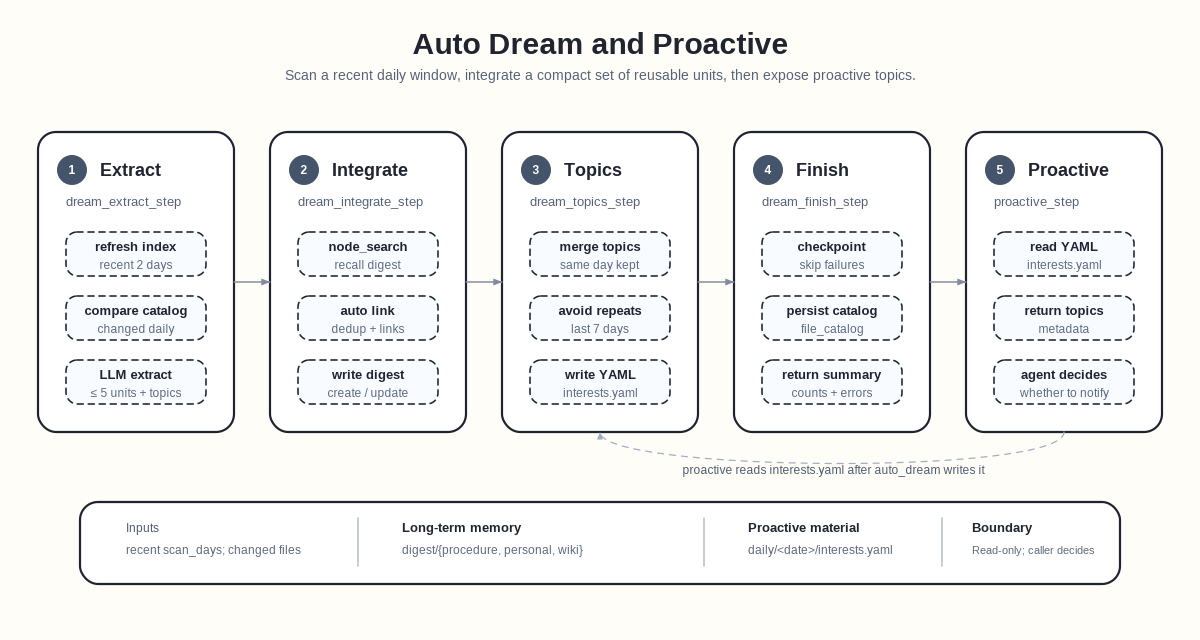
auto_dream |
dream_cron or reme auto_dream |
By default, extracts up to five reusable units from changed files in the latest two-day window, then creates, corroborates, refines, or corrects digest nodes. | digest/** |
proactive_read |
reme proactive_read before an agent decides to act |
Reads topics generated by the independent proactive refresh flow; the host agent decides whether and how to mention them. | Structured topics from daily/<date>/interests.yaml |
|
|
|
|
Search returns matching chunks with line ranges and bounded wikilink neighbors. Optional vector results are fused with BM25 through reciprocal rank fusion (RRF).
Important
proactive_readonly reads and exposes interest topics produced by proactive refresh. It does not independently browse the web, send notifications, or rewrite the knowledge base; the host agent decides whether and how to act on a topic.
📊 Benchmarks
ReMe evaluates multi-session and long-context text and multimodal memory with agentic search-and-read workflows. The figures below are the published reference runs in this repository; model, prompt, dataset, and judging details are documented with each benchmark.
Long-Horizon Memory
| Benchmark | Setting | Sample size | Agentic score; avg. query tokens | Focus |
|---|---|---|---|---|
| LongMemEval cleaned-s | Overall | 500 questions | 89.4% / 44.3K | Cross-session retrieval, knowledge updates, and temporal reasoning |
| BEAM | 100K context | 20 cases / 400 questions | 66.1% / 65.0K | Ten types of long-context memory tasks |
| BEAM | 1M context | 35 cases / 700 questions | 65.0% / 101.8K | Ultra-long conversation settings |
| LongMemEval cleaned-s | Optimized by HoMe | 250 test questions | 91.6% / 17.9K | HoMe-optimized memory system |
| BEAM | 1M context, optimized by HoMe on Beam100K | 35 cases / 700 questions | 70.4% / 60.4K | HoMe-optimized memory system |
Multimodal Memory
| Benchmark | Setting | Sample size | Agentic score | Focus |
|---|---|---|---|---|
| MemLens-256K | ReMe Image · Qwen3.8-Max | 189 / 195 questions | 72.49% | Multimodal long-history question answering |
| MobileMem-Omni | ReMe Image · Qwen3.8-Max | 20 users / 1,333 questions | 60.69% | Personal visual memory and reasoning |
Proactive Memory
ReMe also achieved a 0.580 PROC score across five user personas in the repository's π-Bench evaluation, 2.4% above NanoBot under the same test-model configuration. PROC measures proactive handling of hidden intent, clarification, cross-session preferences and conventions, task dependencies, and underspecified requests.
🧩 Extensions and Plugins
Plugins are optional Python distributions that contribute Component, Step, or Job backends and configuration. They are installed separately and enabled explicitly by configuration. Daily Paper and Auto Fin are independently packaged plugins; see their documentation for Daily Paper and Auto Fin.
| Plugin | Capability |
|---|---|
| Daily Paper | Discover and rank papers, analyze PDFs with an agent, and generate file-native notes and a five-minute brief. |
| Auto Fin | Fetch topic-related CLS news, search ReMe history, and generate wikilink-backed Markdown reports. |
See Plugin Management to install, inspect, validate, enable, and uninstall ReMe plugins.
📚 Documentation
These guides cover the main user workflows and the runtime contracts implemented by the current code.
| Guide | What you will learn |
|---|---|
| Quick Start | Install ReMe, start the service, and run the first file and memory operations. |
| Configuration | Configure the workspace, models, Service, Jobs, Components, plugins, and CLI overrides. |
| Services and Deployment | Use HTTP, SSE, MCP, and Studio while respecting the default security boundary. |
| Memory as File | Understand workspace layers, frontmatter, wikilinks, chunks, and the file-as-source-of-truth model. |
| Auto Memory | Preserve source conversations and distill reusable daily memory cards. |
| Auto Resource | Import supported text and image resources as source-linked daily cards. |
| Auto Dream and Auto Link | Consolidate daily notes into evolving digest nodes and readable wikilink relationships. |
| Memory Search | Use BM25, optional vectors, RRF fusion, line-range recall, and progressive link expansion. |
| Proactive | Read interest topics safely and integrate them into a host agent's decision flow. |
| Proactive Runtime | Use long-term memory to follow tasks, act on events and schedules, and deliver reminders. |
| Application Scenarios | Follow concrete financial research, coding-memory, and personal knowledge-base examples. |
| Framework | Understand Application, Job, Step, Component, service, configuration, and lifecycle boundaries. |
| Agent Integrations | Choose an interface and connect DSH, Claude Code, Codex, Qoder, ZCode, OpenClaw, Hermes, or another agent. |
| DSH plugin, Claude Code plugin, Qoder plugin, and ZCode plugin | Configure host-native recall, automatic capture, consolidation, and diagnostics. |
| CLI and Job API | Learn command syntax and use the generated default Job parameter reference. |
| Operations and Recovery | Diagnose services, maintain indexes, and back up, migrate, or recover a workspace. |
| ReMe Blog | Read the product story, design rationale, examples, and benchmark summary. |
🛠️ Common Commands
Run reme help for the full job list. Common workspace and maintenance commands are:
| Command | Purpose |
|---|---|
reme status |
Show stateful data-component memory estimates and process RSS. |
reme search |
Retrieve memory with BM25 and wikilinks by default, plus vectors when enabled. |
reme read / reme write / reme edit |
Inspect and maintain Markdown memory files. |
reme traverse / reme graph_snapshot |
Explore wikilink neighborhoods or the category-rooted digest graph. |
reme chat |
Stream a read-only, workspace-aware agent conversation. Requires LLM credentials. |
reme reindex |
Rebuild BM25 and embedding indexes from already-ingested chunks. |
🤝 Community and Contributing
- Issues, requests, and help: Check Open Issues first. If there is no related discussion, open one with the background, expected behavior, and impact scope.
- Code contributions: Before making changes, read the repository's contribution guide. Source, schemas, and tests are the authoritative architecture and extension guide.
- Documentation contributions: Update the canonical files under
docs/en/,docs/zh/, or the relevant package directory in this repository. The documentation site is generated from these files. - Commit convention: Conventional Commits are recommended, for example
feat(search): add link expansion optionordocs(zh): update quick start. - Pre-submit checks: Before submitting a PR, try to run
pre-commit run --all-filesandpytest. If tests that depend on LLMs, embeddings, or external services cannot run, explain that in the PR. - Documentation: Visit reme.agentscope.io.
Contributors
Thanks to everyone who has contributed to ReMe:
📄 Citation
@software{ReMe2026,
  title = {Remember me, Refine me: Memory Management Kit for Agents},
  author = {ReMe Team},
  url = {https://reme.agentscope.io},
  year = {2026}
}
⚖️ License
This project is open source under the Apache License 2.0. See LICENSE for details.