# Memory as File
ReMe's core idea is **Memory as File, File as Memory**.
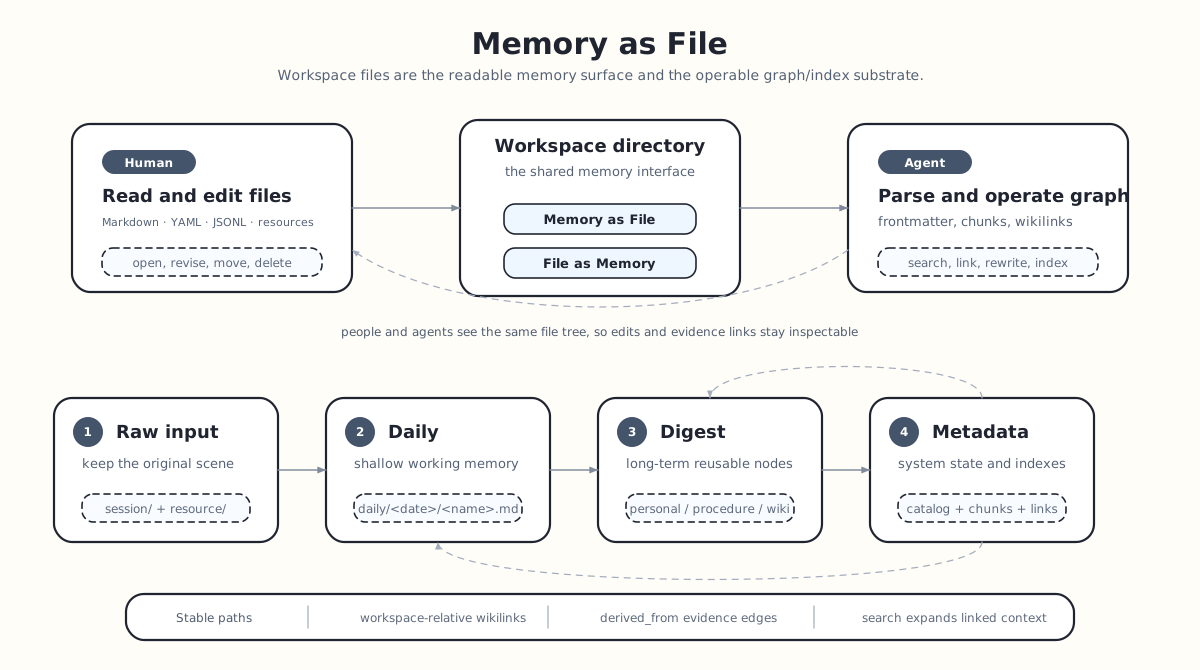
**Memory as File**: long-term memory is not hidden in a black-box database. Its source material and readable memories
live in user-owned files under the workspace. Users and agents can directly read, write, move, and delete those files;
indexes and snapshots under `metadata/` are derived state that can be rebuilt.
**File as Memory**: each file is more than ordinary text. It is an indexable, linkable, and evolvable memory node. ReMe
parses frontmatter, body chunks, and wikilink edges from files and organizes them into retrieval indexes and a graph.
In other words, files are both a human-readable interface and an operational interface for agents. Directory structure
carries the memory layers, while Markdown syntax expresses content, metadata, and relationships.
## Design Goals
ReMe represents memory as files not merely for convenient storage, but to give long-term memory several essential
properties:
| Goal | Meaning |
|---------------|-------------------------------------------------------------------------------------------------------------------------------------------------------|
| Readable | Users can open the workspace directly and read daily notes, digest nodes, and source material like ordinary notes. |
| Editable | Users and agents can correct, extend, move, or delete memory with file operations, without a specialized database client. |
| Traceable | Long-term conclusions in digest can point back to daily, resource, or session files from a Sources section. |
| Portable | The workspace is an ordinary directory. Markdown, JSONL, YAML, and resource files can be backed up, synchronized, versioned, or moved to other tools. |
| Indexable | Although the files are plain text, ReMe parses frontmatter, chunks, and wikilinks to build a retrieval index and file graph. |
| Collaborative | Humans judge and correct; agents organize, link, and retrieve. Both operate on the same files. |
ReMe memory is therefore neither a hidden database record nor a prompt fragment visible only to an LLM. It is first a
file owned by the user and only then indexed by the system for retrieval.
## Memory Layers
A ReMe workspace divides memory into four layers:
```text
source records -> session/ + resource/
working memory -> daily/
long memory -> digest/
system state -> metadata/
```
Each layer solves a different problem.
`session/` and `resource/` preserve source records. Files under `resource/` remain unchanged at their original path.
Standard Auto Memory records retain conversation messages while intentionally omitting tool-result and base64 data
blocks; this keeps recalled output and binary payloads from masquerading as user-provided evidence. Generated Agent
runtime state instead lives under `mem_session/`.
`daily/` is the lightly processed layer. It organizes the day's conversations and resources into more readable daily
notes:
what happened, which conclusions were reached, which follow-up tasks remain, and where the source material lives. Daily
does not aim for final abstraction; it is closer to a workbench for the day.
`digest/` is the deeply processed layer. It stores memory nodes that can be reused over time, such as user preferences,
project background, procedural experience, conceptual knowledge, and decision precedents. Digest should not merely copy
daily. It should merge recurring facts, methods, and relationships into more stable descriptions.
`metadata/` is the system index layer. It stores runtime state such as the file catalog, chunk index, and graph
snapshots. Users normally do not edit this content manually. The actual editing surface is `daily/`, `digest/`, and,
when necessary,
`resource/`.
These layers let ReMe preserve both the original situation and its abstraction: daily reconstructs what happened, while
digest answers what remains reusable later.
## Directory Layout
ReMe uses directories to express memory organization and layers. Source material first enters `resource/` or `session/`,
then flows into `daily/`, and is finally integrated into `digest/` by `auto_dream`.
The corresponding automatic flows are [Auto Memory](./auto_memory.md), [Auto Resource](./auto_resource.md), and
[Auto Dream](./auto_dream.md). Use [Memory Search](./memory_search.md) to retrieve these files.
```text
/
├── metadata/ # system index layer; persistent indexes, graph, catalogs; not a manual editing surface
├── session/ # source-record layer; source conversations
│ ├── dialog/
│ │ └── .jsonl # source messages saved by auto_memory
│ └── claude_code/
│ └── .jsonl # ReMe copy used by auto_memory_cc
├── mem_session/ # generated Agent wrapper sessions/config, not user memory
│ ├── agentscope/
│ ├── claude_config/
│ └── codex/
├── resource/ # source-record layer; original external material
│ ├── . # root-level input uses today's date
│ └── YYYY-MM-DD/
│ └── . # dated input uses the directory date
├── daily/ # lightly processed layer; facts, conversation summaries, and resource interpretations by date
│ ├── YYYY-MM-DD.md # index page for the day
│ └── YYYY-MM-DD/
│ ├── .md # topic-named conversation or resource card
│ └── interests.yaml # proactive interest topics generated by auto_dream
└── digest/ # deeply processed layer; reusable personal facts, procedures, and knowledge nodes
├── personal/
│ └── .md # user profile, preferences, and durable personal facts
├── procedure/
│ └── .md # procedures, methods, and operational experience
└── wiki/
└── .md # general knowledge, concepts, and decision precedents
```
Typical flows:
```text
conversation
-> session/dialog/.jsonl
-> daily/YYYY-MM-DD/.md
-> digest/personal | digest/procedure | digest/wiki
external resource
-> resource/[YYYY-MM-DD/].
-> daily/YYYY-MM-DD/.md
-> digest/wiki | digest/procedure
```
The first two steps focus on recording and organizing; the final step focuses on long-term distillation. `auto_memory`
and
`auto_resource` generate daily notes from source input, and `auto_dream` extracts and integrates digest nodes from
daily. The generated daily filename comes from validated frontmatter `name`; `session_id`, `source_conversation`, and
`source_resource`
provide stable provenance and lookup identity instead of determining the filename.
## Markdown Format
ReMe favors Markdown for memory because it works well for human reading, agent editing, and programmatic parsing.
A typical memory file:
```markdown
---
name: Solar Supply Chain Research
description: An end-to-end view from polysilicon to modules
tags: [new energy, solar]
---
# Conclusions
The solar supply chain consists of [[digest/wiki/polysilicon.md]], wafers, cells, and modules.
One major producer is [[digest/wiki/longi.md|LONGi]].
```
### Frontmatter
Frontmatter is a YAML block at the beginning of a file, enclosed by `---`:
```markdown
---
name: Document name
description: Document description
source_conversation: [[session/dialog/abc.jsonl]]
---
```
The current code recognizes `name` and `description` explicitly. Other fields are preserved as additional metadata. The
write interface merges `name`, `description`, and `metadata` into frontmatter.
Treat frontmatter as a node-level summary and the body as evidence, explanation, and relationships. For example:
```markdown
---
name: "User preference: documentation style"
description: The user prefers direct, engineering-oriented technical explanations with context but without unnecessary length.
kind: preference
confidence: observed
---
The user repeatedly asks documentation to explain motivation, boundaries, and examples while avoiding marketing language.
Apply this preference when following [[digest/procedure/technical-documentation.md]].
## Sources
This preference was recorded in [[daily/2026-06-20/documentation-style.md]], which captures the user's repeated guidance.
```
This has three benefits:
1. `name` and `description` serve as lightweight summaries in lists, recall results, and agent decisions.
2. The body can carry fuller facts, conditions, counterexamples, and sources.
3. Ordinary wikilinks can be parsed by the graph and maintained when files move.
Frontmatter is best for stable, short, structured fields; the body is best for explanations meant for people. Do not put
long body text into YAML fields.
### Wikilink
Wikilinks express relationships between files with `[[...]]`:
```text
[[daily/2026-06-20/session.md]]
[[notes/example.md#L9]]
[[notes/example.md#L9-L10]]
[[notes/example.md#L9-L10,L15-L20]]
```
ReMe wikilinks use **literal path semantics**:
```text
[[X]] -> target_path = "X"
```
ReMe does not append `.md` automatically, search by filename, or automatically resolve folder notes. Use complete
workspace-relative paths with their extensions.
Ordinary Markdown links such as `[label](../wiki/example.md)` do not create `FileLink` edges and are not rewritten by
move or retarget operations.
Anchors such as `#L9`, `#L9-L10`, and `#L9-L10,L15-L20` remain ordinary `target_anchor` strings in the graph. The graph
parser does not validate line-anchor syntax, so values such as `#L0`, `#L10-L9`, and `#L9,` are also stored. The `read`
job does not interpret an anchor appended to `path`; use the separate 1-based, inclusive `start_line` and `end_line`
arguments to read a range, for example `read(path="digest/wiki/solar.md", start_line=9, end_line=10)`.
Wikilinks support these behaviors:
```text
body link -> create a FileLink
move a file -> rewrite [[old path]] in inbound edges by default
delete a file -> return remaining inbound edges so references can be cleaned up
search match -> expand inbound and outbound links to provide context
```
Parsed result:
```text
FileLink
source_path = current file
target_path = notes/example.md
target_anchor = L9-L10,L15-L20
```
Older documents containing wrappers such as `related:: [[path]]`,
`- related:: [[path]]`, or `[related:: [[path]]]` remain readable. ReMe ignores the surrounding text and indexes the
inner `[[path]]` as an ordinary link. After upgrading from a version that stored typed links, run `reme reindex`
once to rebuild the derived graph without the removed relationship field.
### Sources and Relationships
The two most important link types in ReMe are source links and conceptual relationship links.
A Sources section records where a long-term memory came from:
```markdown
## Sources
The preference was observed in [[daily/2026-06-20/documentation-style.md]], and the supporting report evidence is retained in
[[resource/2026-06-20/report.pdf]].
```
A conceptual relationship link explains which other long-term memories relate to the node. Weave it into natural prose:
```markdown
This analysis extends [[digest/wiki/solar-supply-chain.md]], follows
[[digest/procedure/research-report-analysis.md]], and contrasts with
[[digest/wiki/central-inverter.md]].
```
## Human and Agent Editing
Because memory is stored as files, users can edit the workspace directly, while agents can read and write the same files
through ReMe's file tools. Both follow the same conventions:
| Operation | Guidance |
|---------------|---------------------------------------------------------------------------------------------------------------------------------------------------|
| Add memory | Write to the appropriate directory, use frontmatter for Markdown, and prefer complete workspace-relative wikilinks. |
| Edit a body | Preserve existing sources and important wikilinks. When correcting an old conclusion, explain how the new material changes the previous judgment. |
| Move a file | ReMe's move tool rewrites old paths in inbound edges by default. After a manual move, inspect inbound links again. |
| Delete a file | Check inbound links first. ReMe's delete tool returns source files that still point to the target, making dangling references easier to clean up. |
| Edit metadata | Use frontmatter for short fields. When the body changes substantially, update `description` as well. |
A practical rule is: **an agent may rewrite the wording, but it must not lose evidence edges**. In particular, Sources
entries and existing digest-to-digest wikilinks are the basis for traceable and extensible long-term memory.
## Path Semantics
All file tools and wikilinks use workspace-relative paths as their basic unit:
```text
digest/wiki/solar.md
daily/2026-06-20/documentation-style.md
resource/2026-06-20/report.pdf
```
This creates a clear boundary: ReMe does not treat `[[solar]]` as a repository-wide title search and does not assume
Obsidian-style same-name resolution. `[[digest/wiki/solar.md]]` points to that exact path.
Recommended practices:
1. Include `.md` when linking a Markdown file.
2. Use the complete source path when linking from digest to daily or resource.
3. Rename or move files through ReMe's move tool whenever possible to avoid stale paths.
4. Put external source material under `resource/YYYY-MM-DD/...` and long-term abstractions under `digest/...`. Do not
put raw source material directly into digest.
Explicit path semantics sacrifice a little convenience when writing by hand, but provide predictability, portability,
and automatic maintainability.
## Memory Chunking
Memory chunking divides a file into retrievable fragments. ReMe does not split Markdown at fixed lengths by default; it
tries to preserve semantic structure.
This section explains how files become retrieval chunks. For index updates, BM25, vector recall, and link expansion, see
[Memory Search](./memory_search.md).
Traditional RAG often uses fixed-window splitting:
```text
Document
|
| every N tokens + overlap
v
chunk 1 | chunk 2 | chunk 3 | ...
```
This is simple, but it can cut headings, tables, code blocks, lists, and `[[wikilinks]]` in the middle. After a match,
the agent often sees only an isolated fragment without knowing its section or relationship to other memory nodes.
ReMe chunking is closer to splitting memory by file structure:
```text
Markdown file
|
| frontmatter + headings + blocks + wikilinks
v
semantic chunks with document skeleton
```
Comparison:
```text
traditional RAG chunk
= fixed-length text fragment + overlap
ReMe memory chunk
= section structure + body fragment + line range + wikilink relationship context
```
Markdown files use `MarkdownFileChunker`:
```text
Markdown
|
| mistletoe AST
v
Document
└─ H1 section
├─ paragraph / list / table / code
└─ H2 section
└─ ...
|
v
FileChunk[]
```
Chunking rules:
```text
1. Parse frontmatter first; send the body to the chunker separately.
2. Build a section tree from heading levels.
3. Prefer one complete section per chunk.
4. When a section is too long, recursively split its subsections and body blocks.
5. Repeat table headers when splitting tables.
6. Repeat the fence when splitting code blocks.
7. Pack lists by item.
8. Only then split greedily by line and add [Part X/N].
```
By default, every chunk includes its heading skeleton:
```text
# Top-level heading
## Current section
Matched body fragment
## Following section heading
```
This lets the agent see not only an isolated paragraph but also its structural position in the source file.
Non-Markdown files use `DefaultFileChunker` by default. It splits by byte size and preserves a small overlap. For
Markdown, the chunker also avoids cutting `[[wikilinks]]` in the middle.
`DefaultFileChunker` and `MarkdownFileChunker` decode files with their configured `encoding` and normalize platform
newlines to LF before indexing. Their default `invalid_encoding_policy: replace` keeps decodable content searchable
when a source contains invalid bytes, without modifying the source file. Set `invalid_encoding_policy: strict` on a
chunker component to reject such files instead.