# Auto Resource `Beta`
Auto Resource is ReMe's entry point for interpreting resources and is currently in **Beta**. Resource files first enter
`resource/`, preferably under a date directory, and are then interpreted into daily resource cards. Each card's filename
comes from the LLM-generated frontmatter `name`, and `source_resource` links the card back to its original file.
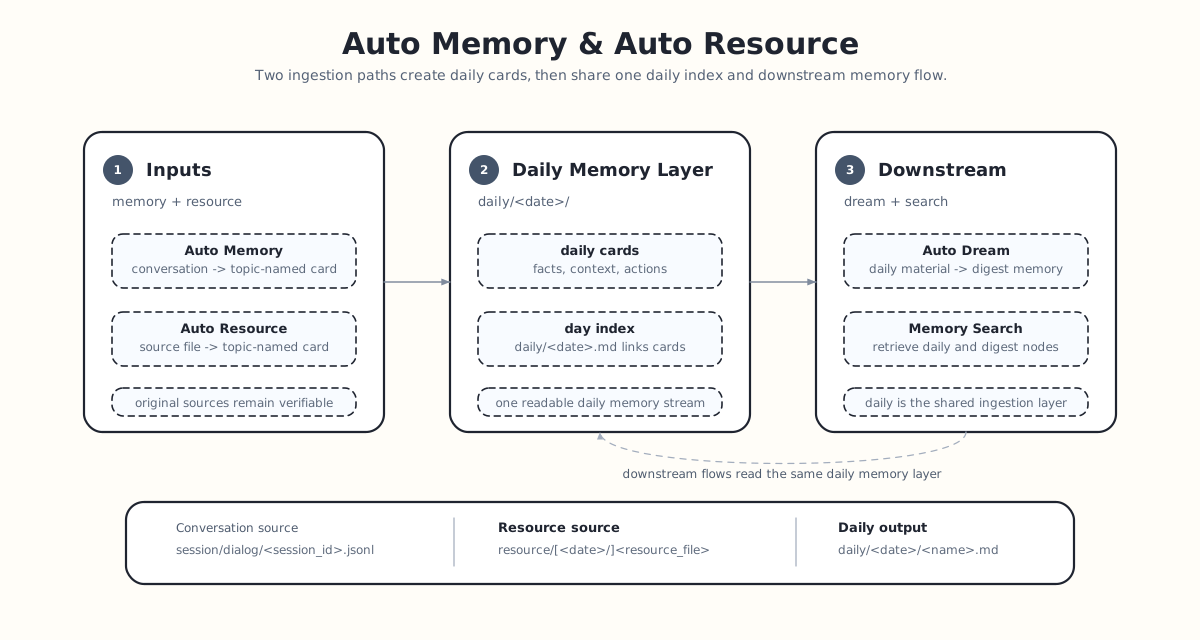
For the general file semantics of workspace layers, `resource/`, and `daily/`, see
[Memory as File](./memory_as_file.md). For the flow that writes conversations to daily, see
[Auto Memory](./auto_memory.md).
```text
resource/[YYYY-MM-DD/]
├─ step 1: daily/YYYY-MM-DD/.md # interpreted resource card
├─ step 2: source_resource points to the original resource
└─ step 3: daily/YYYY-MM-DD.md # daily index linking the cards
```
## What It Records
Auto Resource does more than copy file content. It extracts information that will make the resource easier to retrieve
and understand later:
- Core content: what the resource is mainly about.
- Structure: its sections, tables, fields, and data organization.
- Key details: important numbers, names, dates, and conclusions.
- Context and purpose: why the resource exists and how it relates to current work.
- Actionable items: tasks, deadlines, and follow-up work.
In short, it turns "a file was archived" into "the resource is usable."
## Original Resource Entry Point
Auto Resource uses `resource/` as the entry point for source material. Date directories are recommended, and their date
determines which daily memory layer receives the interpreted card. A file directly under `resource/` is also supported
and uses today in the application timezone.
Example directory:
```text
workspace/
resource/
quick-note.txt # enters today's daily layer
2026-06-20/
market-report.md
meeting-notes.csv
```
The current Beta version is best suited to text-based resources such as `md`, `txt`, `json`, `jsonl`, `csv`, `yaml`, and
`html`.
## Resource Cards
Each resource file produces one daily resource card. The system initially uses the resource file's stem as a temporary
path. After the agent writes the card, the file is renamed according to its frontmatter `name`:
```text
resource/2026-06-20/market-report.md
↓
daily/2026-06-20/market-report-highlights.md
```
The resource card links to the original file through frontmatter:
```yaml
source_resource: "[[resource/2026-06-20/market-report.md]]"
```
When a resource changes, Auto Resource finds and updates the corresponding card through `source_resource`. When a
resource is deleted, its daily note is also removed. The older `daily/YYYY-MM-DD/.md` naming convention
remains supported as a fallback.
## Daily Index
Resource cards enter the same daily memory layer as Auto Memory cards. The day's `YYYY-MM-DD.md` page acts as an index
and organizes those resource cards:
```text
daily/
2026-06-20.md
2026-06-20/
market-report-highlights.md
meeting-notes-summary.md
```
To review which resources were processed on a day, start with `YYYY-MM-DD.md`. To inspect what was distilled from one
resource, open its corresponding resource card.
## Preserving the Original Resource
The interpreted daily note is optimized for readability; the original resource is retained for trust and verification.
Auto Resource does not move the original file. It remains at its original path under `resource/`. Text resources can
therefore enter the daily memory flow while their source files stay in their original location.
## What Happens Next
Auto Resource only creates resource interpretations in the daily layer. To distill long-term knowledge from resources
into
`digest/`, use [Auto Dream](./auto_dream.md). The default live index covers daily cards and digest nodes. Run
`reme reindex`
when original resource files must also be directly searchable; see [Memory Search](./memory_search.md).